
Schedule recurring practices: a whole season in one go
The short answer
To schedule recurring practices, you pick the weekday, the start and end date and the time once. In Koach you do that in the Schedule tab via More and then Recurring trainings. The button counts how many practices it will add, and it skips days that already have a practice.
Scheduling recurring practices saves you a season of typing. You set up your regular practice night once, up to the end of the season, and after that you only deal with the exceptions: a public holiday, a holiday week or an evening when the gym is closed.
How do you schedule a regular practice night for the whole season?
In Koach you set up a series from the Schedule tab. Only the coach can do that; players and parents then simply see the practices appear in their own schedule.
- Open the sheet. Go to Schedule, tap More (the three dots) at the top right and choose Recurring trainings.
- Check the five rows. Everything is already filled in. Every shows the weekday of your last practice, From the next time that day comes around, Until the end of your season (if your team has no season, 1 July) and Time the start time of your last practice. Focus is optional: whatever you type there is added to every practice.
- Pick a template if you like. If your team has practice templates, there is also a Template row. If you pick one, every new practice gets that plan right away.
- Tap the button. It counts how many practices will really be added, for example Add 35 trainings. Then the message 35 trainings added appears.
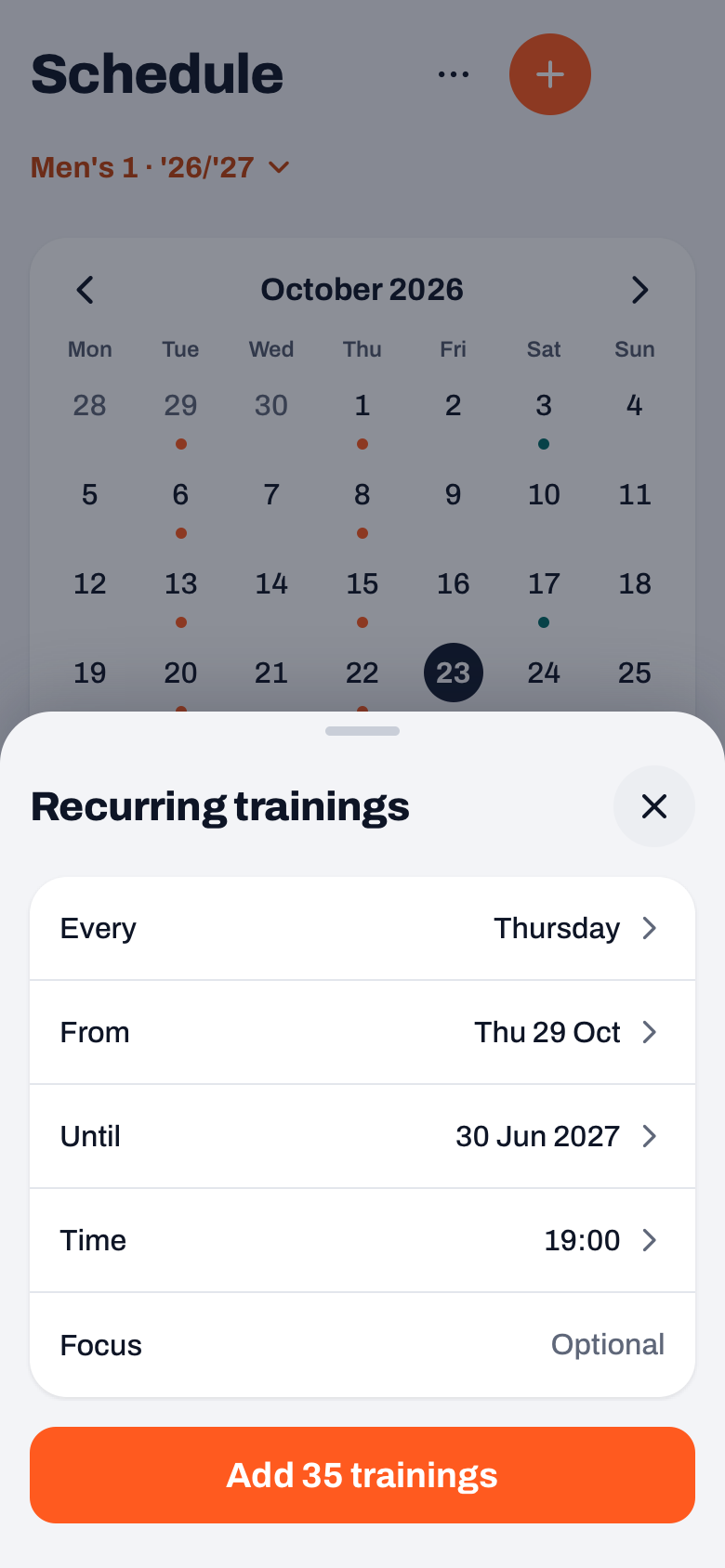
Two things to know. A series has one weekday; if you practise on Tuesday and Thursday, you make two series. And Koach skips days that already have a practice: they do not count in the button and are not overwritten. If no new practices would be added, the button is disabled. So you can safely lay a series over the same period again, for example if you made it too short.
Which dates drop out? Public and school holidays
A series puts a practice on every chosen weekday in the period, including public holidays and school holidays. In the example above, 24 and 31 December fall on a Thursday, so they are in there too. For evenings like that you have two options, both via More at the top right of the practice:
- Cancel training. The practice stays in the schedule as cancelled, so players and parents see that nothing is on. Players get a notification if the date is today or later. Plan and attendance are kept, but the practice does not count towards attendance. If it goes ahead after all, choose Reinstate training.
- Delete training. If the practice is part of a series, Koach first asks how far it should go: This training only, This and all following or All trainings in the series, with the number of practices. Only then comes the confirmation.
For a holiday week, cancelling is usually the better choice: the week stays visible, and nobody wonders whether the practice was forgotten.
14 days free, no credit card. Set up your regular practice night until the end of the season tonight and watch your schedule fill up.
Plan your season in KoachChanging the time or focus of the whole series
If the gym time moves by half an hour, you do not change thirty evenings one by one. Open a practice from the series, tap the pencil (Edit training) and change the time or the focus. When you save, Koach asks in the Edit training sheet whether the change is for this practice only, this one and all following, or all practices in the series. How to make that choice and what does and does not carry over is covered in detail in editing a recurring practice.
Does your club use a hall schedule? Then it starts on your dashboard
If your club's board uses the halls in Koach, you do not have to copy the day and time yourself. After Publish schedule you get a card on your dashboard: Hall time from your club, with Your hall slot for your team is set, the day, the time and the hall with the court. Schedule as recurring training opens the same sheet, already filled in with the weekday, the period of the hall rental (or otherwise up to the end of your season) and the start time. The hall and the court go into the Focus field.
- The schedule plans nothing by itself. Only when you tap the button with the number of practices are they in your schedule. After that the card disappears.
- Not now closes the card for good. It only comes back if the board changes your block and publishes the schedule again.
- Changes for a single week also come as a card. If the hall is closed one week, you see No hall on that date, with the choice Cancel training or Keep it.
How the board sets up such a schedule is covered in making a practice schedule for your club. The halls are part of the Club plan; more on the page for clubs.
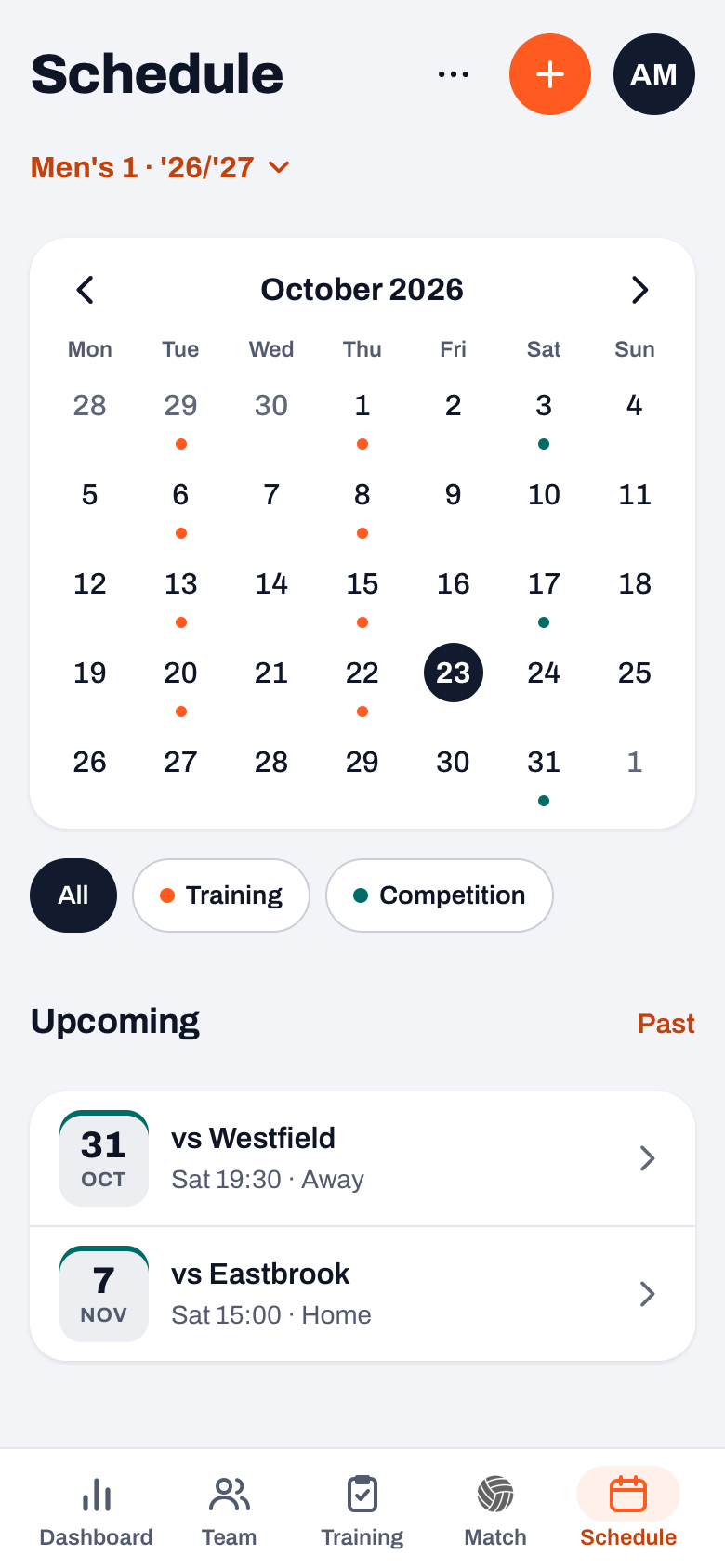
Once added, the series is in the team calendar, next to your matches. If you want every practice to have a plan right away, first save a good plan as a template; how that works is in copying a volleyball practice plan. More about the rest of your season preparation is in organising the volleyball season, and what Koach costs after the trial is on the pricing page.
Set your season dates first. Until takes over the end of your season. Check it beforehand via the button with your team name and season at the top of the dashboard, then Manage seasons. Your series then stops on the right day by itself, and you do not have to remove stray practices in July afterwards.
Frequently asked questions
Can I repeat two practices a week in one go?
Not in one series: a series has one weekday. If you practise on Tuesday and Thursday, open Recurring trainings twice and pick a different day each time. You can later change or delete both series separately.
What happens to practices that are already in the schedule?
They stay as they are. Koach skips a day that already has a practice: it does not count in the button and is not overwritten. If you lay a series over a period in which everything is already planned, the button is disabled.
Can I delete a whole series at once?
Yes. Open a practice from the series, tap More and choose Delete training. Koach then asks whether it is about this practice only, this one and all following, or all practices in the series, with the number of practices. Only then comes the confirmation.
Does scheduling recurring practices cost extra?
No. Recurring practices are included in every plan. You can try Koach free for 14 days, with no credit card; after that you choose Coach for one team with two coaches or Club for unlimited teams and coaches. Only the club's hall schedule is part of Club.

Set up your practice night for the whole season tonight
14 days free, no credit card. After that you only handle the exceptions.
Get started with KoachOr read first what the volleyball coaching app does.