
The whole series or just this evening? Editing a recurring volleyball practice
At the start of the season you planned your whole Thursday evening: the same time every week, right through to the end of the season. Then the hall manager lets you know the gym opens half an hour later. Without help that means opening thirty evenings one by one — and somewhere around evening four you give up and type it into the group chat instead. That is exactly what Koach asks one question for, the moment you edit a practice that belongs to a series.
One change, thirty evenings
A fixed practice night is the easiest part of your planning: you set it up once and you are done with it for the whole season. In Koach you do that with the repeat function — you pick the day, the start and end date and the time, and the app puts down a practice every week. How to set that up is in planning a practice in three steps and in planning faster.
The hard part comes later. A fixed evening rarely stays exactly the same for a whole season. The hall slot shifts half an hour, the focus of the block changes, or the gym turns out to be free at a different time in the second half of the season. Those are not thirty separate decisions but one decision that touches thirty evenings. As long as an app does not know that difference, you have to carry it out by hand — and that is the moment the team calendar loses its authority, because whatever is not in it goes by message again.
So Koach asks you a question first when you make a change like that: how far should this go? Here that question is called the scope, and the answer is always one of three options.
Where the question turns up
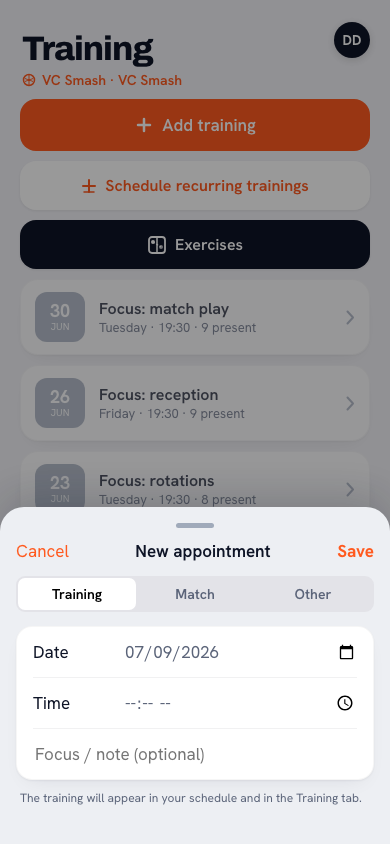
You open the practice as always: tap it in the calendar or in the Training tab. At the top right of the practice screen is a pencil, Edit training. That opens the same sheet as when planning: Date, Time and below that Focus (optional). Change the time or the focus there and tap Save, and the Edit training sheet appears first with the question of how far the change should reach.
You get the same question when removing one, through More (⋯) and then Delete training, or at the bottom of the edit sheet with Delete event. There too Delete training comes first with the scope, and only then the confirmation. That order is the whole point: answering "are you sure?" before you know whether it is about one evening or half a season is not a confirmation.
If the practice does not belong to anything, you notice none of this: your change is simply saved, exactly as with editing a match or a one-off calendar item. The question only comes up when there really is more than one evening at stake.
Three options, with the real number attached
The sheet names three choices, and two of them have the number of practices behind them. If you are halfway through the season on this week's practice, you read something like:
- This training only — the change stays with this evening. This is the exception: the one week you start at 19:00 because there is a match afterwards.
- This and all following: 18 trainings — from today on, the new version applies. This is almost always what you mean when something changes structurally; what lies behind you ought to stay as it actually was.
- All trainings in the series: 32 trainings — including the evenings that have already happened. Useful when you are fixing a mistake that has been in there from the start.
Those numbers being there is not decoration. "This and all following" says nothing; "this and all following: 18 trainings" is a number you can react to before you touch anything. If it does not match what you had in mind, you are probably in a different series from the one you thought.
Options that come down to the same thing, Koach leaves out. If you are on the first practice of the series, "this and all following" and "all trainings" are identical and the middle button disappears; if you are on the last one, it drops out too because it is the same as "this training only". Two buttons with the same outcome do not make a choice clearer, they make it shakier.
You can also back out: below the three options is Cancel, and tapping away does the same. Nothing has been saved at that point, so your sheet stays as you had it. If you do choose, the app briefly reports afterwards what happened — for instance 18 trainings updated.
Even a series you never created as a series
The most surprising part is here. You do not need to have used the repeat function at all. If you once entered your practices one by one — or they date from before this feature existed — Koach looks at the pattern and says so as well: "This training was not planned as a series. Koach found 32 trainings on Thursday at 20:00." If those evenings have no time on them at all, the sentence reads "… 32 trainings on Thursday, with no time set."
A recognised pattern like that is stricter than a real series, and that is on purpose. For the pattern, only practices on the same weekday with the same start time count. So the evening you once set to 19:00 by hand falls outside it — it no longer fits the pattern and stays untouched. With a series you did create with the repeat function it is the other way round: those evenings are marked as belonging together, so even one whose time you adjusted separately still belongs to it.
And if there is nothing to find, nothing happens. If Koach finds fewer than two practices that belong together, the sheet does not appear and your change is simply saved. So the app never quietly assumes you mean a series: it shows what it found, with the number attached, and you confirm it.
Deleting: first the number, then the confirmation
With deleting there is one more step behind the scope, because this is the one action you cannot turn back. If you choose more than one practice, you read: "You are deleting 32 trainings. Their attendance and session plans go with them. This cannot be undone."
Below that comes a second sentence you want to read before you tap on: "14 of those have already taken place." That is the number of practices that fall before today — and therefore the number of evenings whose attendance and ratings you are throwing away. Anyone clearing out a series because the season is running differently from the plan almost never means the past. In that case choose "this and all following": your future is empty and your attendance figures stay right.
If it is about a single practice, nothing changes from what you are used to: you get the usual question whether to delete the practice on that date, with "Attendance, plan and report of this training are removed for good." below it, and that is that.
If one evening is not going ahead, do not cut it out of the series. A practice that falls through because the gym is closed should be cancelled, not deleted — that way it stays visible that it was there, and it does not count towards your attendance figures. See cancelling instead of deleting.
What travels along, and what stays put per evening
A bulk change is only usable if you know exactly what it touches. In Koach two things travel through the series: the time and the focus or note. Nothing else.
So what stays where it is: the attendance for each evening, the drill blocks of each evening, and the "cancelled" status of that one week the gym was closed. That is not laziness but the difference between a template and an event. The time is an agreement that holds for the whole series; who turned up last week is something that happened once.
There is a second safeguard in it: only the fields you have genuinely changed in this sheet travel along. If you only adjust the focus, the evening someone set to 20:00 by hand simply keeps its own time — you did not touch the time, after all. What you do touch deliberately beats such a manual adjustment: "Thursday practice starts at 20:00 from now on" should apply to that one evening as well, otherwise the whole bulk action is unreliable.
In practice that means you can move the time of your whole series with peace of mind without losing the content of your practices, and you can set the theme of the block across twelve evenings in one go without the attendance from last month shifting.
A different date always stays this one evening
There is one exception you need to know, otherwise you will count your chickens. If you change the date in the edit sheet, the scope question does not come and the move applies to that one practice only. So you cannot shift your Thursday series to a Tuesday in one action.
That is not an omission but a boundary. Moving a whole series means every individual date can land on a day where a practice already stands, and the question "so what do we do with that one?" has no answer an app may give silently thirty times over. For a single practice Koach does not answer it silently either: move a practice to a day that already has one, and it stops you with the message that there is already a practice on that day. You delete or move that one first, or pick another day.
If your fixed evening really has to move from Thursday to Tuesday, treat it as what it is: the end of one series and the start of a new one. Delete the old series with "this and all following" — the evenings that have already happened then stay neatly in place — and then put the new day down with the repeat function. Existing practices are not overwritten in the process, so a one-off evening you already had somewhere survives it just fine.
What you are left with is small and dull, and that is exactly the intention. The hall manager rings, you open one practice, set the time right, choose "this and all following" and read that eighteen practices have been updated. Your team opens the calendar and sees the new time. No thirty edits, and no message in the group chat that will have been scrolled past again in three days.
Frequently asked questions
Can I turn a series change back?
There is no undo button. If you have changed the time or the focus of a series, you put it right by doing the same step again with the old value and the same scope. Deleting is different: that is final, and the attendance and session plans of those evenings do not come back.
Will my team get thirty notifications if I move the whole series?
No. One notification goes out, and it is about the practice you had open. The rest of the series is updated quietly and everyone sees the new time as soon as they open the calendar. If you only change the focus or the note, no notification goes out at all.
Can players or parents do this too?
No. The pencil to edit a practice is only there for the coaches and the team owner. Players and parents do see the practice in their calendar, with the new time on it, but cannot change anything about it. A second coach of the same team can, so agree between you who manages the fixed evening.
Does the same question apply to matches?
No, the scope question exists only for practices. Matches and other calendar items stand on their own and you edit them one by one. That makes sense too: matches rarely follow a fixed pattern of day and time.



Try it yourself in Koach
Less admin, more coaching.
Get started with KoachOr read first what the volleyball coaching app does.