
Volleyball analysis app: what your scored points tell you
The short answer
A volleyball analysis app doesn't have to film anything. Log who won each point and how, and Koach works out your momentum, side-out per rotation and error breakdown, then lines your matches up side by side. Video shows why something went wrong, but it takes a camera and time.
If you're looking for a volleyball analysis app, you're probably picturing video: a camera on a tripod and hours of tagging afterwards. You don't need that to get started. The points you score during the match already show where a set turned, which rotation you got stuck in and which errors cost you. Here's what that gives you, what video adds, and which app does what.
What should a volleyball analysis app do?
Analysis is only worth something if it answers a question you can take into practice. "We lost 3-1" is a result. "In one rotation we almost never turned a pass into a point" is analysis. So look for five things in an app:
- Logging doesn't get in the way of coaching. For each point you tap who scored and how, or what went wrong. Nothing more, because you're still coaching. How that works live is covered in tracking stats with an app.
- The flow of a set, not just totals. A 25-22 set doesn't tell you whether you led the whole way or came back late.
- Per rotation. A set is often lost in one rotation. An app that doesn't know who was in which rotation can't show you that.
- Numbers when you need them. In the time-out, between sets and right after the match, not the next day.
- Across matches. One match is a snapshot. Only side by side do you see whether a problem keeps coming back.
14 days free, no credit card. Score your next match, then see which rotation left points on the table.
Analyze your next match in KoachWhat you get from scored points
In Koach you score the match live on your phone. Under Who scored the point? you pick the player, then whether it was an attack, a block or a serve; if the point came from an opponent's mistake, you tap Opponent error. If the point goes to the other side, you tap Good ball by opponent, or you pick who made the error and choose which one under What went wrong?. When the opponent serves, you can rate the pass from 0 to 3. Because the app knows which six players are on court and in which rotation, it turns that into:
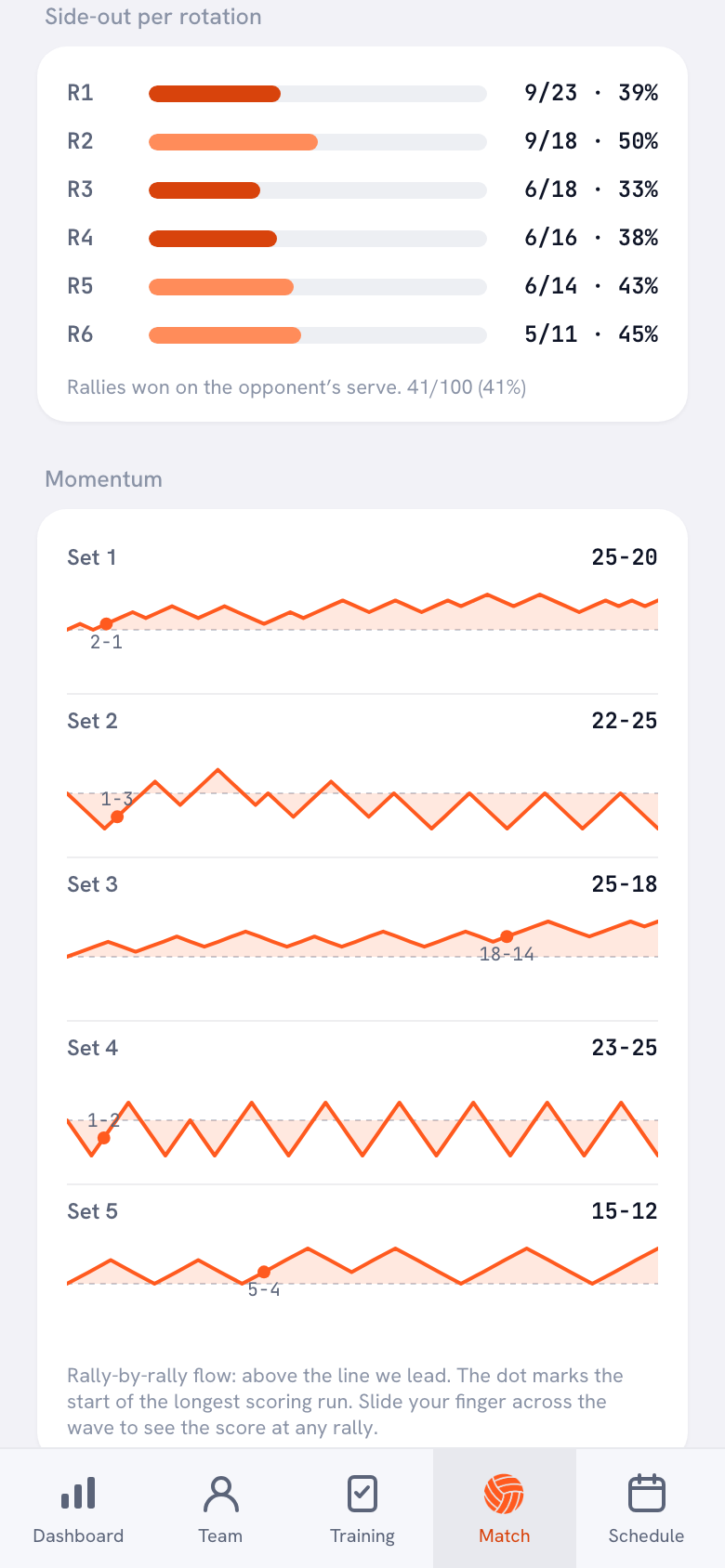
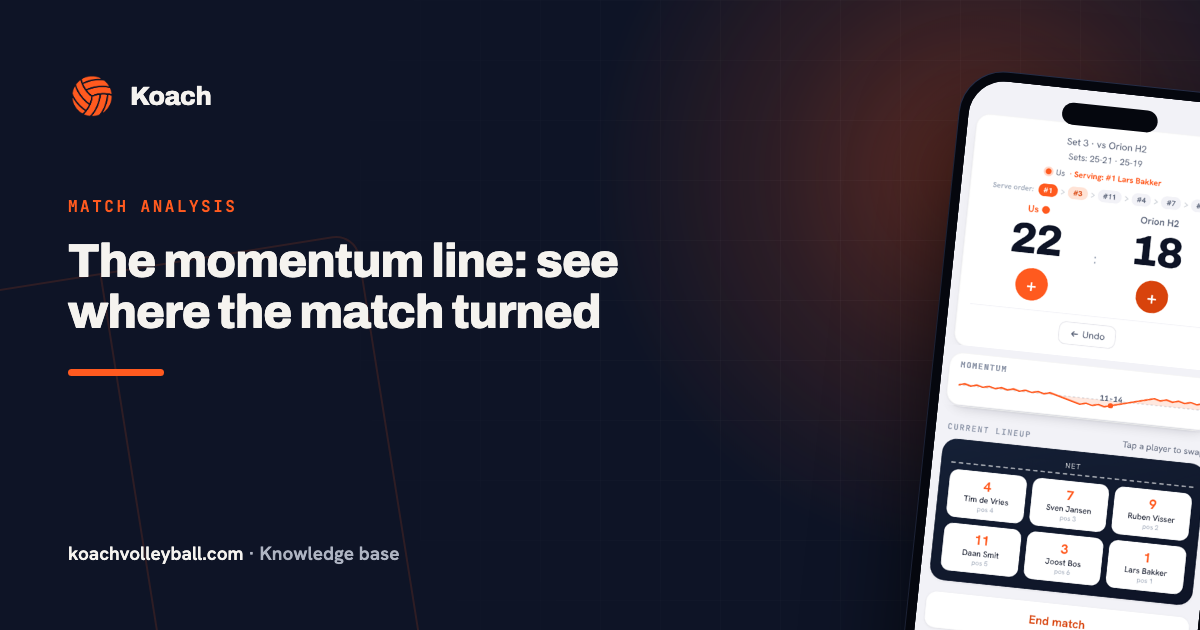
- Momentum. For each set, a wave that follows the score rally by rally: above the line you're ahead. A dot marks the start of the longest scoring run, so you see straight away where a set got away from you or swung your way. How to read that line is explained in the momentum line.
- Side-out per rotation. For each rotation, R1 through R6, how many rallies you won on the opponent's serve. Why that one number says so much is covered in what side-out is.
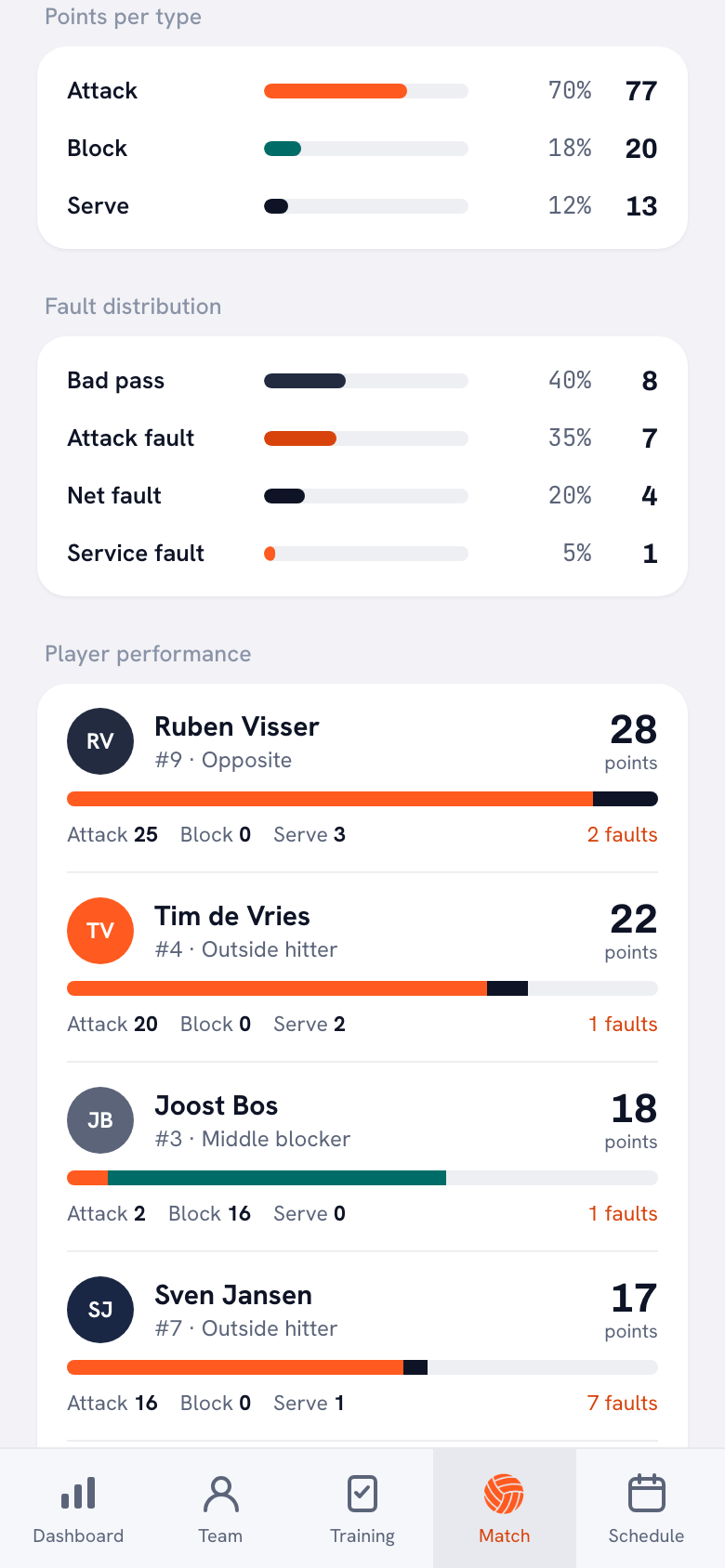
- Points per type and fault distribution. How many of your points came from attack, block and serve, how many from opponent errors, and which of your own errors gave points away, split into Service fault, Attack fault, Bad pass, Too late, Net fault and Other. That shows you whether your lost points are spread out or come down to one kind of error.
- Reception. The average pass rating for the team and for each player, with the number of passes next to it.
- Serve runs. Who put together the longest runs of consecutive points on their own serve. On the dashboard, Serve pressure this season shows your side-out for the whole season and the longest serve runs.
- Player performance. For each player, points from attack, block and serve, with the number of errors alongside.
Those are the building blocks. What each of those numbers tells you, and what it doesn't, is explained in understanding volleyball stats. How to work through them in order after the match, from the points you gave away to the moment a set turned, is in match analysis in five steps.
Analysis during the match: the time-out
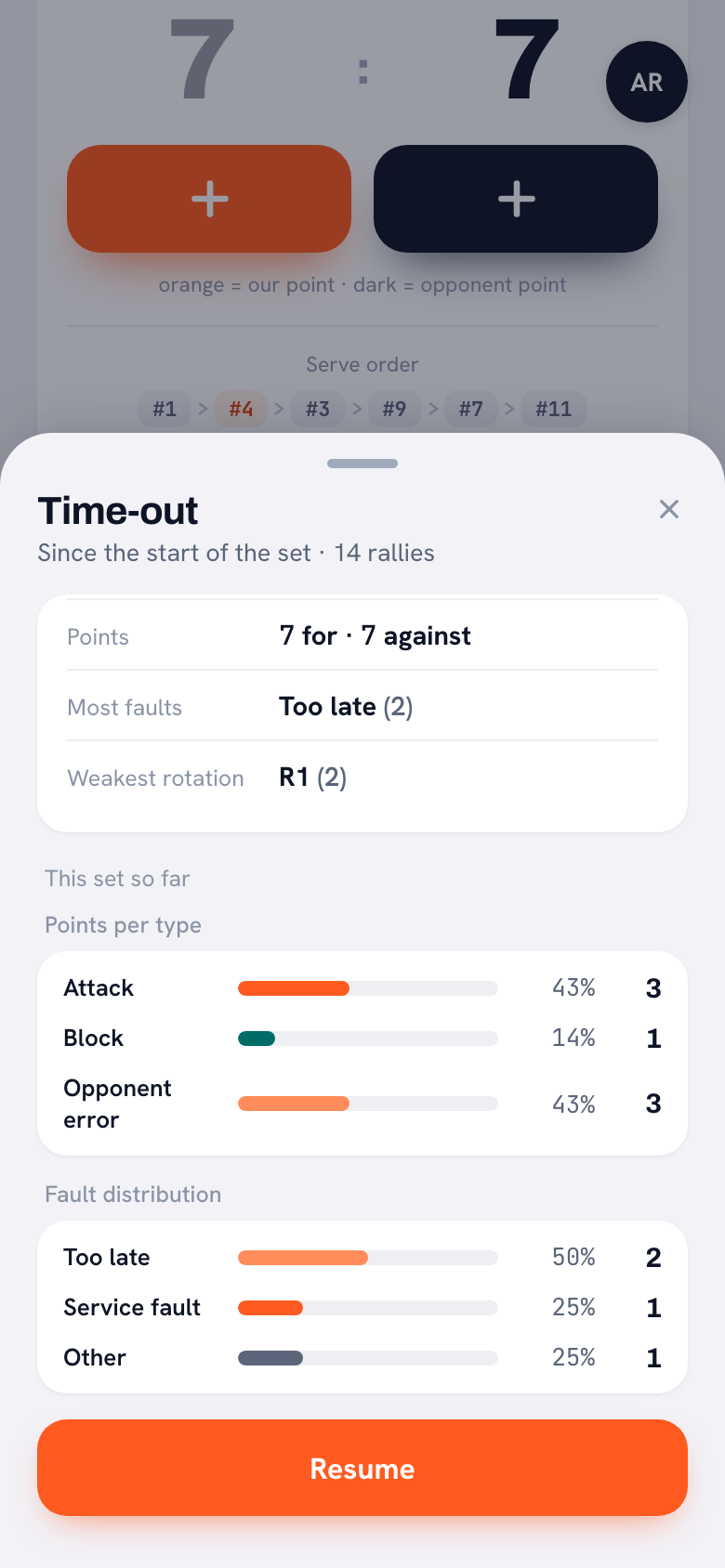
Most analysis happens after the match, when you can't change anything anymore. Tap Time-out in Koach and you get a card showing what happened since the last time-out, or since the start of the set: points for and against, the most common error and the weakest rotation. If you already called a time-out, the points show whether things went better or worse than in the stretch before. Below that you see the points per type and the fault distribution for the set so far.
A time-out is short. It helps that the card points to one thing: if Most faults says Bad pass, you know what to talk about. What to say with the numbers in those thirty seconds is covered in using stats in a time-out. Between sets, the Set break screen shows the set scores and the numbers, and that's where you set up the lineup for the next set.
Comparing two matches
One bad night of passing can be bad luck. If the same error shows up three matches in a row, it's a pattern. That's what Compare matches on the Match tab is for. You pick at least two played matches and see them side by side:
- Result: the score of each match and how your points stack up against the opponent's.
- Points per type: attack, block and serve for each match, side by side.
- Faults: the total for each match, and per type of error.
- Player performance: each player's points in every selected match, with an arrow showing whether they scored more or fewer in the last selected match than in the first.
Playing the same team again soon? Check Previously vs, followed by the opponent's name, when you set up the match and in the match details: the last five matches against that opponent, across all seasons, with the set scores and the head-to-head record. For each player, Performance over time in the player profile shows points per match, with Form (last 3) next to the average per match. How to use numbers like these in a conversation with your team is covered in preparing a post-match review with data.
What video adds
Scored points tell you what happened and where. They don't tell you why. The numbers show that your passing fell apart in one rotation; only video shows that your libero kept standing too far forward there. A recording also gives you:
- technique and positioning: how a player was set up, not just that the ball went wrong;
- the opponent: where their hitters attack and how they serve;
- clips for your players, which often convince them more than a number.
The trade-off is that someone has to film, the footage has to be uploaded, and watching it back after the match takes time. Whether software can take over the watching and tagging is covered in pulling stats from video automatically. For a lot of club teams the honest order is: score points first and find the patterns, and only start filming once you know which rallies you want to watch.
Volleyball analysis software: which app does what?
We make Koach, so read this as an overview written by someone with a stake in it. The facts about the other apps come from their own websites, checked in October 2026.
- Data Volley 4 is scouting software from Data Project, with a Professional version for pro teams and a Lite version for mid-level clubs. It runs on Windows only, and an annual license costs $799 (Professional) or $299 (Lite), according to the Data Volley 4 product page. The better choice if you have a scout who knows the program.
- Hudl offers, among other things, Hudl Assist, with team and player stats linked to video, and Volleymetrics, where analysts log every ball contact on both sides of the net within 12 hours, for college and pro teams. No prices are listed: you request a demo or a quote. The better choice if you already film and want to outsource the analysis.
- Balltime, now a Hudl product, lets you upload volleyball footage; the software tags every ball contact and every player, cuts out the dead time and makes highlights. The Player plan costs $20 per month for 15 hours of footage per month, according to Balltime's pricing. The better choice for a player who wants video of themselves.
- Koach doesn't film. You score live, and the app turns that into momentum, side-out per rotation, fault distribution, reception and match comparisons, in the same app as your lineup, practices and attendance.
| What you want | Video (Hudl, Balltime) | Koach |
|---|---|---|
| Watch a rally again | Yes | No |
| Look at technique and the opponent | Yes | No |
| Works without a camera or recording | No | Yes |
| Who produces the numbers | Analysts or software, after upload | You or a player, live during the match |
| Price per month | Balltime Player $20; Hudl Assist on request | €2.99 after 14 days free |
Sources: Balltime, Balltime pricing, Hudl Assist, Volleymetrics and Data Volley 4, checked in October 2026. Prices and features can change; check them yourself before you choose.
What Koach doesn't analyze, and who it's for
Koach doesn't count attack attempts, only attack points and attack errors. So the app doesn't calculate a hitting percentage. You don't track individual stats for the opponent's players, and there are no heatmaps, attack directions or video.
It's a good fit if you coach a club or youth team, want to see for yourself where sets slip away without anyone having to film, and want those numbers in the same app as your lineup and practices. It's not a good fit if you have a dedicated scout or analyst coding every ball contact, if you need video for technique feedback or scouting the opponent, or if you coach beach volleyball: Koach is built for indoor volleyball with six players.
What does a volleyball analysis app cost?
Prices vary widely, from an annual license for scouting software to a monthly subscription for video. You can try Koach free for 14 days, with no credit card and every feature. After that you choose Coach for €2.99 per month (one team, two coaches) or Club for €9.99 per month (unlimited teams and coaches); on a yearly plan you pay €2.49 or €8.33 per month. Players and parents use the app for free. In the App Store and on Google Play you see the price in your own currency. Everything is on the pricing page.
Start with one question per match. Decide beforehand what you want to know, for example which rotation gets you the fewest side-outs, and after the match look only at that. After a few matches, put them side by side with Compare matches and you'll see whether it's a pattern.
Frequently asked questions
Can you analyze a volleyball match without video?
Yes. If you log who won each point during the match and how, or what went wrong, you have enough for the questions that matter most: where a set turned, which rotation got you few side-outs and which errors cost the most points. Koach works that out without a camera. Video mainly adds the why: technique, positioning and what the opponent did.
Is there a free volleyball analysis app?
Koach isn't free forever, but you can try it free for 14 days, with no credit card and every feature, including momentum, side-out per rotation and match comparisons. After that, Coach costs €2.99 per month for one team; players and parents pay nothing. If you're looking at an app with a free basic plan, check above all whether it can also analyze per rotation and across several matches.
Can I analyze a match afterwards if I didn't score it live?
Partly. With Enter the result manually and Enter stats afterwards you add the set scores and each player's points and errors, even days later. Momentum, side-out per rotation, reception and serve runs only come from live scoring, because for those the app needs to know, rally by rally, who was on court and what happened. It can't rebuild them from totals afterwards.
Who keeps the stats if I'm coaching?
You can do it yourself: for each point you pick the player and the type of point or error. If you want your hands free, use Authorize a player to keep score. A team member with a linked account then keeps the score and stats for that match on their own phone, for example a player who isn't playing that day. Afterwards, the match and its numbers show up in your app as usual.
Does the app track the opponent's stats?
Not per player. You log how your team lost a point, such as a bad pass or a net fault, or whether it was a good ball by the opponent, and when the opponent made an error. If you want to know where their hitters attack or how their servers work, you need video or a scout.

Analyze your next match without a camera
14 days free, no credit card. After the match you'll know which rotation cost you.
Get started with KoachOr read first what the volleyball coaching app does.