
Volleyball errors by position: where on court does it go wrong?
The short answer
Volleyball errors by position show where on court a player makes their errors, such as attack errors at the front or passing errors at the back. Convert them to errors per 100 rallies in that spot, or you compare unequal numbers. In Koach this is on each player's On court map.
Volleyball errors by position show where on court things go wrong, and that often says more than the total. A player with seven errors can get almost everything right in one spot and give away half the points in another. Here is how to read errors by position and by rotation, and how to see them in Koach.
Why errors by position say more than the total
A total of seven errors tells you that something is going wrong, not where. In each spot on the court a player does something different: attacking and blocking at the front, passing and digging at the back, and serving from position 1 when your team serves. An error at 4 is usually a different problem from an error at 6, and it calls for a different drill.
On top of that, players don't stand in every spot equally often. Someone who plays forty rallies in one spot and sixty in another will naturally make more errors in the second. So don't just count, but convert to errors per 100 rallies in that spot.
Worked example: one player, two spots
Over two matches a player made 4 errors in position 4 and 3 errors in position 2. In position 4 they stood for 40 rallies, in position 2 for 60 rallies.
- Position 4: 4 errors in 40 rallies is 4 / 40 × 100 = 10 per 100 rallies.
- Position 2: 3 errors in 60 rallies is 3 / 60 × 100 = 5 per 100 rallies.
In raw numbers, 4 and 3 are close together. Per 100 rallies, the player makes an error twice as often at 4. At the same time, forty rallies is not many: one error more or less changes the figure at 4 by 2.5. Treat it as a hunch and see whether it comes back in the next matches.
Position in the lineup or the spot where they played?
You want to know this before you read a court map. An app that follows the lineup and the rotation knows the spot where a player stood when the rally started: position 1 to 6, as on the scoresheet. Where they switched to after the serve, it does not know. If you switch an attacker from 2 to 4 after the serve, their attack errors from those rallies end up at position 2, even though they made them at 4.
If you don't switch after the serve, like many youth and recreational teams, the lineup is also where play happens and you can read the map literally. If you do switch, read position 2 as "in the rotations where they start at 2". That is still useful: it tells you in which rotations things go wrong, and you can change that with a different starting lineup or a different serve receive formation.
One spot often colours the picture: position 1. Whoever serves stands at 1, so every serve error a player makes lands in that spot. A dark position 1 is therefore usually a serving problem, not a problem in defence at right back.
Errors by position in Koach: the On court map
On the Team tab, open a player's profile and choose Stats. The Errors block starts with the season total and the type that costs the most, with a bar per type underneath. From 100 live-scored rallies onwards you also see the number of errors per 100 rallies.
Below that is On court: a court with the net at the top and six boxes, 4, 3 and 2 at the front and 5, 6 and 1 at the back. Each box shows the number of errors in that spot and, below it, the number per 100 rallies the player stood there. The more errors per 100 rallies, the darker the box. The map only uses matches you scored live, and only errors where you tapped a player under Who?. Which types of errors you can choose there is in types of errors in volleyball.
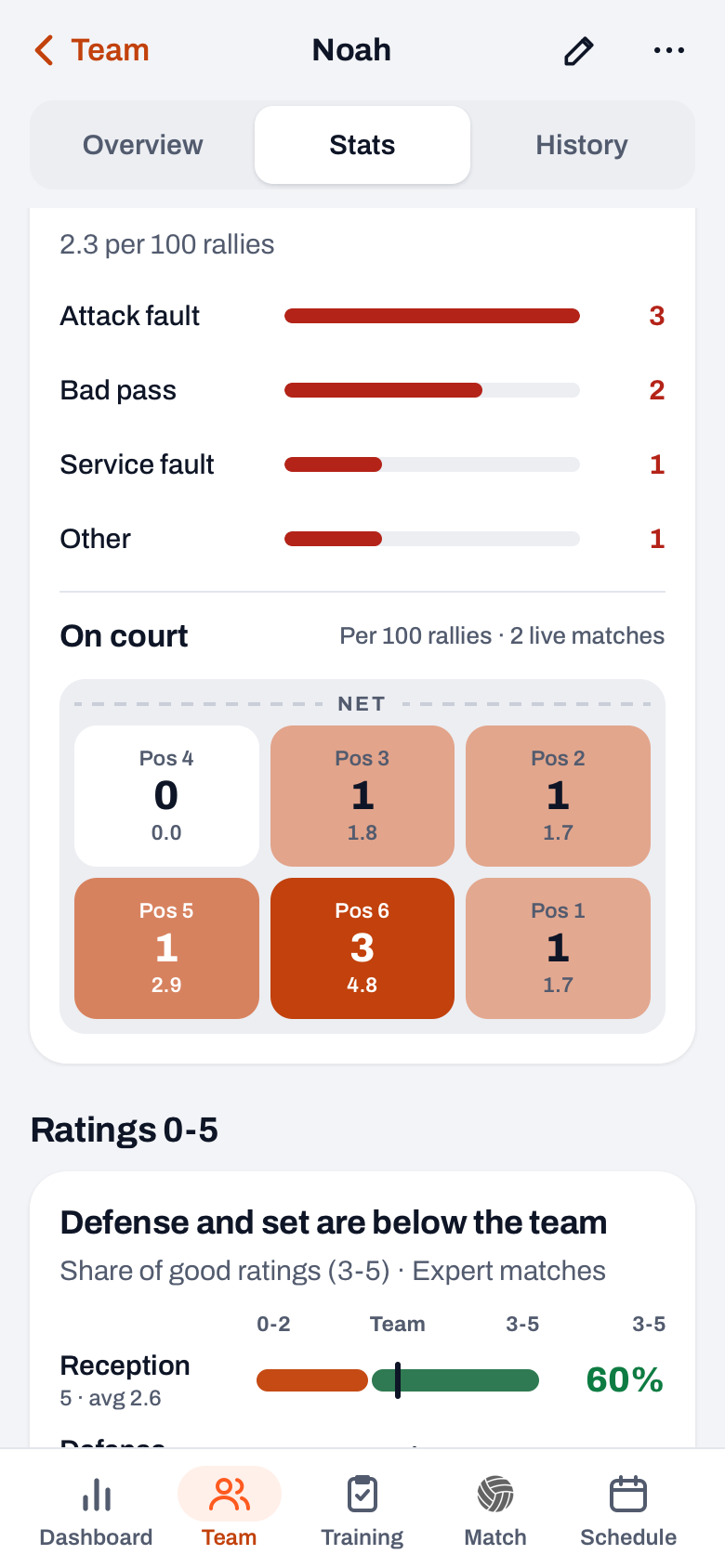
If you play with varying lineups, there is one more list underneath: By rotation · errors per 100 rallies. With one fixed lineup it shows exactly the same as the court, so the app leaves it out. On the Overview tab an insight line sums it up, for example "Attack fault costs the most", with the count below it and, if that error happened at least twice in the same spot, "often at position 4".
14 days free, no credit card. Score two matches live and see for each player in which spot the errors happen.
Try Koach with your teamBy rotation: where your team loses points
The court map is per player. For the team you look per rotation. Open a played match and choose Stats: in the Rotations table each rotation has an Err column, the number of your own errors in that rotation, with the highest in red. Next to the side-out and the break point you then see whether a weak rotation is down to your own errors or to the opponent's winners. How to read that table is in side-out and break point by rotation.
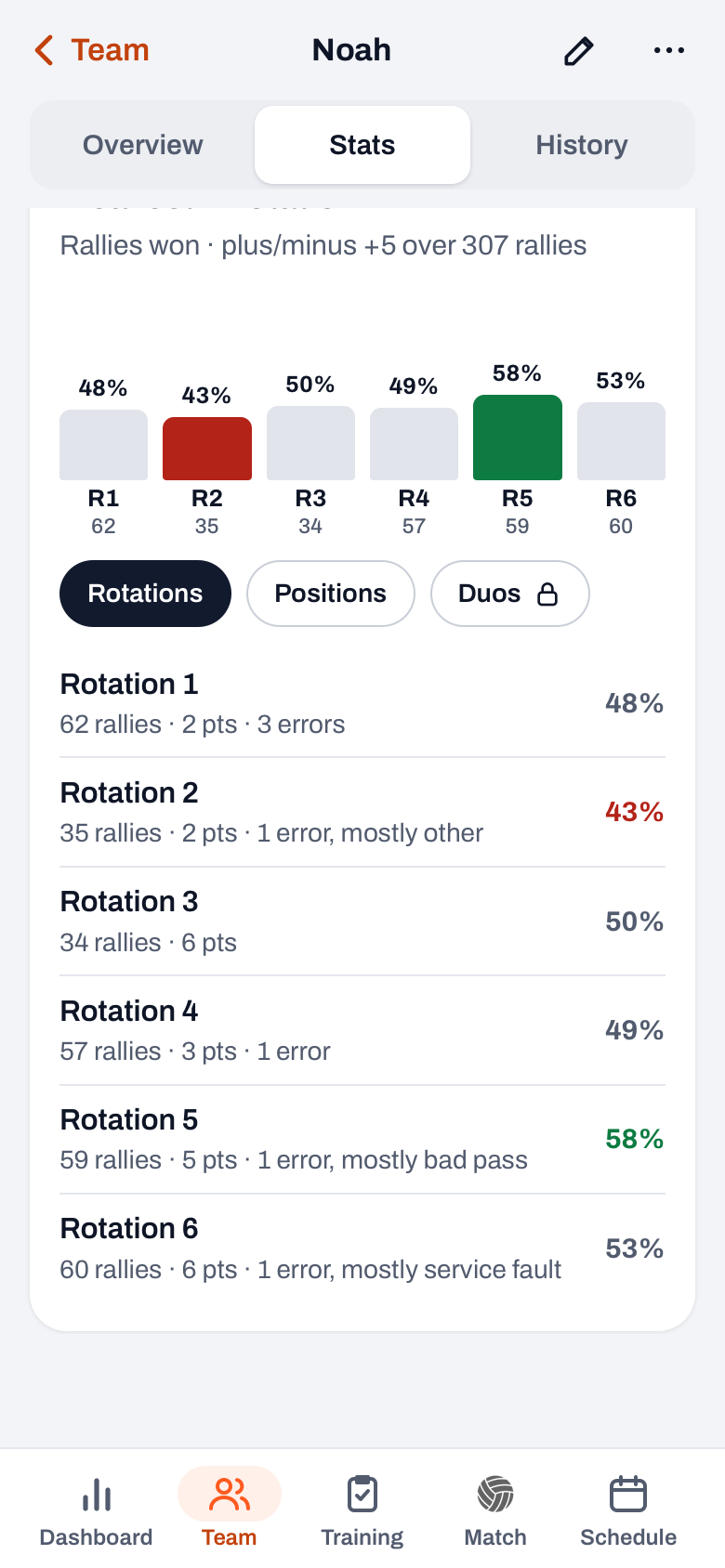
A player's profile also has the Rotations and positions block: per rotation how many rallies they were on court, how many points they scored and how many errors they made. If the type of error in a rotation differs from their usual one, it says which type it mostly was. With the Positions chip you see the same per spot.
Spotting a pattern, and what you then train
- Attack errors at the front. These are often high balls after a bad pass. Train the answer to the difficult ball: high and deep, off the block and out, or a smart shot over the block, as in poke, tip and roll shot.
- Bad passes at the back, at 5 and 6. Then it is down to the reception or the dig, not the attack. Look at the rotations where it happens: often two weaker passers stand side by side there.
- Net faults at 3 and 2. Usually the block: too late, too close to the net, or drifting into it on landing.
- A dark position 1. Serve errors. Check whether it is one server or the whole team.
If you scored in Expert mode, the Attack block in the profile also shows how attacks turn out after a good pass compared with a bad one. If the attack errors come mainly after a bad pass, it is a reception problem that shows up in the attack. If one rotation is full of errors, the fixes are in how to find your weakest rotation. And whether an error is a problem or the price of being brave is something you discuss with the player using error load per player.
What does the player see?
Players see the same Errors block, court map included, in their own profile. If you don't want that, for example with young players, switch off Players see own errors under Team settings on the Team tab. You keep seeing them, and a team parent sees them for their own child's matches; a regular parent sees no match stats. Whether that is wise is discussed in showing errors to youth players. Want to see whether the errors go down over the season? In Stats, under Per match, choose the Errors chip; how to read such a line is in tracking player development.
The court map works in Simple mode and in Expert. You can try Koach free for 14 days; what it costs after that is on the pricing page.
Tap the player for every error. An error without a name does count towards its type, but ends up on nobody's court map. If you choose nothing under Who?, you get a map that looks calmer than the court really was.
Frequently asked questions
Why is position 1 so often dark on the court map?
Because whoever serves stands in position 1. Every serve error a player makes therefore lands in that spot, on top of the errors they make there at right back when the opponent serves. So a dark position 1 is usually a serving problem. Check in the bars per type how many of their errors are serve errors before you draw conclusions about the defence.
Does Koach count where a player attacked or where they stood in the lineup?
The spot in the lineup: where the player stood when the rally started, position 1 to 6 as on the scoresheet. If you switch spots after the serve, the app doesn't know. An attacker who switches from 2 to 4 therefore gets the errors from those rallies at position 2. In that case, read the map as the rotations in which they start in that spot.
Does a player see their own errors by position?
Yes, players see the Errors block with the court map in their own profile, unless you have switched off Players see own errors in the Team settings. You can make exceptions per player. As the coach you always see the errors, and so does a team parent for their own child's matches. The data stays stored; the switch only affects what the player gets to see.
What does it cost to track errors by position?
You can try Koach free for 14 days, with no credit card and with every feature, including the court map and the Rotations and positions block. After that you choose the Coach or Club plan; the prices are on the pricing page. There is no extra work: the app takes the position from the lineup, and you only tap the type of error and the player.

See where on court the errors happen
14 days free, no credit card. After two matches you'll have your first court map.
Get started with KoachOr read first what the volleyball coaching app does.