
“Parents were guessing what the colour of that little button meant”
Volleyball coach Dennis Boekhout, 28, on the card on the parent dashboard: their child’s next five events, the status in plain words, and what a parent deliberately never sees.
Parents could already sign their child in and out in Koach. What they could not do was look back. The status was spelled out only for the next match. For a training session or a tournament they had to guess it from the colour of a small button.
Since September the parent dashboard carries a card with their child’s next five events. Dennis Boekhout explains what it shows, what it deliberately leaves out, and why it saves him messages on a Friday night.
What could a parent actually see before this card existed?
“One thing: how their child stood for the next match. That was written out properly, in words. Everything beyond it they had to work out themselves.
“Which is exactly the wrong way round. A child trains more often than they play. So it was precisely for the sessions and the tournaments that a parent had no idea.”
So how did they work it out?
“Through the schedule, one item at a time. Next to every line sit two buttons, a green tick and a red cross, and the colour told you which of the two was on. That button is thirty-eight pixels wide.
“So you were guessing what the colour of that little button meant. A father at my club put it most honestly: I can see something is green, but I do not know whether he is going or not. That is where every design argument ends.”
What does the card show now?
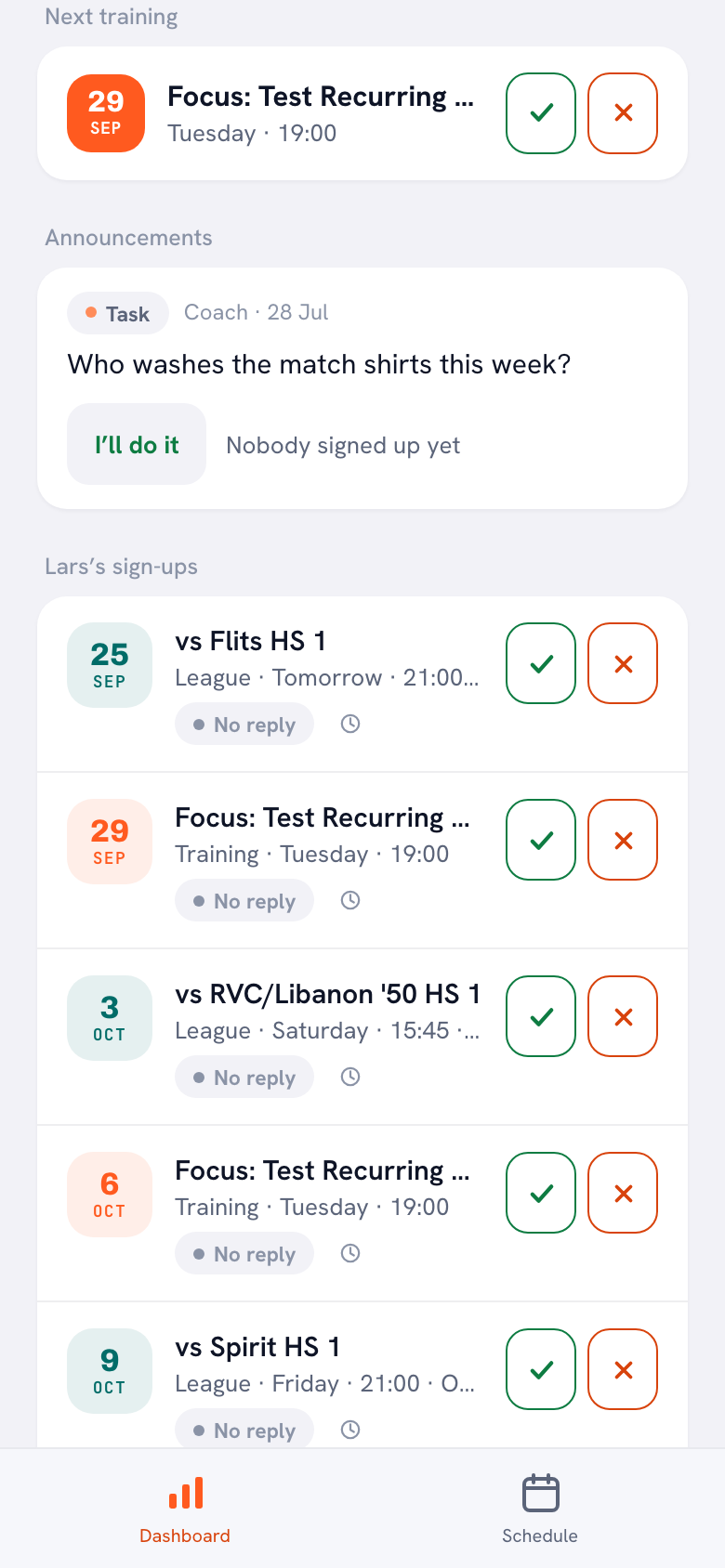
“The next five things your child has on, one under the other. Training, match and tournament all mixed together, simply by date, because that is what a week looks like at home too. At the top it says ‘Lars’s sign-ups’, with your own child’s name in it.
“Each line gives the date, what it is, which day and what time. Underneath that, the status in words. And on the right the two buttons to change it, so you never have to go anywhere to answer.”
Why five, and not simply all of them?
“Because a parent does not want a season overview. They want to know what has to be sorted this week and next week. Five lines covers that comfortably.
“If nothing is coming up, the card says so in as many words: nothing scheduled in the coming weeks. And they still have the full schedule in their own second tab, so nobody loses anything.”
The status is written in words. Why not just a colour?
“Because a colour is not a word. Green could mean anything: he is going, it has been filled in, nothing is wrong. Now it literally says Signed up, Coming to watch, Not coming or No reply.
“That last one matters most. ‘No reply’ is the only status a parent actually has to do something about. The other three are a confirmation, the fourth is a task. Colour will never explain that difference to you.”
And the reason for pulling out is shown too?
“If it has been filled in, yes. ‘Test on Thursday’, for instance. First of all that helps the parent, because they type something like that two weeks ahead and then forget it.
“It also saves me a message. If a reason is there, I do not have to ask why. That sounds small, but it is the difference between a list and a conversation you have already had.”
There is also a button to sign your child up for every training session at once.
“There is, and for a parent it simply did not exist before. A player had one, in their own Training tab. A parent does not have that tab, so they had to tick everything separately. With ten sessions that is ten searches through a list that also holds bar duties.
“Now the button sits on their dashboard. One tap and their child is signed up for everything still to come, with a message telling them how many that was.”
Does that button also override a withdrawal?
“No, and that is the most important thing about it. It only touches events that have had no answer at all. If you deliberately pulled your child out of next week’s session, that stays exactly as it is.
“That sounds obvious and it is not. A bulk button that sets everything to yes signs up a child who is at his grandmother’s on Wednesday. Then I have a list that is right on paper and half a team in the hall.”
What does a parent deliberately not see?
“Almost everything. No stats, no lineups, none of the notes I have written on a player. And nothing about other children: their card is about their child and about nobody else.
“A parent has no Team, no Training and no Match in their navigation either. Those tabs do not exist for them. They see the schedule, the bar duties, the driving rota and their own child’s sign-ups. Enough to take part, too little to coach with.”
There is a small clock behind the status.
“That opens the history: who signed in or out, when, and who changed it afterwards. For a parent that sheet opens filtered on their own child straight away, with the name in the heading.
“It exists because ‘but I definitely pulled him out’ used to be an argument with no evidence. Now it is not an argument any more. And the sheet says nothing about the rest of the team, because those are other people’s children.”
What does this save you as a coach?
“Messages on a Friday night. That is not a joke, that is genuinely the answer. ‘Is Lars coming tomorrow?’ and ‘does he have to play this weekend?’, every week again, from three or four parents at once.
“That answer was already in the app. It was just sitting somewhere a parent never found it. Now it is on their own screen, and on Saturday morning I look at a list instead of at my phone.” [laughs]
Let parents see where their child stands
In Koach a parent sees their child’s next five events with the status in plain words, and signs them in or out with one tap. Free to try: set up your team and invite the parents.
Try Koach free