
Invite club members to the app: a whole team at once
The short answer
To invite club members quickly, work team by team: one message with a personal link behind every name, in that team's group chat. Since version 3.1, a club manager or board member in Koach creates those links from Members, for players or for parents, without the coach having to do anything.
Inviting club members is often left to the coaches, and that is where it stalls. The club dashboard shows a list of players without an account, and nobody knows who should ask them. Here is how to sort it out yourself as a board, team by team, and what to watch for with youth teams.
Why members don't end up in the app by themselves
In most clubs every coach invites their own team. One does it in the first week of the season, another never, and a new coach often doesn't even know it is possible. With youth teams there is an extra question: does the child get an account or the parent? The result is a member list in which a different part is missing for every team, and a board that only finds out when a club message doesn't reach part of the members.
You can take that over as a board, and a fixed approach works best:
- Pick one moment. For example the first two weeks of the season, once the teams are fixed.
- Work team by team. One message per team, in the group that team already uses. People respond to something about their own team.
- Give everyone their own link. A general link for the whole team can lead to duplicate or wrongly linked accounts. With a link per name you know exactly who is still missing.
- Check again after a week. Anyone who still hasn't joined by then, you ask personally, or through the coach.
Which members don't have an account yet is shown in the Members section; how that list works is in keeping track of the club's member list.
Players or parents: which link do you choose?
This is the choice you need to get right for each team, because it is hard to undo.
- A player link is for someone who logs in themselves. The player creates their own account and with it becomes the player in the team: they sign up and see their own numbers.
- A parent link links a parent alongside the child. The child's card stays with the child, and the parent can sign the child up and off. How that works for parents is in adding parents to your team.
If a parent uses their child's player link anyway, they take over the child's card. A rule of thumb: if the child manages their own calendar, choose players; if the parent does, choose parents. With older youth players both are possible: the child with their own account, and a parent following along.
How to invite a whole team at once in Koach
Since version 3.1 (November 2026) you do this as a board from the club dashboard, even if you aren't in any team yourself.
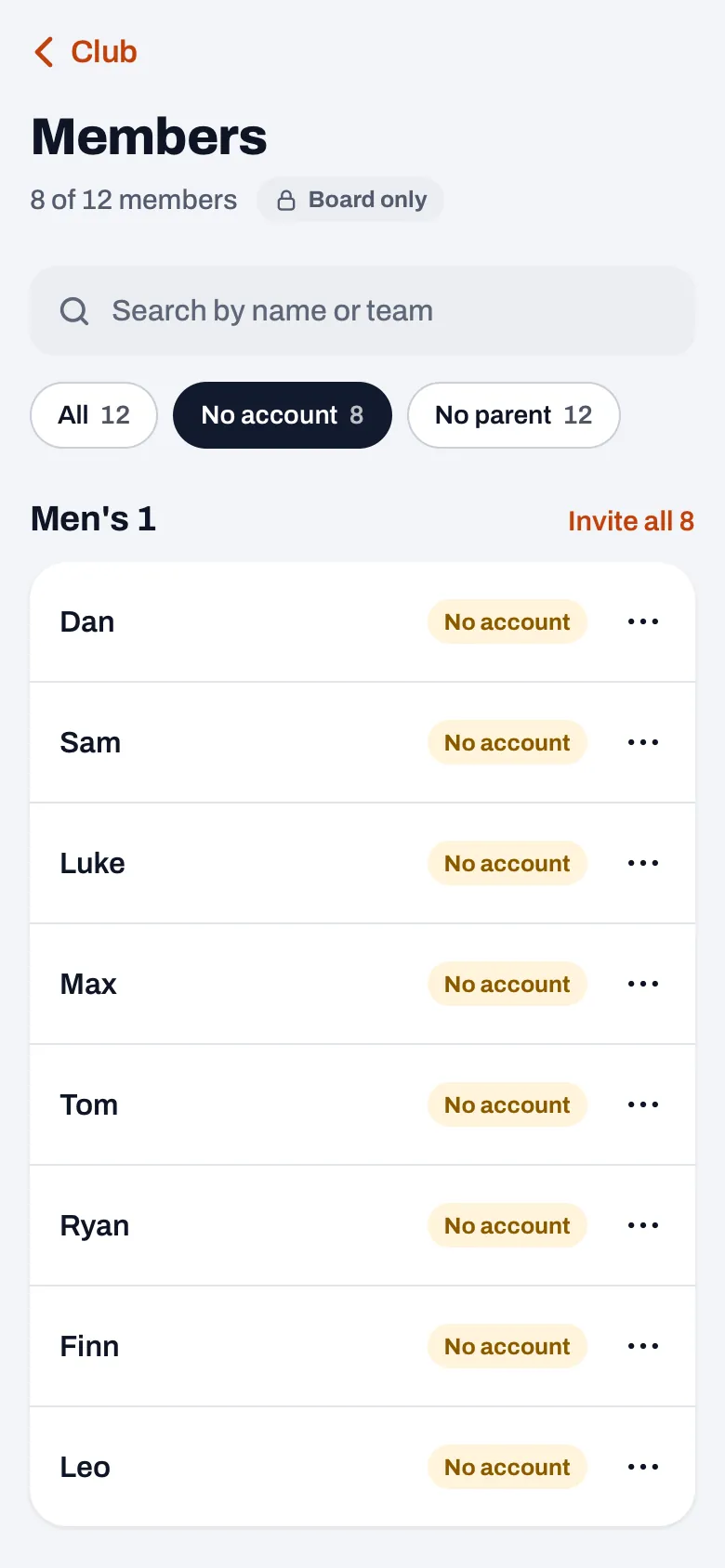
- Open Members. Go to Profile, tap Club dashboard and choose Members in the People group.
- Choose a filter. Tap No account or No parent. The list then shows, per team, who it concerns.
- Tap Invite all N in the team header. N is the number of members of that team who can get a link.
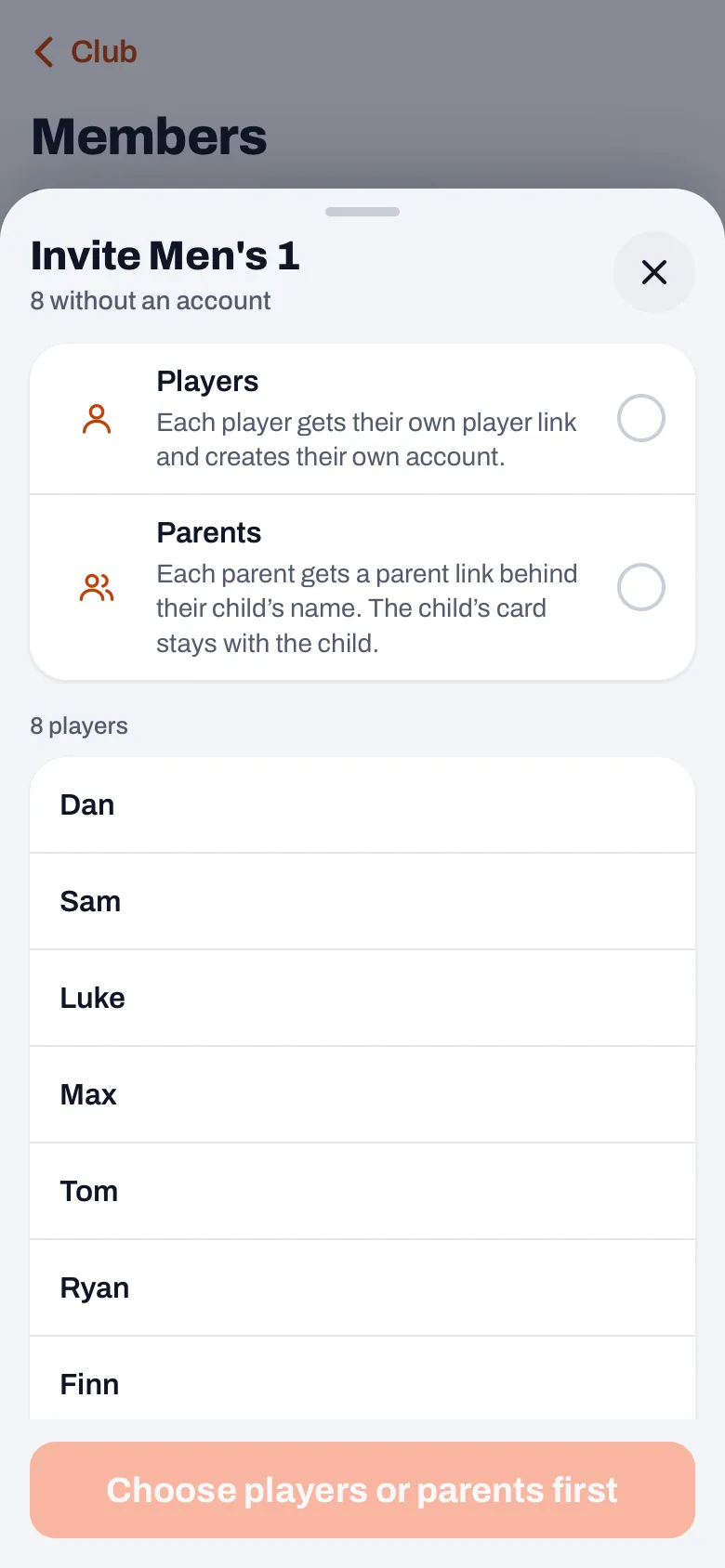
- Choose who the links are for. A sheet opens with the team name and the number without an account or without a parent. At the top you choose Players or Parents, each with a line of explanation below it. Nothing is preselected, on purpose. If you came via No parent, Parents is already fixed. If you choose Players, the sheet warns that a parent who uses a player link takes over the child's card.
- Check the names and tap Create N links. As long as you haven't chosen, the button says Choose players or parents first.
- Share the message. You get one message with a personal link behind every name, with Copy and Share. Koach doesn't send anything itself: you or the coach puts the message in the team's group.
There is no trial on Club. For the whole club, get in touch with us. If you would rather start with your own team, try Koach as a coach free for 14 days, no credit card.
Koach for clubs Try Koach with your teamWho isn't included, and what do you need to know about the links?
- Training-only players and players set to inactive aren't included. The sheet lists them under "Training-only or inactive, not included". If one of them does need a link, invite them separately.
- With Parents, children who already have a parent aren't included. They are listed under "Already has a parent, not included". You create a link for a second parent separately: in Members, tap the three dots next to the name, choose Invite and then Parent link.
- A new player link replaces the old one. A player link shared earlier for the same names stops working after that, so use the new message.
- Each link belongs to one name, works once and is valid for 30 days. That is also stated at the bottom of the message.
- At most 60 at a time. If there are more names in the list, or a link fails, it says why for each name, for example "Not done yet, 60 at most at a time" or "Could not create the link". With the Try again for button and the number, you create them after all. Anyone who has an account by then isn't included again.
- Search counts. If you typed something in the search field in Members, only the names you see are included.
Who can do this, and what do you need?
The button is there for the Club manager and the Board member. The treasurer, the confidential adviser and the technical manager can see the member list, but can't create links; which role can do what is in the club roles.
The club dashboard is part of the Club plan; what it includes is on the page for clubs, and the prices on the pricing page. For players and parents, their account is free. The coach can still invite their own team from the team screen; how that works is in inviting players with a link. And if the main goal is to take pressure off the group chat, also read why the WhatsApp group gets stuck for a volleyball team.
Let the coach post the message. The message starts with Hi! I use Koach for and the team name (for parents: Hi parents of and the team name), and the parent message ends by asking people to get a second link from the sender. That reads like a message from the coach, and players and parents respond faster to someone they see every week. Create the links yourself, and send the message to the coach. If you post it yourself, adjust the first sentence, and for parents the last one too.
Frequently asked questions
What happens if a parent uses their child's player link?
Then the parent's account is linked to the child's player card: in the app, the parent is then the player. The child can no longer use that card themselves afterwards. So for a youth team where the parents manage the calendar, choose Parents. The sheet also warns about this as soon as you choose Players.
How long is an invitation link valid?
Thirty days. Each link belongs to one name and works once. If you create a new player link for the same player, the previous one stops working. If a link has expired, open Members again with the No account filter and invite the names that are still listed once more.
Can both parents of a child get an account?
Yes. In the invitation for the whole team, a child who already has a parent isn't included. For the second parent you create a separate parent link in Members, via the three dots next to the name and Invite. More on this in the article about two parents per player.
Does the coach need to do anything for this?
No. A club manager or board member creates the links from the club dashboard, even without being in the team. It is smart, though, to have the coach post the message in the team group, because it reads like a message from the coach. The coach can also still invite their own team from the team screen.
Bring your club into Koach
Get in touch about Club, or try Koach free for 14 days with your own team first.
Get started with KoachOr read first what the volleyball coaching app does.