
Managing a volleyball team as a coach: the complete overview
Managing a volleyball team is more than six names on a form. Who plays where, who is there on Thursday, who is improving and who is drifting away? Most coaches juggle a group chat, a spreadsheet and their memory. This article lays out the complete workflow — and shows how to keep everything in one place.
What does team management actually involve?
Ask ten coaches what team management means and you will get ten answers. In practice it comes down to five recurring tasks:
- Knowing your roster: who is in it, with which position, jersey number and role — player profiles are the foundation.
- Assigning roles: who is the setter, who is the libero, who can cover several positions?
- Tracking availability: attendance at practice and matches determines what you can field on Saturday.
- Recording development: notes and statistics per player make growth something you can actually discuss.
- Setting direction: a team goal everyone works towards.
The problem with scattered lists
The classic approach — a group chat for communication, a spreadsheet for the roster, a notebook for observations — works until it does not. The list is outdated, the spreadsheet lives on the laptop at home and the notebook is in the other bag. Worse: nothing is connected. Tuesday's attendance says nothing about Saturday's lineup, because the two live in different systems.
What complete team management looks like in Koach
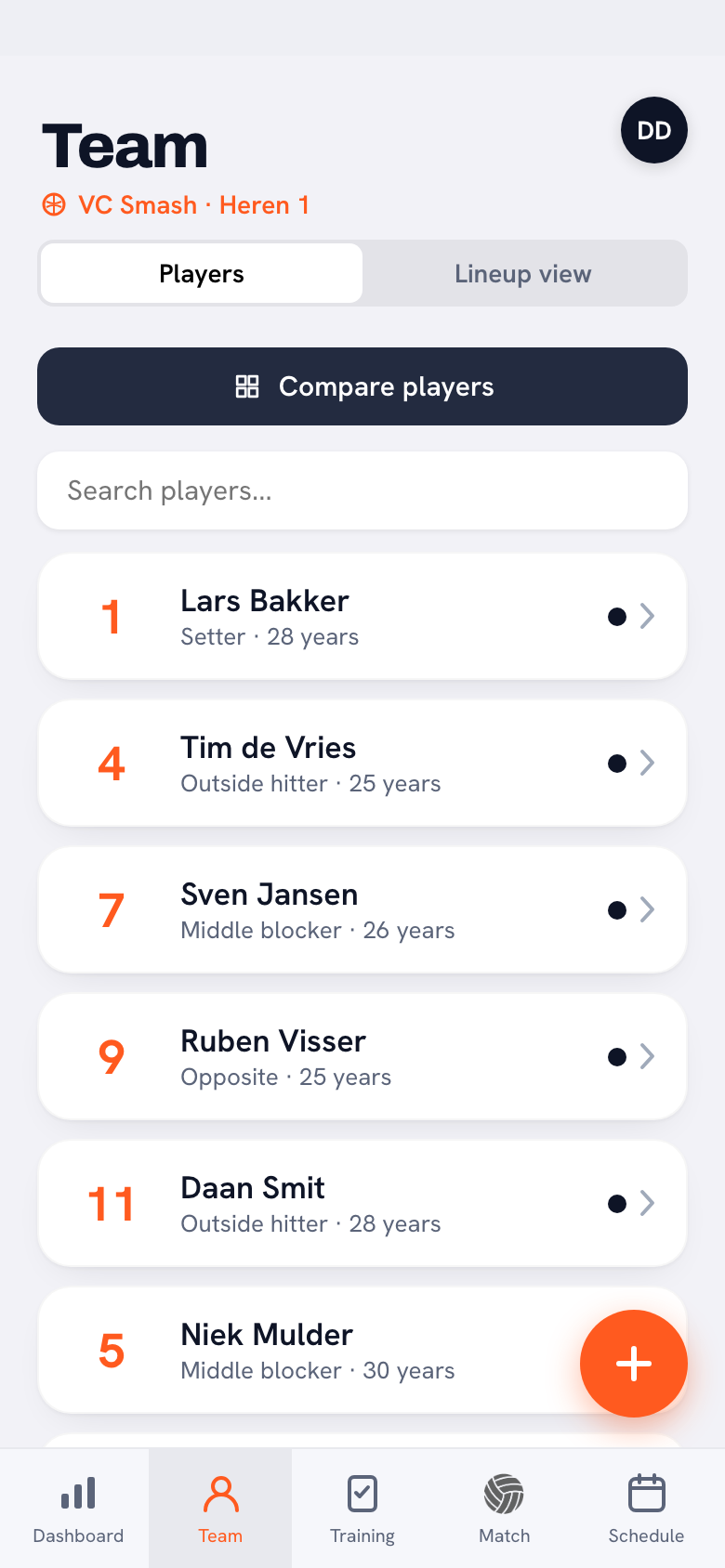
In Koach, the team is the heart of the app. The Players tab shows your entire roster with jersey number, position and age. Tap a player and you are in the full profile: statistics, goals, notes and attendance. On the Lineup tab you place those same players in a 5-1 or 4-2 and assign the setter and libero roles.
The difference with scattered lists: everything feeds everything else. Whoever you mark absent at practice shows up in the season overview. Whoever scores in the match sees it back in their own profile. Team management stops being a separate chore and becomes a by-product of coaching.
Start small: begin by adding just your roster with positions and jersey numbers. Attendance, notes and goals grow along naturally once you use the app at practice.
The yearly cycle of team management
- Before the season: build your roster, invite players, agree on a team goal.
- During the season: track attendance and effort, take notes, rotate lineups.
- Winter break: mid-season review per player, adjust goals.
- After the season: evaluation talks backed by a full season of data — and a flying start for next year.
Frequently asked questions
What is the minimum I should track as a coach?
Three things: your roster with positions, attendance at practice and match results. That alone lets you back up fair decisions. Notes, goals and statistics are the next step.
Can I share team management with an assistant coach?
Yes. In Koach several coaches work in the same team: everyone sees the same roster, attendance and notes, and drills are organised per coach.
How much time does digital team management take per week?
Less than the scattered lists it replaces: ticking off attendance takes a minute per practice, and the rest — statistics, overviews, percentages — updates automatically.

Put your team in one place today
Roster, roles, attendance and growth — Koach keeps track while you coach.
Get started with Koach