
Volleyball player tracking system: set one up without Excel
The short answer
A volleyball player tracking system is a fixed way to follow how each player develops: attendance, effort, match stats, ratings, notes and a goal, at fixed moments and in one place. In Koach the player profile fills itself from your practices and live matches, with Overview, Stats and History.
A volleyball player tracking system sounds like something for a pro club with a staff of ten. But every volleyball coach already tracks their players, usually in their head or in an Excel file that stalls in December. Here you read what to track, how often, and how to keep it up for a whole season.
What is a player tracking system?
A player tracking system is nothing more than an agreement with yourself: for every player you record the same data, at fixed moments, in one place. You mostly hear about it in football, where youth academies follow players over several years this way. For a volleyball team it is smaller, but the goal is the same:
- Seeing development you would otherwise miss. A player who passes a little better every week does not stand out to you. A line over twelve matches does.
- Backing up conversations. "Your passing has improved" is an opinion. An average that goes up week by week is a conversation a player can do something with.
- Handover. If a player moves to another team next season, the new coach does not start from zero.
The difference from loose notes: in a system you can look back and compare. For that, the data has to come in the same way every time.
What data do you track per player?
You do not have to measure everything. Choose what you actually use in conversations and for your lineup. These are the data that give you the most in a volleyball player tracking system:
| Data | When | What it tells you |
|---|---|---|
| Attendance | Every practice | Whether someone is there enough to grow, and whether that changes |
| Effort and attitude | After practice, a score from 1 to 5 | What no match stat shows: work ethic, coachability |
| Points and errors | Every match | Where a player wins points and gives them away |
| Ratings from 0 to 5 per ball contact | Matches you scout in detail | The quality of reception, set, attack and defence |
| Rallies won and plus/minus | Every live match | What the team does while the player is on court |
| Notes | When something stands out | The context behind the numbers |
| Personal goal | Start of the season, adjusted halfway | The direction you work towards together |
A system with three columns that you keep up gives you more than twelve columns that stay empty from November. Start with attendance, points and errors and one goal per player, and only add something when you miss it. What to do with the results is in the pillar article tracking player development in volleyball.
Player tracking in Excel or in an app?
A spreadsheet costs nothing and you decide the columns yourself. For one coach with discipline and a handful of data, that works fine. It goes wrong at three moments:
- On the sideline. You do not type into a spreadsheet during a match. You write on paper and copy it over at home, or you don't.
- With two coaches. Two people in one file means two versions, and after a few weeks nobody knows which one is right.
- Across seasons. A new file every season, and a player's line breaks exactly when it gets interesting.
An app solves that by letting the data come in where you already work: at practice and during the match. If you measure things that appear nowhere else, such as a jump test, just keep those in a spreadsheet alongside it. And if you do want one player's numbers in Excel, export them in Koach via More (the three dots in the profile) > Export player (CSV).
The player profile in Koach: Overview, Stats and History
In Koach the player profile is your player tracking system. You open it via Team and a tap on the player. At the top are three tabs.
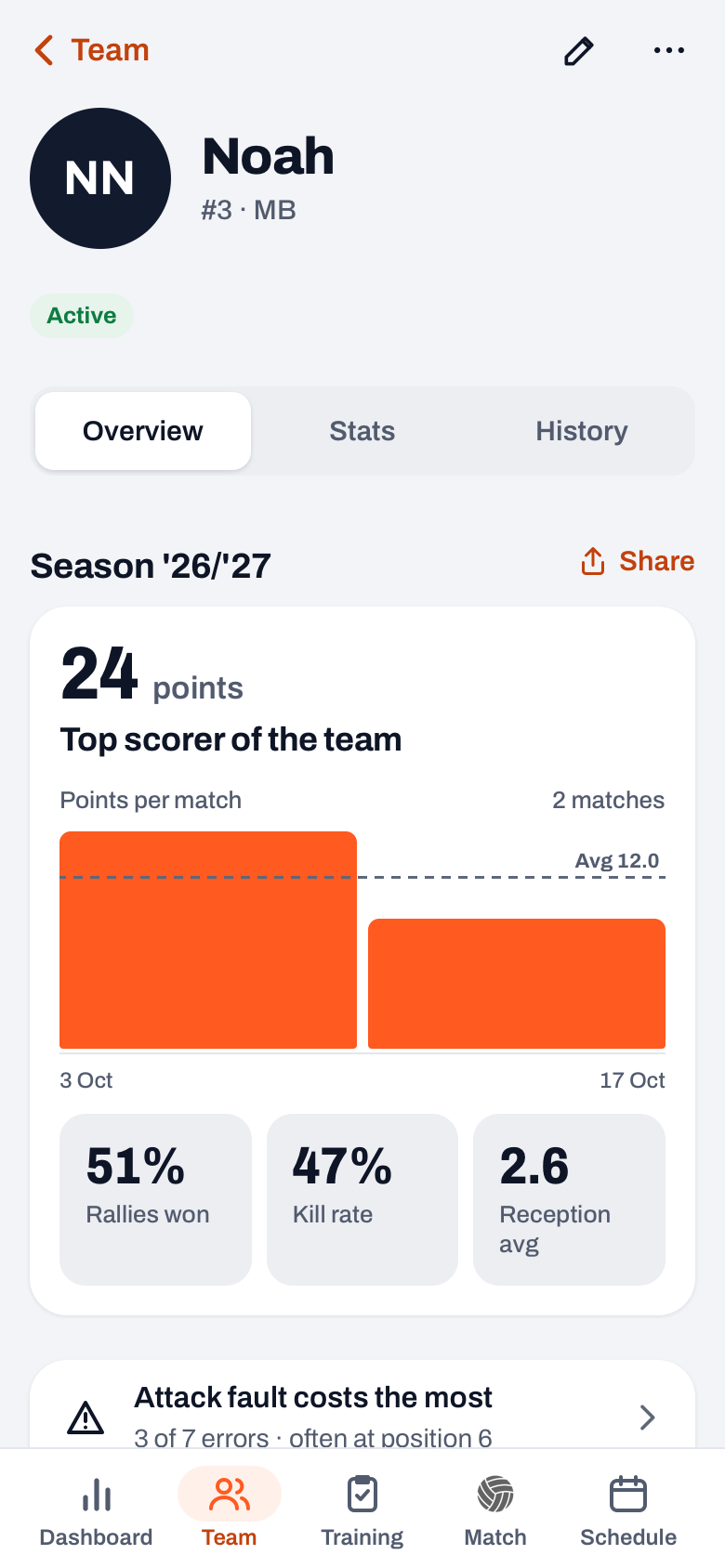
Overview starts with the season card: the points total, a bar per match with the average as a dotted line, and tiles such as Rallies won, Kill rate and Reception avg once there are enough measurements. From four matches on there is also a form line, such as "Form is rising". Below that come short insight lines, for example Attack fault costs the most, which jump to the right block. Also on Overview: the Personal goal and the Notes, which only coaches see.
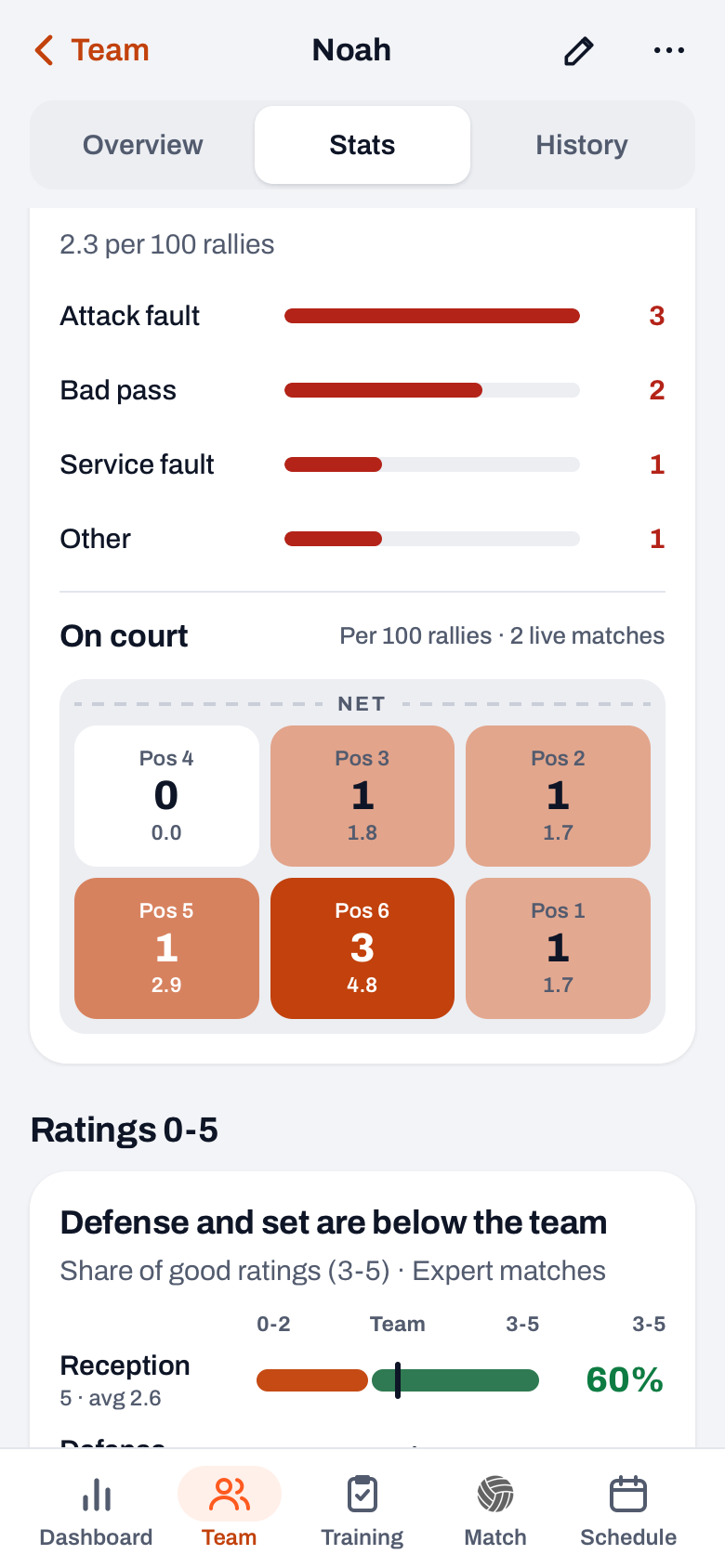
Stats bundles the season's match numbers in blocks that each start with a one-sentence conclusion: Points, Attack, Errors with the small On court diagram (errors per position per 100 rallies), Ratings 0-5, Per match (a line for the measure you choose) and Rotations and positions. A libero gets an extra Reception block once there are reception ratings, a setter a Setting distribution block. If your team already has a closed season, the Compare chip puts the player next to themselves in that season.
History shows the seasons, the matches and the practices, with attendance and, for the coach, the average effort. If your team belongs to a club, you also see Previously with other teams. How to read the line per match is in reading the growth chart.
14 days free, no credit card. Add your squad, score one match live and see what shows up in your players' profiles.
Try Koach with your teamWhere does the data come from?
- Attendance comes from practice: you mark players present, late or absent.
- Effort you rate after practice with Rate effort: a score from 1 to 5 per player for Technique, Game awareness, Coachability, Work ethic and Effort.
- Points, errors and rallies come from live scoring, even in the basic Simple mode: per point you tap who scored or what went wrong, and the app knows who was on court.
- Ratings 0-5 come from Expert mode, in which you rate every ball contact. That is a job for a second coach, so you can keep coaching.
- Notes you write in the profile with Add note. If you turn on Flag for club, in a club team the note also shows up in the club's team log. More about good notes is in keeping notes per player.
What do players and parents see of the tracking system?
In Koach a player only opens their own profile, with the same three tabs written to them ("Your form is rising"). They see no notes, no effort ratings from the coach, no comparison with the team and no duos. You can also hide their own error counts from them; when that is wise is covered in should young players see their stats.
Parents do not see a player profile. A team parent sees their own child's numbers for a played match, a regular parent sees no numbers. Exactly what they see is in seeing your child's volleyball stats as a parent.
How to set up a player tracking system in four weeks
- Week 1: goals. Agree one personal goal with each player and put it in the profile. Make it measurable: not "pass better", but "fewer bad passes per match".
- Every practice: attendance and effort. Check off attendance and give a few players an effort rating each evening, so after a month you have rated everyone a few times.
- Every match: live scoring. Simple is enough for points, errors and rallies. If you have a second coach, let them score along in Expert now and then.
- After four weeks: the first conversation. Open the profile together with the player and discuss the goal. How to structure that conversation is in holding the evaluation talk with a player.
The player profile is included in both plans; what Koach costs after the 14 free days is on the pricing page.
Plan the reviewing, not just the entering. Block half an hour in your calendar once a month to go through all profiles. A system you never read back is just an archive.
Frequently asked questions
Can you run a player tracking system in Excel?
Yes, for one coach with a handful of data a spreadsheet works fine. It gets difficult when you want to enter data during matches, work with two coaches in the same file or follow a player over several seasons. In Koach the data comes in at practice and during live scoring, and you export one player's numbers as a CSV if you still want them in Excel.
What does a player see of their own data?
A player only opens their own profile, with Overview, Stats and History written to them. They do not see notes, effort ratings from the coach, the comparison with the team average or the duos. The coach can also set per team or per player that a player does not see their own errors.
How long do you have to measure before you see something?
One match says little. In Koach the form line in the profile only appears from four matches on, and tiles such as kill rate and rallies won only once there are enough measurements. Count on a month with a practice and a match every week before you see a first line, and on half a season for a reliable picture.
What does a player tracking system in Koach cost?
You can try Koach free for 14 days, with no credit card and every feature. After that you choose Coach (one team, two coaches) or Club (unlimited teams and coaches); the monthly and yearly amounts are on the pricing page. The player account itself is free, so your players pay nothing to see their own profile.


Track every player without a spreadsheet
14 days free, no credit card. After a month you see the first lines.
Get started with KoachOr read first what the volleyball coaching app does.