
Add your team schedule to Google Calendar, iPhone or Outlook
The short answer
To add your team schedule to Google Calendar, your iPhone or Outlook, you subscribe to a calendar feed: a link you paste into your calendar app once. When the coach moves a match after that, your calendar updates itself at the next refresh. In Koach that link is under Sync calendar.
You can add your team schedule to Google Calendar by typing in every match, and that works until the first match gets moved. If you subscribe to your team's calendar feed instead, practices, matches and tournaments sit in the calendar you already use, and changes come through by themselves. Here is how to do it in each calendar app.
Typing in, importing or subscribing: what is the difference?
There are three ways to get your team's schedule into your phone calendar, and only one of them stays correct.
- Typing it in. You create every match yourself. That costs you an evening, and every match that gets moved has to be changed by hand afterwards.
- Importing. You open a calendar file (.ics) and your calendar copies the events. That is a snapshot of one moment: whatever changes later does not come through.
- Subscribing. You paste a calendar link into your calendar app. The app then keeps fetching that link by itself. A moved match, a new practice or a cancelled evening then appears on its own, without anyone sending a message.
For a season full of rescheduled matches and cancelled practices, subscribing is what you want. It works in the iPhone's Calendar app, in Google Calendar (including on Android) and in Outlook. If your league or club offers a calendar link of its own, it works the same way. Below you will see how it goes with the link from Koach; the team calendar itself is explained in the team calendar.
Where do you find the calendar link in Koach?
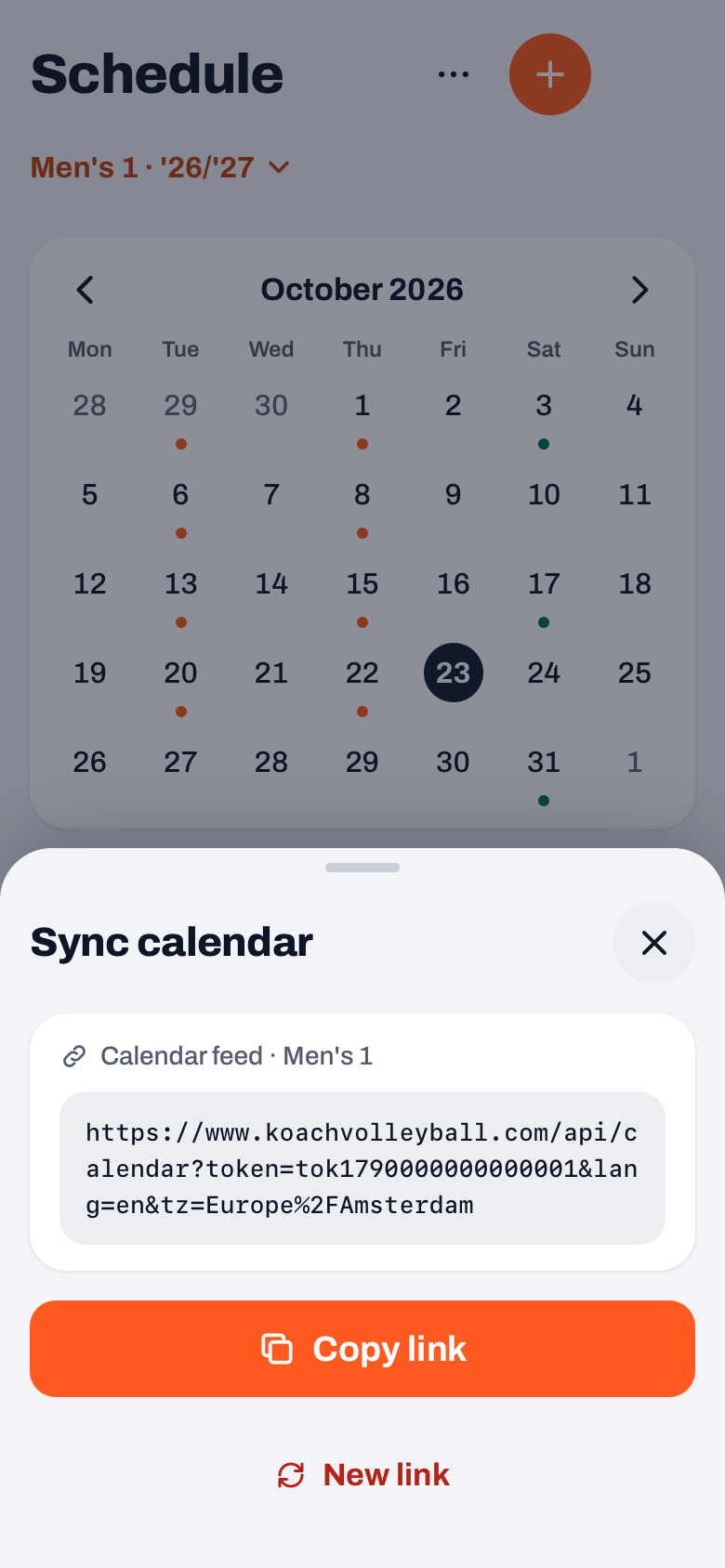
As a coach, open the Schedule tab, tap More (the three dots) at the top right and choose Sync calendar. A sheet with that title opens. In it is a card "Calendar feed" with your team's name and the link itself, and below it the Copy link button. The first time a coach opens this sheet, the app switches the feed on.
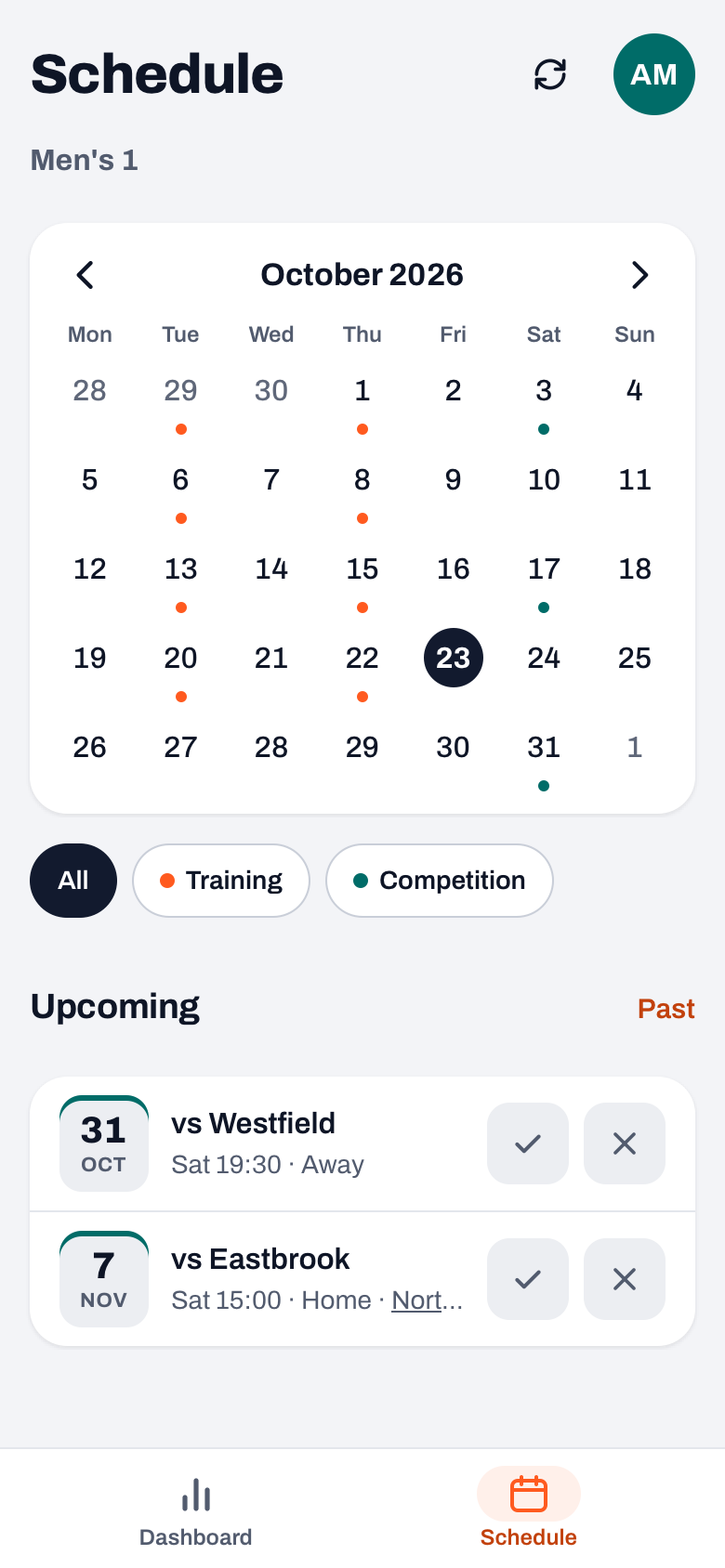
Players and parents have an icon with two circular arrows at the top right of their schedule. It opens the same sheet, so they can copy the link themselves. If the coach has never opened the feed, they see: "The calendar feed is not switched on yet. Ask your coach to open it once."
14 days free, no credit card. Put your matches and practices into Koach tonight, and tomorrow the whole team has them in their own calendar.
Try Koach with your teamHow to add the team schedule, app by app
First copy the link with Copy link. After that it depends on the app. The button names below come from the help pages of Apple, Google and Microsoft; in an older version of an app they may be worded slightly differently.
iPhone and iPad (Apple Calendar)
- Open the Calendar app and tap Calendars.
- Tap Add Calendar, then Add Subscription Calendar.
- Paste the link and tap Find.
- Give the calendar a name and a colour. Next to Account, choose iCloud, so the subscription is on your iPad and Mac as well. Tap Done.
In iOS 18 and earlier, the buttons in steps 3 and 4 are called Subscribe and Add.
Source: Use iCloud calendar subscriptions (Apple Support).
Google Calendar (also for Android)
- Open Google Calendar in a browser on a computer. According to Google, you cannot subscribe from the Google Calendar app on a phone or tablet.
- On the left, next to Other calendars, click the plus sign and choose From URL.
- Paste the link and click Add calendar.
- Not seeing the calendar in the app on your Android phone afterwards? In the app, open the menu, go to Settings, choose the calendar and turn on Sync.
Sources: subscribe to someone else's calendar (Google Calendar Help) and fix sync problems with the Google Calendar app (Google Calendar Help).
Outlook
- Open the calendar in Outlook.com or Outlook on the web.
- Choose Add calendar, then Subscribe from web.
- Paste the link, give the calendar a name and click Import.
Source: import or subscribe to a calendar in Outlook.com or Outlook on the web (Microsoft Support).
What the linked calendar does and does not replace from the schedule in the app is covered in the team calendar in your own calendar app.
What ends up in your calendar, and what does not?
- Practices as a two-hour event with your team's name, for example "Training Men's 1".
- Matches as a two-hour event, for example "Match vs Westfield", with the location. For an away match, "(Away)" comes first.
- Tournaments as one all-day event, "Tournament:" followed by the tournament's name, with the venue as location. The matches of that tournament appear alongside it at their own times.
- Other team events, such as a camp or a parents' evening, as a one-hour event with the type in front of the title.
If a practice or match is cancelled, the event stays in your calendar with "[CANCELLED]" in front of the title, so you do not think you deleted it yourself. An event without a time becomes an all-day event. What is not in the feed: events meant for one person only, who is driving and who has signed up. For that you look in the app, which is also where you sign your child in or out.
Times are sent in the team's time zone, and your phone converts them to your own time. If your team plays in a different country from where you live, a match still lands in your calendar at the right moment. The titles come in the language of whoever copied the link.
What version 3.0 added: tournaments are in the feed, and a team with a long history gets all of its events included. Before that, a very full calendar could silently miss events. The feed itself, with the team's time zone, already existed.
How quickly do changes come through?
In Koach a change is there straight away. When your calendar app fetches the link again is up to that app. Microsoft writes that a subscribed calendar usually updates about every three hours with a personal Outlook.com account and about every six hours with a work or school account in Outlook on the web, and that it can take more than 24 hours. Google and Apple give no fixed time on their help pages. If something changes on match day, check the app itself or the dashboard.
If the coach creates a different link with New link, the old one stops working and calendars that use it are no longer updated. That is useful when someone leaves the team, because anyone with the link can read the events. Everyone who wants to stay up to date then pastes the new link.
Sharing the link with players and parents
You do not have to send the link around: players and parents fetch it themselves via the icon in their schedule. If you want to share it anyway, post it once in the team's group chat. A parent with two children in the same team only needs one subscription; for children in different teams or sports, read how to set up one family calendar.
Not entering the schedule into the app by hand? In the Netherlands you can import the schedule of your pool from the Dutch volleyball federation (Nevobo) in one go; those matches then go into the feed as well. That is a Dutch connection. In other countries you add the matches to the Koach schedule yourself, and from there the feed takes them to everyone. You create tournaments on the Match tab, see planning a tournament. How the schedule fits into the rest of your season preparation is in organising the volleyball season, and what Koach costs after the 14 free days is on the pricing page.
Give the team calendar its own colour. When you subscribe, you choose a name and a colour. Pick a colour you use nowhere else, and you will see at a glance in your week view what is volleyball. If you have children in different teams, give each team its own colour.
Frequently asked questions
How do I add my team's schedule to Google Calendar?
Copy your team's calendar link. Open Google Calendar on a computer, click the plus sign next to Other calendars, choose From URL, paste the link and click Add calendar. According to Google this cannot be done from the app on your phone. After that the calendar also shows in the app on your Android phone; if it does not, turn on Sync for that calendar in the app's settings.
Why is a rescheduled match still at the old time in my calendar?
Your calendar app does not fetch a subscription again immediately, but on its own schedule. Microsoft mentions roughly every three hours for a personal Outlook.com account and roughly every six hours for a work or school account, with delays of more than a day. Google and Apple give no fixed time. The new time is in your team's app straight away, so check there on match day.
Can I sign in or out through my phone calendar?
No. A calendar subscription is read-only: you see the events, but you cannot change or reply to anything in it. Signing in or out for a practice or match is done in Koach itself, as a player for yourself or as a parent for your child, on the dashboard or in the schedule in the app.
Does the calendar link cost anything?
Not for players and parents: they use their own account for free and fetch the link themselves. The coach uses Koach with a subscription; you can try the app free for 14 days, with no credit card and every feature. What it costs after that is on the Koach pricing page. The calendar link is not a separate paid extra.
What happens if the coach creates a new link?
Then the old link stops working and calendars that use it no longer receive changes. The events already in your calendar are no longer updated. Copy the new link via the icon in the app's schedule, subscribe again and remove the old subscription from your calendar app.
Put your season in everyone's calendar
14 days free, no credit card. One link, and the whole team has the schedule.
Get started with KoachOr read first what the volleyball coaching app does.