
Excuse your child from practice or a match in the app
The short answer
You excuse your child from practice or a match in the app with one tap on Not coming, on the dashboard or in the schedule. The app then asks why your child cannot make it; the reason is optional and only the coaches read it, plus the team parent for a match. The coach sees the decline straight away.
Excusing your child from practice does not have to mean a message to the coach that disappears among twenty others. As a parent you do it in the Koach app with one tap, for one event or for everything at once. Here is how signing in and out works, what the coach sees and what happens when it gets late.
Where do you sign your child in or out?
As a parent you have two tabs in Koach: Dashboard and Schedule. You do not have a Training or Match tab, so you sign your child in or out in one of those two places. (A team parent also has the Match tab, but signs their child in the same way.)
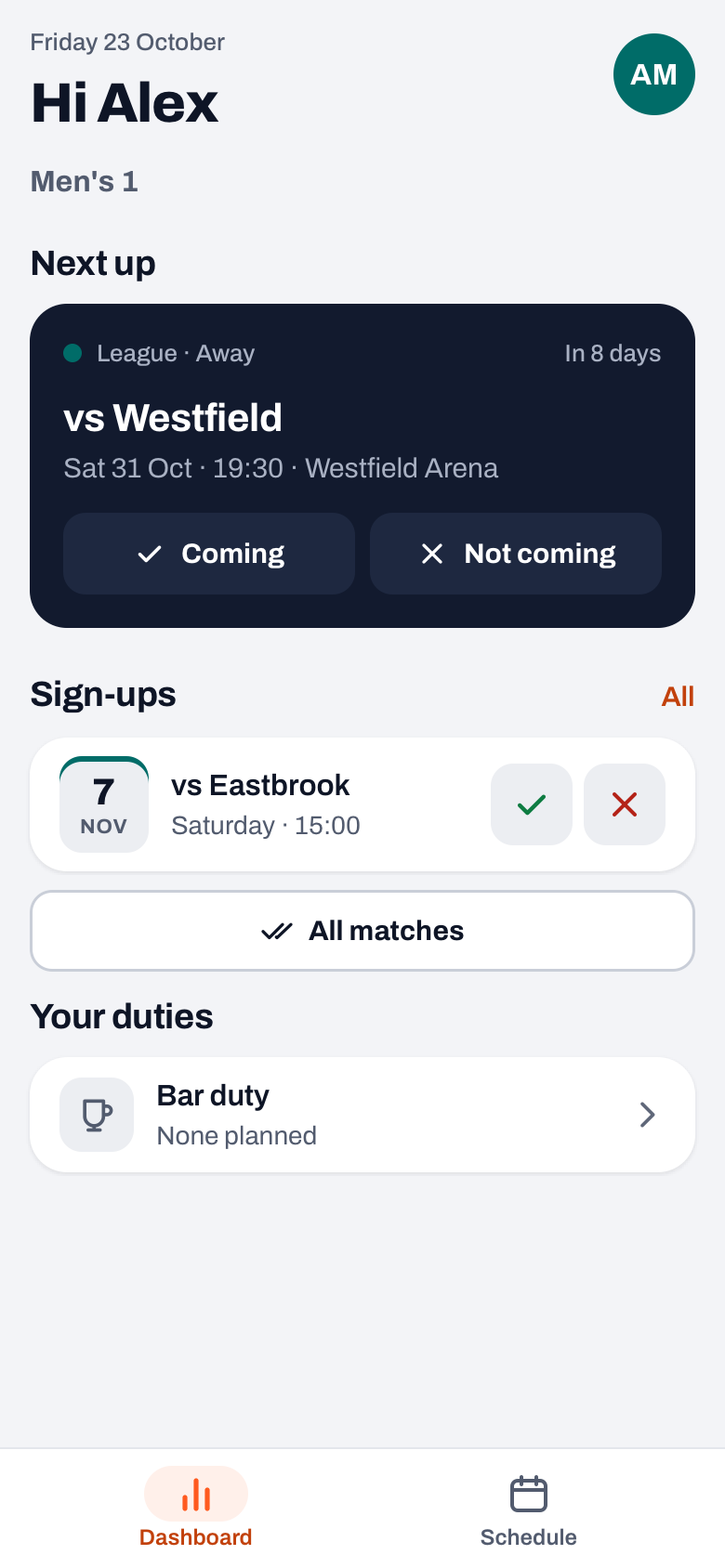
- On the dashboard, Next up sits at the top: the next practice, match or tournament, with the Coming and Not coming buttons. Below it is Sign-ups with the events after that (four at most), each with a tick and a cross.
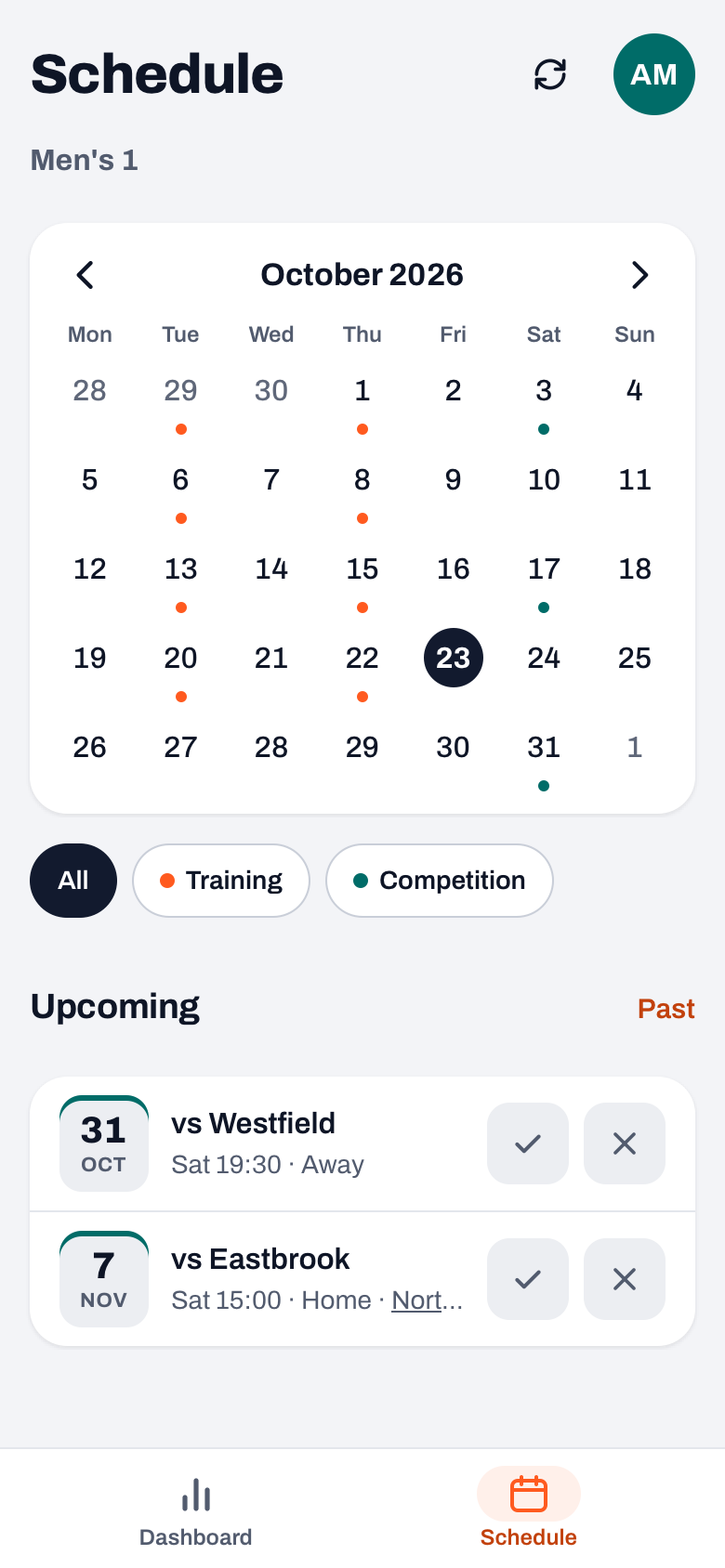
- In the schedule, every upcoming practice, match and tournament is listed under Upcoming with the same tick and cross.
A tap is saved immediately, without confirmation. On the dashboard a message with your child's name appears at the bottom, for example "Sam is coming", with an Undo button in case you tapped the wrong one. In the schedule, if you make a mistake you simply tap the other button.
Excusing your child with a reason
- Tap Not coming or the cross. The decline is saved straight away.
- A question opens with your child's name, for example "Why can't Sam make it?", with the field Reason (optional).
- Type a short reason and tap Save. If you do not want to give a reason, close the question; the decline stays in place.
Below the question it says who reads the reason: "The coaches can read this, and for a match the team parent too. Other parents and players can't." The reason then appears under the event, so you can see what you entered as well. Keep it short and factual: "sick", "school trip" or "family party" is enough.
Signing in for all practices at once
As long as there are events without a reply, the All trainings and All matches buttons sit under Sign-ups. All trainings signs your child in for every upcoming practice that has no reply yet; All matches does the same for this season's upcoming matches. A decline you already gave simply stays. The message says how many events it was, and Undo reverses exactly those.
Players with their own account have the I'm in for all button on their Training tab for this; how that works on their side is in marking your own attendance as a player. As a parent you do not have that tab, so you use All trainings. How players sign themselves up for a match is in match availability.
14 days free, no credit card. Are you the coach? Add your team and see next week who is coming, without a round of the group chat.
Try Koach with your teamWhen does the coach see that your child is not coming?
Straight away. The sign-up list for the practice or match updates immediately. If the coaches have notifications switched on, they also get a push notification, for example "Sam has withdrawn from the training on" followed by the date. The reason is deliberately left out of that notification; they read it in the app. If you sign your child back in afterwards, they get a message that your child is coming after all.
If you have not replied two days before a practice or match, the app sends you a reminder with your child's name, as long as your notifications are switched on. How that nudge works is in the reminder two days ahead.
Changing, clearing and what if it is too late
- Changing. Tap the other button. Going from Not coming to Coming is always possible, as long as the event has not passed.
- Clearing. If you tap the already selected button on the dashboard once more, there is no reply again. The message then says "Sam's reply cleared".
- On the day itself. The buttons are there up to and including the day of the event. If you excuse your child just before practice, let the coach know yourself as well: you cannot be sure they will check their phone before practice starts.
- Afterwards. Once the day has passed, the buttons disappear. Under Past in the schedule you then see your child's status for a practice: a tick, a clock for late or a cross. Late is set by the coach, not by you.
- Cancelled. A cancelled practice or match has no buttons.
If you tap an event in the Sign-ups list, you see your child's sign-up history: who made which choice, and when. More on that in viewing the attendance history. If you have two children in the same team, first pick the right child at the top; see one parent account for siblings.
The parent account is free; the coach or club pays for the subscription, see the pricing. What else you see in the app as a parent is in Koach for parents and in the overview of the volleyball app.
Excuse your child as soon as you know. For an away match the driving rota works with who is coming. A decline on Wednesday still gives the team parent time to rearrange the cars; a decline on Saturday morning leaves an empty seat or a child without a ride.
Frequently asked questions
How do I excuse my child from practice in the app?
Open the dashboard or the schedule and tap Not coming or the cross next to the practice. The decline is saved immediately. The app then asks why your child cannot make it; that reason is optional. If you tap by mistake, use Undo in the message at the bottom of the dashboard, or tap the other button.
Who sees the reason for the absence?
The team's coaches read the reason, and for a match the team parent too, because they arrange the rides. Other parents and players do not see it. The push notification the coach gets does not include the reason either: only that your child has withdrawn. You can see your own reason under the event.
Can I sign my child in for the whole season at once?
Yes. Under Sign-ups on the dashboard you find All trainings and All matches, as long as there are events without a reply. They sign your child in for all upcoming practices or matches that have no reply yet. Declines you already gave stay in place, and Undo reverses the whole batch.
What does the app cost for parents?
Nothing. Parents use their own account for free, also with several children. The coach or the club pays for the subscription. A coach tries Koach free for 14 days, with no credit card and every feature; what it costs after that is on the Koach pricing page.
Why don't I see any buttons to excuse my child?
There are three possible reasons. If the event has passed or been cancelled, there are no buttons any more. If a message says there is no player linked to your parent account yet, your child is not linked; ask the coach to invite you again via your child's name. And with two children in one team, first pick the right child at the top.

Let parents excuse their own child
14 days free for the coach, no credit card. Next week you know who is coming.
Get started with KoachOr read first what the volleyball coaching app does.