
Club membership software: five questions that make the choice for you
You have just become secretary or treasurer and you have inherited a spreadsheet. A tab per team, a column somewhere called “paid?”, and at the bottom a row of names nobody can say are still playing. The question then is not which package is best. The question is which kind of system fits your club — and that follows from five answers you already have.
Five questions, and only then a package
Most comparisons start with a list of features. Wrong way round: nearly every package can do nearly everything, which is precisely why it tells you nothing. Answer these five first and take the answers into every demo.
- How many members do you have? Roughly: up to forty or so, forty to a few hundred, or more. The line that really matters is not the number of members but the number of changes per month: at forty members that is a handful, at three hundred it is dozens.
- Who does the typing — the committee, or the people at the teams? The hinge of the whole decision; there is a section on it further down.
- Does the money run through the club? Does the club collect subs itself, send invoices, produce annual accounts? Or is the money a handful of bank transfers that the treasurer ticks off by hand?
- How many teams are there, and do people move between them? One team is a list. Twenty teams, half of which move on every year, is something else entirely: then the link between person and team matters more than the personal details do.
- Who needs to get in? One person who does everything, or five people with different roles — a treasurer who needs the amounts, a fixtures secretary who only needs names and teams, a welfare officer who should not be able to export the whole membership.
Four of those answers you have in ten minutes. The fifth — who is allowed in — costs a committee meeting, and that is exactly why it so rarely gets asked.
Four kinds of system, and what you give up with each
There are hundreds of products, but they fall into four shapes. Each shape does one thing well and pays for it somewhere else.
1. A spreadsheet, on purpose. At a small club with few changes, one person doing the typing and no money that has to be accounted for, a shared file is a legitimate choice: free, everybody can work it, nobody has to maintain it. What you give up is in the next section — enough to stop doing it once you pass fifty members.
2. A membership package with invoicing. Built around the money: joiners and leavers with dates, subscription rules per category, invoices, direct debits, an export to the bookkeeping. What you give up: teams, sessions and attendance are one field at best, coaches never appear in it, and setting it up takes time. For a club where the treasurer carries the heaviest load, that is worth it.
3. General club software. Broad: members, volunteers, hall hire, newsletter, website, sometimes a till. Attractive because everything sits in one place. What you give up: a great deal of setting up, and the knowledge sits with one or two volunteers. If they leave, nobody dares touch it any more.
4. A sports app the teams are already working in. Here the membership list is not data entry but a by-product: coaches keep their squad up to date because they need it themselves, and the committee reads off the sum. What you give up: no invoices, no direct debits, no bookkeeping, and usually no sign-up form on the website.
Lay your answers alongside that and the choice narrows fast. Money through the club with invoices? Shape 2, possibly alongside shape 4. Lots of teams, little money moving, coaches already working digitally? Shape 4. A clubhouse and hall hire as well? Shape 3. Three teams and thirty members? Shape 1, and no need to feel bad about it.
Who does the typing: the hinge
A system in which the committee retypes what the coaches have already entered is structurally out of date. That is not a matter of discipline but of where the information is born. Somebody stops halfway through the season, somebody moves up to another team, a player is injured for six weeks, a new member trains three times before signing up. All of that happens at training, with the coach, and only reaches the committee once somebody passes it on — which is precisely the step nobody takes.
There are two designs that work, and one that does not.
- The committee enters everything. Works when there are few changes and one person genuinely owns it. Advantage: consistent data, one owner. Disadvantage: that person is a bottleneck and a departure risk.
- The teams enter, the committee reads along. Works when there are lots of teams. Condition: the coach has to get something out of it. Anyone entering data purely because the committee asks will keep it up for one season; anyone using the same list for their line-up and their attendance keeps it up without thinking.
- Both sides may edit. This is the design that does not work. Two people updating the same row, and nobody knowing which one is the latest.
So at a demo, do not ask "can I add members" — everything can. Ask: who is allowed to change this field, and what happens if two people do it at the same time. That second answer tells you more than the whole feature list.
Four things a spreadsheet structurally cannot do
Not inconveniences but limits. Run through them as criteria: can the system you are looking at do all four?
- Keep changes with a date attached
- Link one person to several teams and roles
- One truth, with one owner per piece of data
- Access by role, not by file
Changes with a date. A cell you type over destroys the previous value. You only notice when somebody asks who was a member in the first half of the season — for a pro-rata charge on a mid-season joiner, for a return to the governing body or insurer you are affiliated with, or because a former member insists they cancelled in time. In a file that answer is gone. A system records a change as an event: this member joined on this date, left on that date. Test it in a demo by asking for a membership list as it stood on an arbitrary date in the past. If the system cannot do that, you do not have membership administration, you have an address list.
The link to teams. One human being rarely sits in one place. A sixteen-year-old trains with the seniors, her mother is on the volunteer list, and next year she will be refereeing herself. In a spreadsheet you copy the row — and from that moment you are maintaining two rows that have to stay identical. If the family moves house, you change the address in one place and forget the other. A system stores the person once and the memberships separately: one name, several links. That is why a change of name there is a single action and in a file it is a search.
The other two are just as hard and are worked out elsewhere. One truth means a piece of data has one place and one owner; how you get there from a paper or scattered list is in from paper membership list to digital team management. Access by role is the question of whether the system distinguishes between somebody who may see names and teams and somebody who also gets the email addresses of minors; what you have to arrange around that is in GDPR and your club's member data. Keep to the system question here: can it do rights per role, or is it all or nothing?
Free, open source or paid
Almost every committee starts here, and the three-way split is misleading.
Free usually means: free up to a certain number of members, or without the thing you will need later — export, integrations, more than one administrator. No trap, as long as you go looking for that ceiling before you start.
Open source means the licence costs nothing, not that the system costs nothing. Somebody has to run it, update it, back it up and fix it when it falls over on a Sunday evening. That is not an amount, it is a person. So ask who takes it over when that volunteer stops; if the answer is "we'll cross that bridge when we come to it", pick something else.
Paid gives you an invoice and a supplier you can phone. The real cost question is rarely the monthly fee, though — it is the setting-up time.
In short: ask of every system, the free one included, how you get your data back out again. An export to an ordinary file, of every field, without needing the supplier. If that is not possible, every other property is beside the point.
The honest limit: where a sports app loses
If the centre of gravity of your administration is invoices, direct debits and the annual accounts, then any sports app loses to a membership package built for exactly that. This is not a missing button but a different trade. A package like that works out a pro-rata fee for a mid-year joiner, produces a direct debit file your bank will accept, ties payments to the bookkeeping and delivers a statement the people auditing the books can check. An app for training and matches does none of that, and should not try to.
Koach is explicit about it: the app never touches money. Under Contributions in the club section you can create an item — the membership fee, kit, a tournament entry — put a whole team on it and tick off who has paid, with your own payment link alongside. That is keeping track, not collecting; how you work out the amount itself is in working out the fee: per team or per member. For a club that ticks a list off by hand once a year, that is enough. For a club with monthly direct debits and an accountant it is not, and then you buy a package that does it properly.
Two systems side by side is fine, as long as you agree in advance which one is in charge: usually the money system for "who is a member" and the team system for "who plays where". Never let them answer the same question.
When the shape of Koach fits
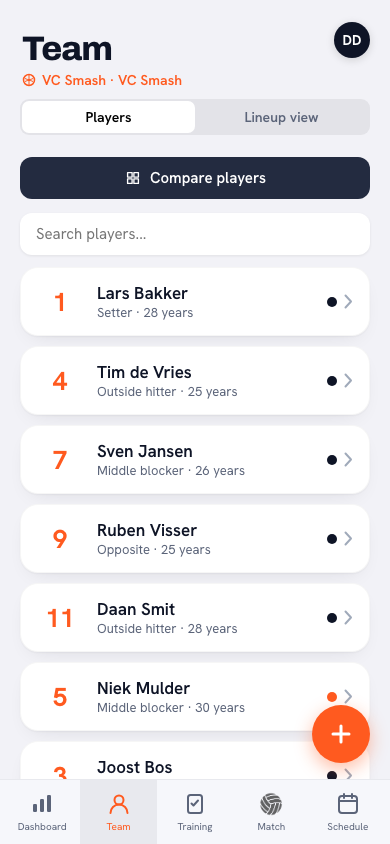
This shape suits one case: a club whose teams are already working in the same environment anyway. The coach sets up their squad, keeps attendance, plans sessions and matches. The committee opens the same house and, under Members, sees the sum: every player, grouped by team, with a search box for a name or a team. You do not change details there, though the committee can create an invitation link for a member; what you see depends on your role: without the right to contact details you only get names and teams. Nobody retyped a thing for it.
More hangs off that than a list: linking teams to the club, club administrators with a role, halls, committees and a team selection for next season — see managing your volleyball club and, for the broader question, an app for your volleyball club. Coach costs €2.99 a month for one team, Club €9.99 a month for the whole club, however many teams it has.
And the honesty alongside it: this is not a membership package. No sign-up form on the website where a new member registers themselves, no invoicing, no link to accounting software; new members arrive because a coach adds them to a team. If your biggest problem is collecting the subs, pick shape 2 and use this article as a question list for that supplier. If the problem is that nobody knows who is a member, the answer is simpler: have the list kept by the people who use it themselves. Whose logo is above it matters far less. Where Koach is of value to a club instead is on the page for volleyball clubs.
Frequently asked questions
We have eighty members and one person who keeps track of everything. Is a spreadsheet really not enough?
Eighty members can work in a file, as long as there are few changes. What decides it is not the number but the risk: with one person entering everything, the whole administration stops the moment that person falls ill or steps down. Test that honestly. If a second committee member could open the file tomorrow and find something in it, there is no hurry. If the answer is no, the problem is not the spreadsheet but the dependence on one person — and that is something a system with logins and roles does solve.
Can you import data from an existing membership package, or does it all have to be typed again?
Always ask before you sign, and ask it from both sides: how do you get the data out of the old system, and which format does the new one accept. In practice you get an export as CSV or Excel and have to map the columns yourself. Reckon on handwork for the things that differ per system: parent-and-child relationships, team memberships and the date somebody joined. Plan the switch for a quiet period, not just before league entries are due.
What is the difference between membership administration and a team app — do we need both?
They answer different questions. Membership administration is about who is a member, since when, and what they owe. A team app is about who trains on Tuesday and who plays on Saturday. Some clubs do both in one environment, others deliberately keep them apart. Either is fine, provided you record which system answers “who is a member”. Without that agreement you end up with two lists that drift apart.
Do we have to tell our federation or governing body if we change systems?
That varies by country and by federation, so check with your own before you announce anything. What holds everywhere: the return to the federation or the insurer is usually a separate stream alongside your own administration. Make sure the new system can give you a membership list as at a given date, because that is the format such a return asks for.
 Adding club admins: the five roles and what each one is for
 Team selection for the new season: a draft in Koach where nothing moves yet
 Moving players to the new volleyball season: making the allocation final
 Sports club digitalisation: where to start and what to combine
 SportsEngine alternatives for volleyball: replace it or keep it?
Try it yourself in Koach
Less admin, more coaching.
Get started with KoachOr read first what the volleyball coaching app does.