
Team availability app: who can make the next match?
The short answer
A team availability app lets every player tell you whether they can make a match, and shows you who's in, who's out and who hasn't replied. In Koach, players tap I'm coming, Can't make it or I'm coming to watch; anyone who stays silent gets a nudge 48 hours before. You share the final squad yourself as an Announcement.
If you're looking for a team availability app, you've probably tried the poll in the group chat already: seven votes by Friday night, two "probably" replies, and no idea whether you'll have eight players or eleven. Here's what an availability app needs to do, what your options are, and what Koach does and doesn't do.
Why a group chat poll isn't enough
Plenty of teams start with a poll in the group chat: who can make Saturday? That works as long as everyone votes right away. In practice, some people vote, some reply in the chat instead, and the rest say nothing. Two days later the poll is buried under photos and messages about rides, and you're counting names on Friday night. The poll doesn't know who's on your roster, so it can't tell you who's missing either.
That's the real problem. A dropout isn't a disaster: you know you're one short and you can do something about it. It's the names with no reply that hold up your planning. Until you know how many players you'll have, you can't set a lineup, sort out rides or ask someone from another team to fill in.
What should a team availability app do?
A team availability app that shows you who can make a match needs to do five things well:
- The question lives on the match. Not in a chat that keeps scrolling, but on the match itself, with the date, the opponent and whether it's home or away.
- The app knows your roster. Only then can it show you who hasn't said anything yet, and that's exactly the list you need to act on.
- More than yes or no. A reason with a dropout helps you judge whether someone can make the next one. And someone who comes to watch but won't play shouldn't count as an available player.
- A reminder for the silent ones. Early enough to still act on, and only for people who haven't replied.
- Parents can answer for their kids. On a youth team, the schedule lives with the parent, not with the eleven-year-old.
How signing up and dropping out works, for players and for coaches, is explained step by step in signing up for a match. Here the question is a different one: which app fits your team?
Your options, side by side
We make Koach, so read this as a comparison by an interested party, and check the other apps yourself. Details about other apps were checked in the App Store in October 2026.
- A poll in the group chat. Free, and everyone's already in it. Fine for a rec team that just wants to know whether enough people are coming. Weak as soon as you want to see who's missing, or look up last week's answers.
- A list or spreadsheet. Clear for whoever keeps it, but someone has to copy every reply over, and that someone is usually you. If you'd still rather work with a list, you'll find the layout and the formulas in the availability spreadsheet template.
- Erbij is a free app from the Netherlands for one question: who's coming? You send the invite through WhatsApp, and the others don't need the app to answer. There's a paid Erbij Plus. Strong if you want the lowest possible barrier. It's a general attendance app, not one built for volleyball.
- Heja and TeamSnap are team apps for any sport. In the App Store, Heja lists a team schedule, availability, automatic reminders and group messaging; TeamSnap lists scheduling, availability, rosters and chat. Both are free to download, with in-app purchases. Their strength is communication: if you want to chat with your team, or your club wants one app for every sport, they're the better choice. The App Store lists only English for Heja, and English, French and Spanish for TeamSnap.
- Koach is built for volleyball only. Availability sits on the same match you then use to set your lineup and score live. The app is available in six languages, including English. There's no chat.
The Heja column shows what Heja itself lists in the App Store. Not listed means it isn't mentioned there; it doesn't mean Heja can't do it.
| What you want | Group chat poll | Heja | Koach |
|---|---|---|---|
| See who can play, per match | As long as everyone votes | Yes | Yes |
| See who hasn't replied | Count it yourself | Not listed | Yes |
| Reason for a dropout | Separately in the chat | Not listed | Yes, optional |
| Coming to watch as its own option | As an extra option | Not listed | Yes |
| Reminder | No | Automatic | Yes, 48 hours before, to anyone who hasn't replied |
| Volleyball lineup and live scoring | No | Not listed | Yes |
| Cost | Free | Free, with in-app purchases | €2.99 per month after 14 days free |
For a fuller comparison with one of those team apps, see the Heja alternative for volleyball.
How match availability works in Koach
Players and parents: one tap per match
For every scheduled match, a player picks I'm coming, Can't make it or I'm coming to watch; coming or not coming also works with a check or a cross on the dashboard and in the Schedule. If they pick Can't make it, the app asks Why can’t you make it?, and they're free to skip the reason. With Sign up for all matches, a player signs up in one tap for every scheduled match of the season they hadn't answered yet; anything they'd already filled in stays as it is.
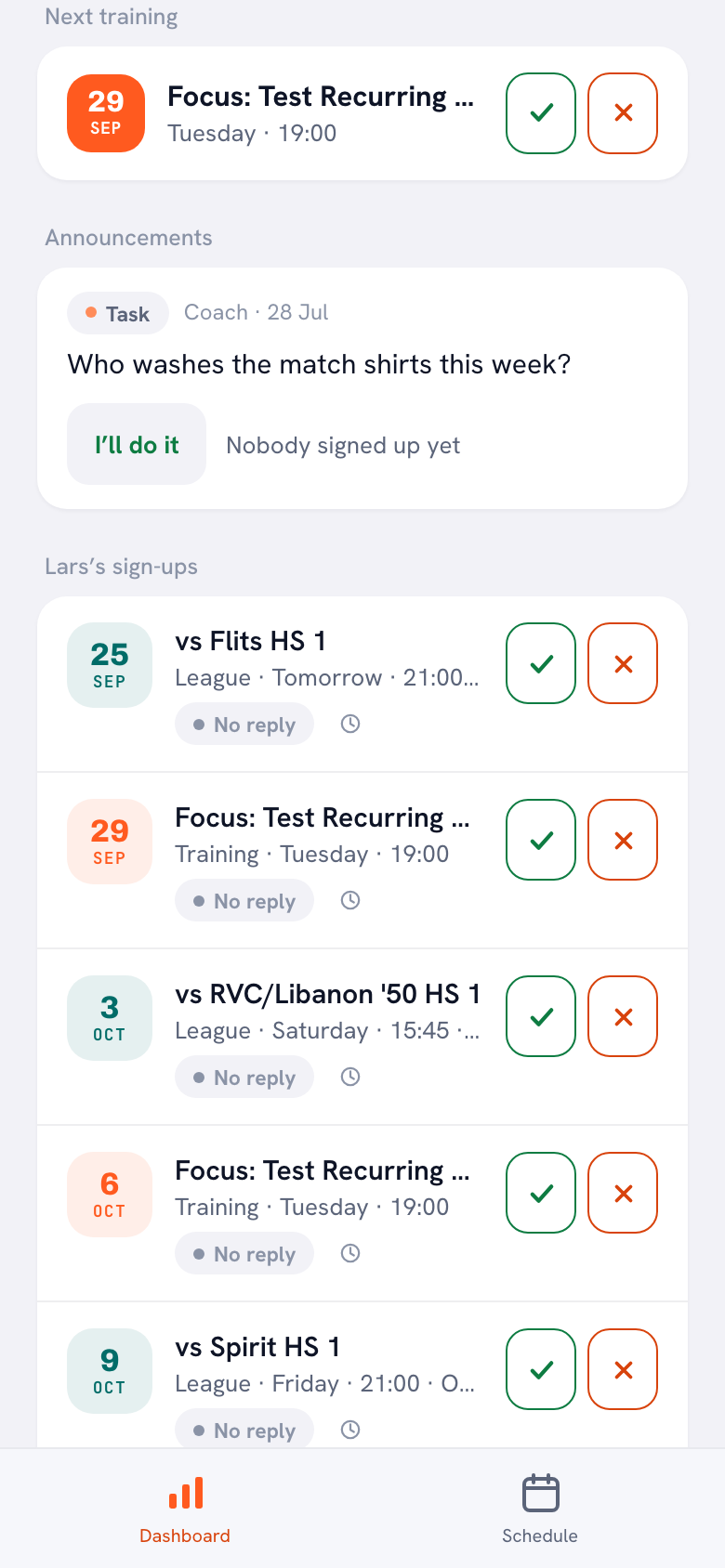
On a youth team, the parent does it. Their dashboard shows a card with their child's name, such as Lars’s sign-ups, with a check and a cross for each match and practice. Players and parents use Koach for free, in the app or in the browser.
14 days free, no credit card. Add your next match, invite your players and check two days out how many names are still grey.
Try Koach with your teamThe coach: one list, in groups
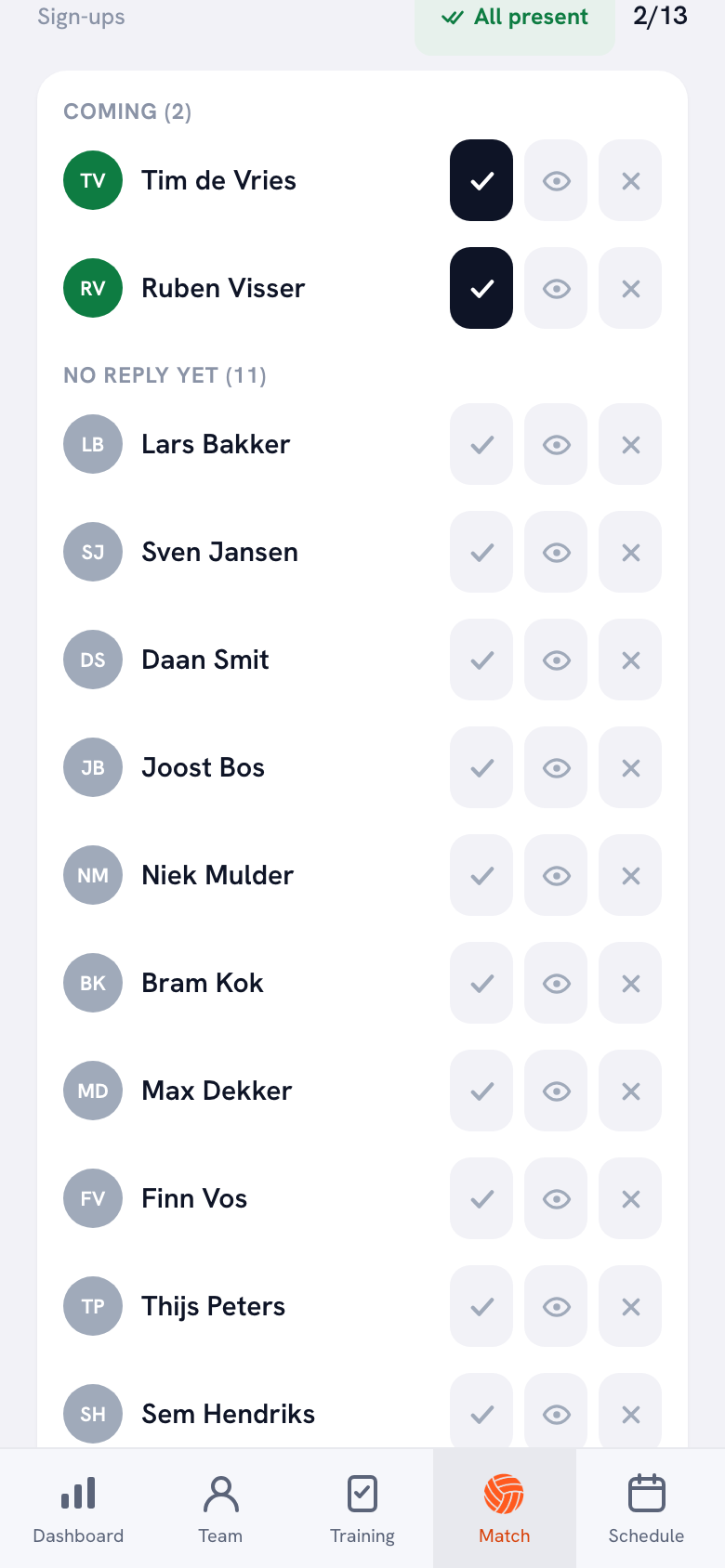
On the match you'll see the Sign-ups block. Your players are grouped under Coming, Coming to watch, Can’t make it and No reply yet, each with a count, and the top right shows the tally: the number coming against the total. The reason appears under each dropout. Every name has three buttons next to it, so you can enter a dropout you heard about at practice yourself. Training-only players sit in their own group at the bottom and don't count toward the tally; players set to Inactive only show up if they replied anyway.
If Attendance in your teams is switched on in your notifications, you get a push notification when someone drops out, when someone can make it after all, and as soon as everyone on the active roster has replied. A parent you make team parent sees the same list with the reasons, so they can sort out the rides. Signing up and dropping out stays with the player, their own parent and you.
The nudge 48 hours before
Two days before the match, Koach checks who still hasn't replied. Only those players get one notification, and so does their linked parent. Anyone who has already replied won't notice a thing, and Koach skips players you've set to Injured or Absent. The evening before, the Day-before reminder also goes out to the whole team, but by then there's little left to arrange. Two days out, you can still ask someone from another team to fill in. The same nudge goes out before practices and tournaments too. How it works exactly, and who doesn't get it, is explained in the reminder two days before.
One condition: notifications only arrive in the iPhone and Android app, not in the browser. So a player with no account and no linked parent gets nothing. They stay on No reply yet until you fill it in or invite them. If you move the match with Reschedule, the sign-ups stay put and the team gets a notification automatically. If you set it to Match cancelled, no more nudges go out for that match.
Telling the team who plays: an Announcement, not a separate feature
Let's be straight about this: Koach has no button for sending out a match squad or call-up. The app shows who can play; who actually plays and what time you meet, you decide and share yourself. You do that with an Announcement under Announcements on the dashboard, for example with the names of the players and the time to meet at the gym. The team gets a push notification in the app, and the message stays on the dashboard instead of scrolling out of sight in a chat. Rides you plan with the Driving rota, or ask for with a Task; on a Task, a parent taps I’ll do it. How announcements, polls and tasks work is covered in team communication with announcements, polls and tasks.
Availability ahead of time is also a different thing from who actually played on the day. A player can sign up properly and still wake up sick that morning. That's a second question with its own record; it's covered in tracking match attendance.
Who Koach is for, and who it isn't for
It's a fit if you coach volleyball and want availability to feed the rest of your match day: the lineup, live scoring and the Driving rota, which works from the sign-ups. It also suits a youth team, where parents sign their kids up and out, and any team where you want to know why someone isn't there.
It's not a fit if all you need is a head count for a rec team that's doing fine in the group chat; a poll or Erbij is free and does the job. If your club wants one app for every sport, or you mainly want to chat, look at Heja or TeamSnap: Koach is volleyball only and has no chat. And Koach doesn't pick your squad or send out a call-up for you; that's still your job, with an Announcement.
If you'd like the bigger picture first, of everything you handle as a coach besides availability, read managing a volleyball team as a coach.
What does a team availability app cost?
You can try Koach free for 14 days, with no credit card and every feature. After that you choose Coach for €2.99 per month (one team, two coaches) or Club for €9.99 per month (unlimited teams and coaches). On a yearly plan you pay €2.49 or €8.33 per month. Players and parents pay nothing: their accounts are free. In the App Store and on Google Play you see the price in your own currency. All prices are on the pricing page.
Have your players tap Sign up for all matches once. Agree at the start of the season that everyone signs up for every match this way and only drops out when they can't make it, at least two days ahead. Then dropouts are the only news, and with Attendance in your teams switched on, you get those as notifications. The 48-hour nudge then only goes to whoever didn't use the button, because anyone who has already replied doesn't get it. Add more matches to the schedule later, and the button shows up for your players again.
Source: Heja in the App Store, TeamSnap in the App Store and Erbij in the App Store, checked in October 2026. Prices and features can change; check them yourself before you choose.
Frequently asked questions
Is there a free team availability app?
Yes. A group chat poll and Erbij are free, and Heja and TeamSnap are free to download with in-app purchases (checked in October 2026). You can try Koach free for 14 days, with no credit card. After that, Coach costs €2.99 per month for one team. Players and parents always use Koach for free; there's no coach version that stays free forever.
Do all my players need to download the app?
No, nobody has to install anything. To reply themselves, a player does need their own account, in the app or in the browser, and that account is free. You invite players with a personal link for each player. Notifications, such as the nudge 48 hours before, only arrive in the iPhone and Android app. If someone has no account, you fill in their answer yourself with the buttons next to their name, or let their parent do it.
Can parents mark their child as available or unavailable for a match?
Yes. A parent with a linked account sees a card on their dashboard with their child's name, such as Lars’s sign-ups, with a check and a cross for each match and practice. With Sign up for all matches, they sign their child up in one tap for every scheduled match of the season that hadn't been answered yet. The parent also gets the nudge 48 hours before.
Can I send out a match squad or call-up with Koach?
Not with a separate feature. Koach shows who can play, but it doesn't pick a squad or send a call-up. You post that yourself as an Announcement on the team dashboard, with who's playing and what time you meet. The team gets a push notification in the app. For a question like who's driving, post a Task; parents then tap I’ll do it.
What happens to availability when a match is rescheduled?
With Reschedule you pick a new date. The sign-ups stay as they are and the team gets a notification automatically, so everyone can check whether their answer still stands. If you set the match to Match cancelled, no 48-hour nudge goes out for it either.

Add your next match to Koach tonight
14 days free, no credit card. Two days before the match you'll see who can play and who hasn't replied.
Get started with KoachOr read first what the volleyball coaching app does.