
Volleyball attendance sheet: free template in Excel and PDF
The short answer
A volleyball attendance sheet lists your players down the side and gives each practice its own column, where you mark every player present, late or absent. Download it free here as a printable PDF and as an Excel file that does the counting. In Koach, players report their own absences and the app works out attendance for you.
Keeping a volleyball attendance sheet practice after practice takes enough time; you shouldn't have to build the sheet as well. Below you can download it free, with no email address needed: a PDF to print and an Excel file that does the math. After that you'll read how to fill it in, what a completed sheet tells you and when an app takes the retyping off your hands.
Download the volleyball attendance sheet: Excel and PDF
The template comes in two versions. Pick the PDF if you work courtside with a pen and a clipboard, and the Excel file if you'd rather fill it in on your laptop after practice and let it count attendance for you. You can also combine them: paper on the sideline, typed up at home.
- Volleyball attendance sheet (PDF): three landscape A4 pages. A blank sheet for 15 players and 12 practices, a page for absences with reasons and a filled-in example. Printing on US Letter? Set the print scaling to fit the page.
- Volleyball attendance sheet (Excel): a whole season in one file, with room for 30 players and 100 practices. Each player's attendance calculates itself, for the full season and for a period you choose.
Both files are free to print, copy and adapt, including for the other teams in your club. There is nothing to sign up for. The Excel file is a plain .xlsx file with standard formulas and no macros.
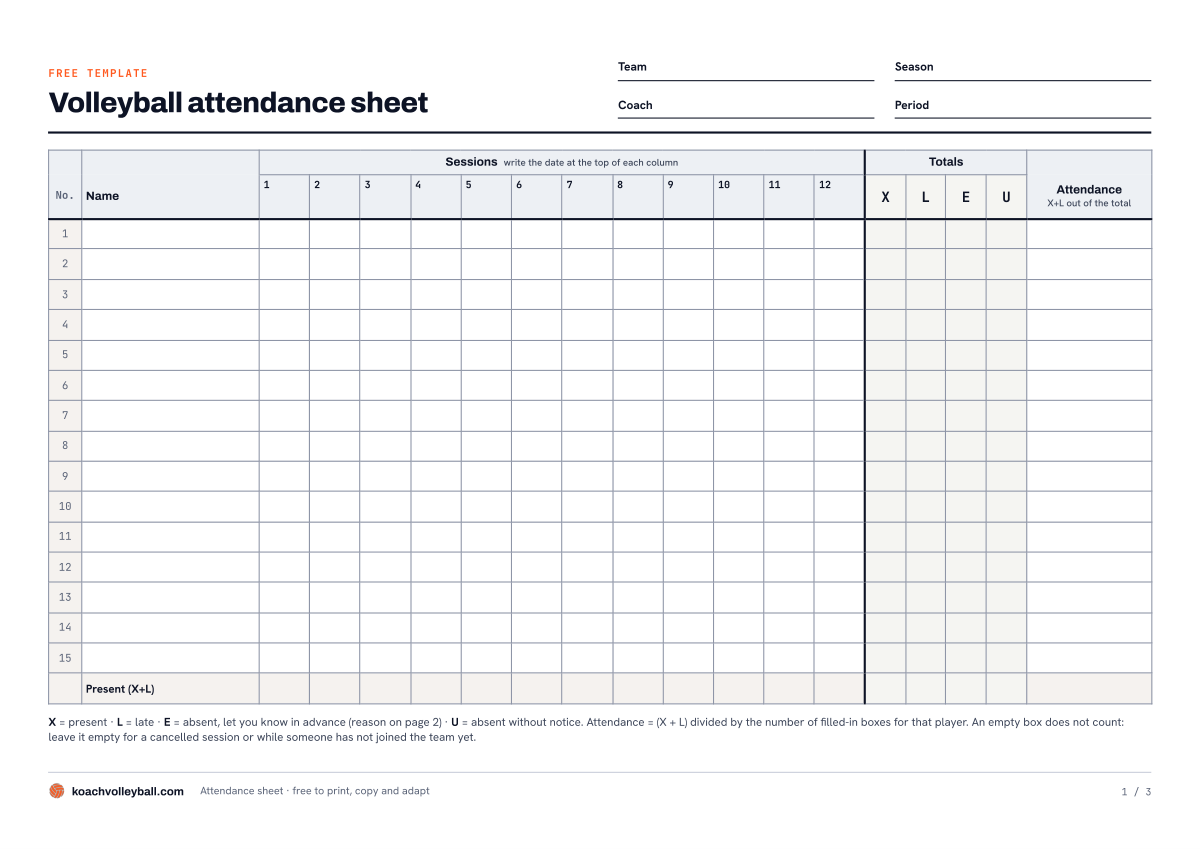
Page 1 of the PDF: team, season, coach and period at the top, with the totals per letter and attendance on the right.
What's in the template?
The PDF: three pages to print
Page 1 is the sheet itself. At the top you fill in team, season, coach and period. Below that are 15 numbered rows for names and 12 columns for practices. You write the date above each column yourself, so the sheet works just as well with one practice a week as with three. On the right you add up each player's letters and write down their attendance. The bottom row, Present (X+L), shows how many players turned up to each practice.
Page 2 is called Absences and reasons. For each absence you write the practice date, the name, the reason, who reported it (player or parent) and when it came in. Eight prompts help with the reason: illness, injury, school, work, transport, family, holiday and other. After a few weeks you can see why practices get missed, and whether people let you know in time.
Page 3 is a filled-in example for a fictional team. More on that below.
The Excel file: a season that adds itself up
The Excel file has four tabs:
- How it works: the instructions in five steps, plus how attendance is calculated.
- Attendance: the season sheet. In the yellow Session date row you enter the date of each practice, and in each box you pick a letter from a drop-down list. The grey columns count each player's X, L, E and U and work out their attendance. At the bottom you see how many players were at each practice and how many boxes you filled in, so you can tell whether you forgot someone.
- Absences: one row per absence, with drop-down lists for name, reason and reported by. On the right, the sheet counts how often each reason comes up.
- Example: the same fictional team as in the PDF, so you can see how the formulas work. Once you no longer need it, delete the tab.
The Excel file does two things paper can't. At Period from and to you enter two dates, say the first and last day of a month, and the Attendance period column then shows attendance over just those practices. At Highlight attendance below you set a threshold; any player below it gets an orange fill. It is set to 75%, but that is an example, not a standard: put it wherever it makes sense for your team.
If you also want to track match stats in Excel, that calls for a different kind of file. Where a spreadsheet runs out for that job is covered in tracking volleyball stats in Excel.
How do you fill in a volleyball attendance sheet?
- Add your roster. One player per row. Anyone who trains with you regularly goes on the list; a one-off guest does not, because they skew the numbers.
- Write the date above the column. Each column is one practice. You can date upcoming practices in advance.
- One letter per player per practice. X is present, L is late, E is excused (absent, but they let you know) and U is unexcused (absent without notice).
- Write down the reason. For every E, note the reason on the absences page, plus who reported it and when. It takes a few seconds, and after a month it tells you more than the letter itself.
- Leave blank whatever doesn't count. If a practice is cancelled, the whole column stays empty. If a player joins mid-season, their earlier boxes stay empty. An empty box never counts.
Here is how to work out attendance: the number of X plus L, divided by the number of boxes you filled in for that player. So late counts as present, and the L column shows how often it happened. A player with six X, one L and one E made it 7 out of 8 times. The Excel file does that sum for you; on paper you do it at the end of the period with a calculator.
Taking attendance is just one part of a practice night. How to handle the whole evening, from planning to review, is in running a volleyball practice.
A filled-in example: what the sheet tells you
Page 3 of the PDF and the Example tab show a fictional team of ten players after 8 of 12 practices. Three things stand out, and they show why four letters say more than a checkmark:
- Grace made 5 out of 8 practices and missed two without notice. That is a conversation to have now, not at the end of the season.
- Jess joined the team at practice 4. Her first three boxes are empty and don't count, so she was there 5 out of 5 times. Had you counted those boxes as absences, she would have ended up at the bottom for no reason.
- Freya was late twice. She made 8 out of 8, but the pattern is there to see.
Across the team there were 68 attendances out of 77 filled-in boxes. The absences page lists six absences with a reason, from illness to a school exam. What to do about low attendance is another story; for that, see how to increase practice attendance.
PDF, Excel or an app: which suits you?
Each format has its own strength. Paper always works, even when your phone is dead and the gym has no signal. Excel does the math. An app takes away the retyping, because players log their own absences.
| What you want | Excel | Koach | |
|---|---|---|---|
| Fill it in without a phone or laptop | Yes | No | No |
| Each player's attendance worked out for you | No | Yes | Yes |
| Players report their own absences | No | No | Yes |
| A second coach sees the same list | Only with the paper in hand | If you share the file | Yes |
| Cost | Free | Free | 14 days free, then Coach €2.99 per month |
The PDF or the Excel file is enough if you coach one team, you are the only one keeping track and you hear about most absences at the gym. And if you deliberately don't want an app, a paper sheet is a perfectly good choice: it's free, it works anywhere and nobody needs an account.
An app is the better fit if absences come in through the team group chat and you retype them, if you share the team with a second coach, or if you want to see each player's attendance without counting at the end of the month. If you want players to report their own absences, they do need their own free account. How paper and an app compare in practice is covered in tracking attendance at volleyball practice; what an attendance app should be able to do, you'll find in the attendance app for volleyball.
From attendance sheet to app: what Koach takes over
Anyone who runs a season on a sheet soon notices that ticking boxes is the easy part. The work is in the messages about absences, the sheet left on the kitchen table and the adding up. In Koach, the columns of the template belong to the practice itself:
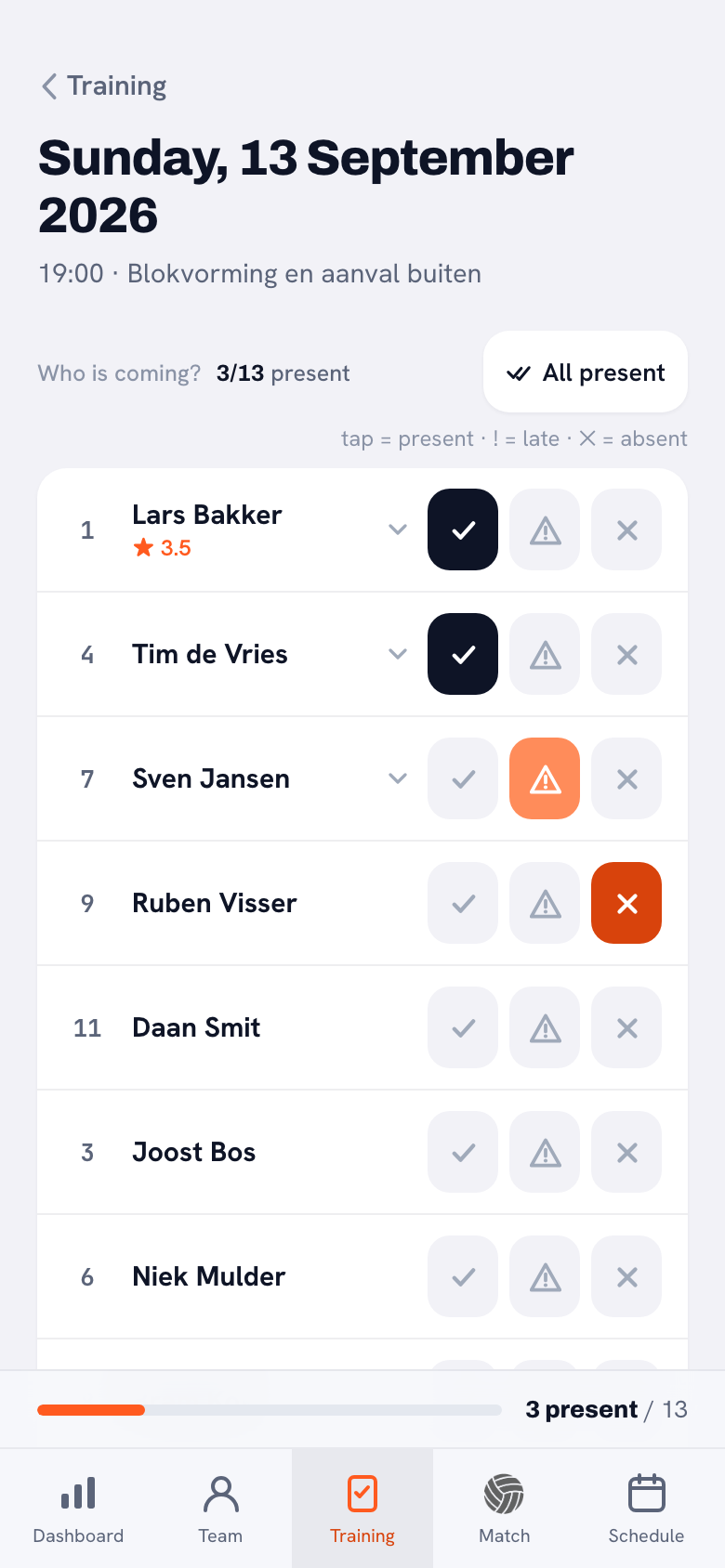
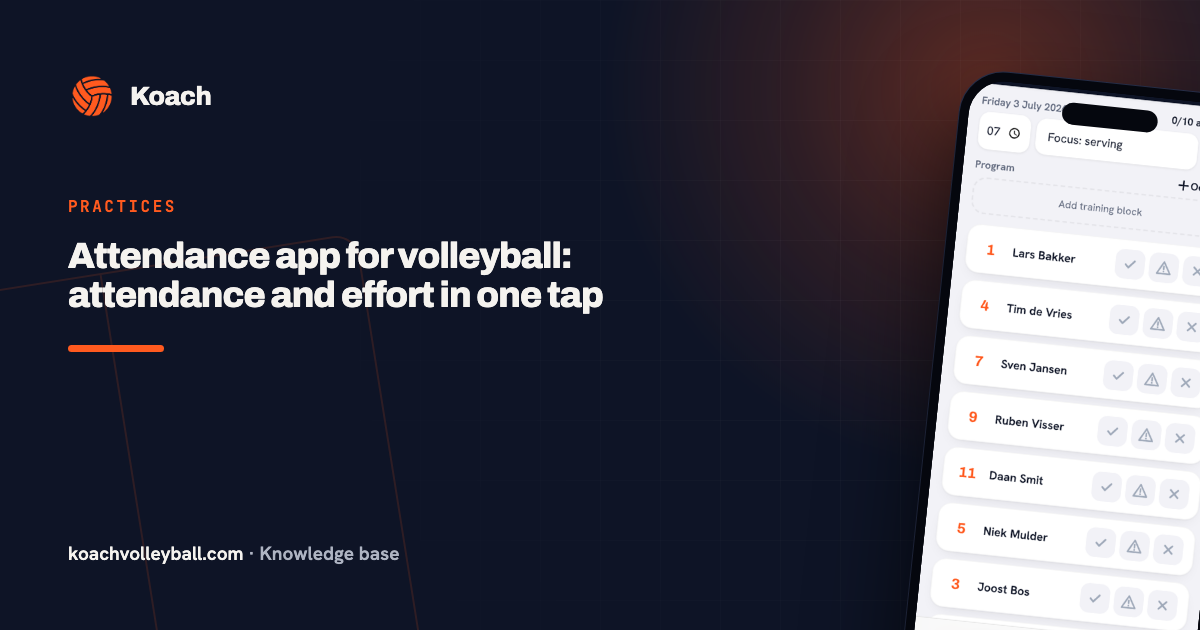
- The letters per practice. At each practice you tap present, late or absent for every player. With All present you mark everyone who has no status yet as present in one tap; anyone who already said they can't come stays absent. At the top you see how many players are coming.
- Absences with a reason. Players, and parents on behalf of their child, sign up or drop out themselves. Anyone who can't make it gets the question Why can’t you make it? and can add a reason. What that looks like for a player is in marking your own attendance.
- The Attendance column. Each player has a Training overview with the number of times present, the average effort and attendance over the season. Just like in the template, late counts as present.
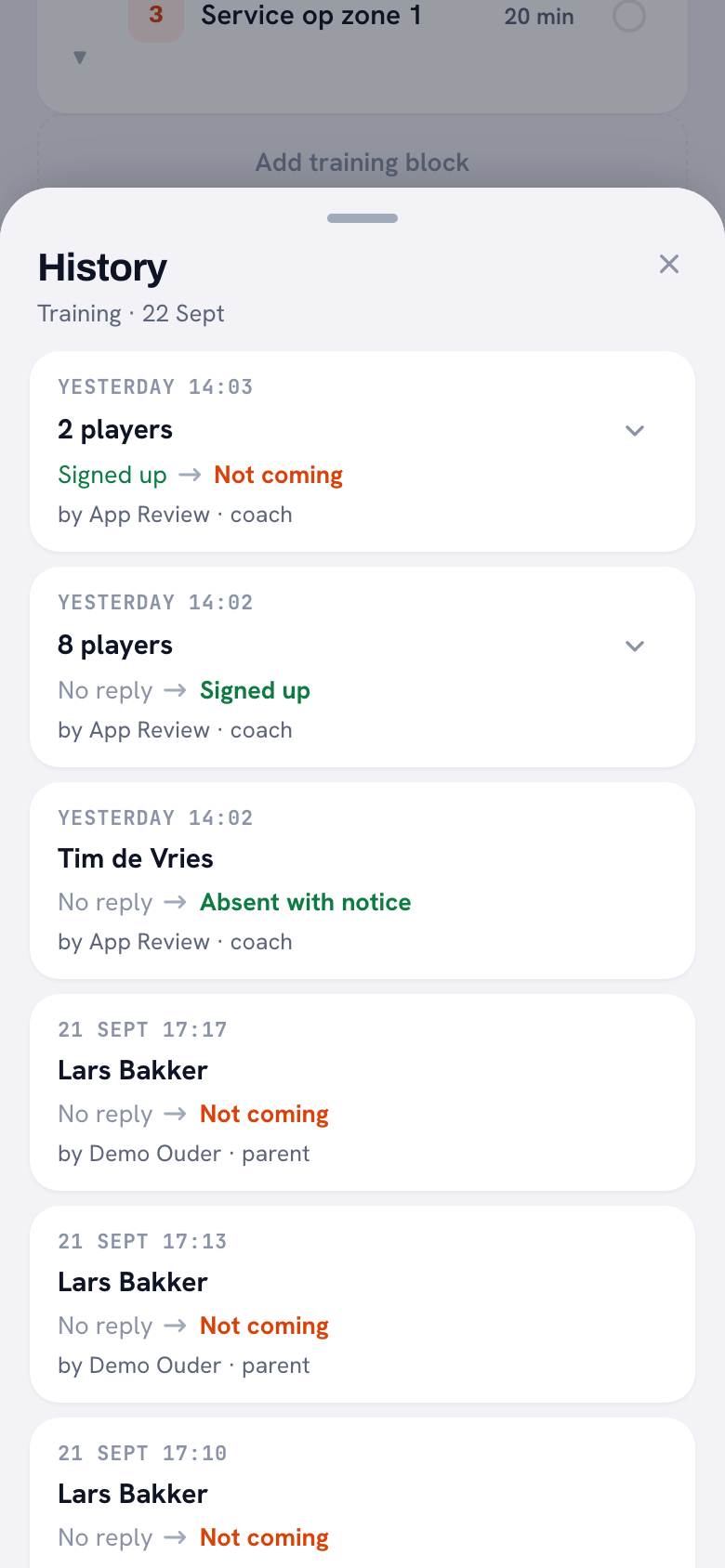
- Reported by and reported on. With View history you see, for each practice, who signed up or dropped out and when, and whether it was the player, a parent or a coach.
- The reminder. The iPhone and Android apps send a reminder the day before, and anyone who still hasn't responded 48 hours ahead gets a nudge. There are no push notifications in the browser.
- A spreadsheet after all. Export season (CSV) gives you a file for Excel with each player's attendance over the season and, for each practice, the number present and absent. Exactly who was at each practice is not in that export; you see that in the app.
14 days free, no credit card. Add your roster tonight, let your players sign up or drop out for the next practice themselves, and after a week see whether you still need the sheet.
Try attendance in Koach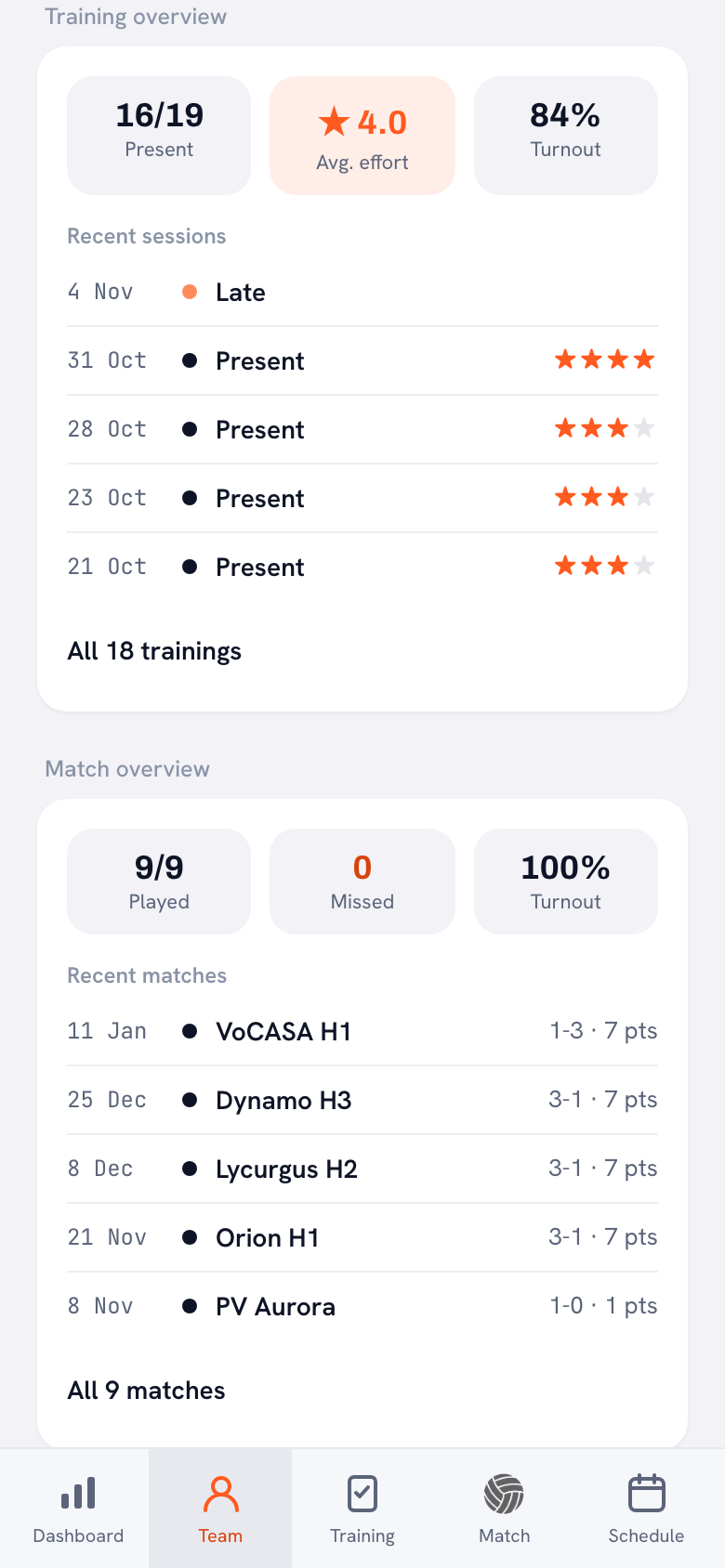
Why tallying after the fact is different from knowing in advance who's coming is explained by the maker of Koach in the interview on tracking practice attendance.
What Koach doesn't do, and what it costs
There are two things Koach doesn't do. There is no import of your roster from Excel or CSV: you type in the names or send your players an invite. And the app doesn't print an attendance sheet, because there is no PDF export. If you want a list on the locker room wall, keep the PDF from this page for that.
You can try Koach free for 14 days, no credit card. After that you choose Coach for €2.99 per month (one team, two coaches) or Club for €9.99 per month (unlimited teams and coaches); a yearly plan costs less. Players and parents pay nothing. All prices are on the pricing page; in the App Store and on Google Play you see the price in your own currency.
Keep E and U apart from the very first practice. A player who lets you know is doing what you asked; one who stays away without a word deserves a conversation. Agree on a fixed deadline as well, for example by the evening before. On a sheet with nothing but checkmarks, you never see that difference.
Frequently asked questions
How do I make an attendance sheet in Excel?
List your players down the first column and give each practice its own column with the date at the top. Enter one letter per practice, for example X for present and E for excused, and count them per player with the COUNTIF function. Rather not build it yourself? Download the free template on this page: its formulas already work out attendance per season and per period.
How do you calculate a player's attendance percentage?
Divide the number of practices the player attended by the number of practices that counted for them. If they made 7 out of 8, divide 7 by 8, which is 87.5%. Leave cancelled practices and practices from before they joined out of the count, or a new player comes out lower than they should. Count late arrivals as present, but keep track of them separately so you can spot a pattern.
Is the volleyball attendance sheet really free?
Yes. You download the PDF and the Excel file without an account or email address, and you are free to print, copy and adapt them, including for every team in your club. Just make a separate copy of the file for each team. Koach itself is a paid app for coaches: you can try it free for 14 days with no credit card, and players and parents always use it for free.
Is there an app for volleyball practice attendance?
Yes. In Koach you tap present, late or absent at each practice, and players report their own absences with a reason; the app works out each player's attendance. You can try Koach free for 14 days, no credit card. After that, Coach costs €2.99 per month for one team with two coaches, and Club costs €9.99 per month for unlimited teams. Players and parents pay nothing.
Can I import my Excel attendance sheet into Koach?
No. Koach has no import from Excel or CSV: you type in your players' names or send them an invite, and from then on the app keeps track of attendance. So Koach won't take over a file with attendance from earlier practices; hold on to that one. The other way round does work: with Export season (CSV) you open the attendance from Koach in Excel.


Let your players report their own absences
14 days free, no credit card. After a week you'll know whether you still need the sheet.
Get started with KoachOr read first what the volleyball coaching app does.