
Volleyball playbook app and free PDF template
The short answer
A volleyball playbook records your system, starting lineup, serve receive for each rotation, attack plays, defense and signals. Below you can download a free template (PDF, five pages). In Koach, the volleyball playbook app for your team, you keep the starting lineup as a saved lineup and draw every game situation on the tactics board.
A volleyball playbook app or a playbook on paper does one job: it records what your team has agreed on. Who stands where, who takes the ball and which signal calls which attack. Below you get a free template to print, what belongs in a good playbook and how to keep it up to date in Koach, so it doesn't end up at the bottom of your bag.
What goes in a volleyball playbook?
A playbook is not a tactics book full of everything you have ever read. It is your team's book: what you have agreed on together, written down so a new player picks it up quickly and you don't have to explain it again at every practice. What goes in depends on the level you coach, but these six parts almost always show up:
- Your system and the roles. Whether you run a 5-1, 4-2 or 6-2, who your setters are, who plays libero and who is captain. Why you would pick one system over another is covered in how to build a volleyball lineup; here the point is getting it on paper.
- The starting lineup and your roster. Who starts in which position in rotation 1, and for every player their position and what else they can play.
- Serve receive for each rotation. Where everyone stands when the opponent serves, for all six rotations. How many players should pass is explained in serve receive formations with 3, 4 or 5 passers.
- Attack plays. For each play a name, who runs where, where the ball goes, the signal and when you run it.
- Defense. The block and the spot of every defender against an attack on the outside, through the middle or from the back row, plus the free ball and covering your own hitter. The systems themselves are explained in defensive systems: perimeter and rotation defense.
- Signals and agreements. What you call out or show by hand, and what applies to serving, time-outs and substitutions.
How those parts fit together, from serving pressure to defense, is covered in volleyball tactics basics. This article is about the format: how you get it on paper, and how you keep it current for a whole season.
Free volleyball playbook template (PDF) to print
The template below follows exactly those six parts. You don't need an account and you don't have to leave an email address.
- Download the volleyball playbook template (PDF): five A4 portrait pages to print (on US Letter, choose "fit to page"), with system, starting lineup and roster, serve receive by rotation, six attack plays, six defensive situations and a page for signals.
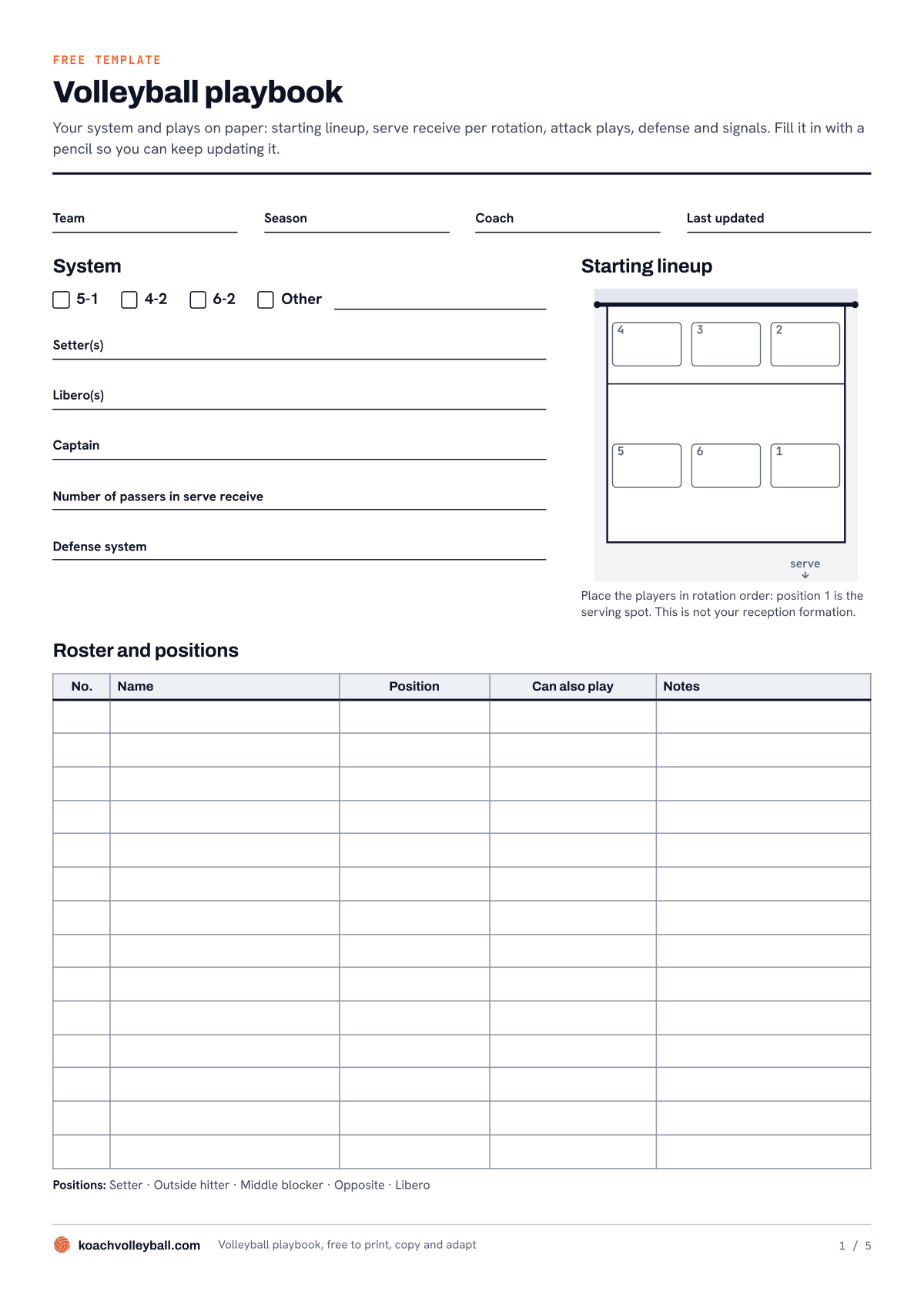
What is on the five pages:
- System, starting lineup and roster. Boxes for 5-1, 4-2, 6-2 or other, lines for setter(s), libero(s), captain, the number of passers in serve receive and your defense system. Next to that a court with positions 1 to 6 and a table with number, name, position, can also play and notes.
- Serve receive by rotation. Six courts, one per rotation, with room for the setter's position, the passers and a note.
- Attack plays. Six boxes with a name, the signal and when you run the play. Marks along the net are one meter apart, so you can draw the approach routes to scale.
- Defense. Six situations: an attack from their position 4, 3 or 2, an attack from behind their 3-meter line, the free ball and covering your own attack. A black dot above the net is the opposing attacker.
- Signals and agreements. A table with the signal or call, what it means and who gives it, plus lines for your serving plan and other agreements.
How to fill it in: start with page 1 and enter the starting lineup in rotation order, so position 1 is the serving spot. On page 2, rotation 1 is that starting lineup; after that everyone moves one position on, clockwise. From those positions, draw where your players stand in serve receive and walk through every rotation slowly at practice. Start with a few attack plays and only add one once it works at practice. Every time you change something, fill in the date under Last updated, so everyone knows which version counts. Use a pencil: a playbook is never finished.
Don't want to rotate all six by hand? The free rotation generator builds them for you from your players and your system, no account needed.
Paper or app: what suits your playbook?
We make Koach. So read this as the advice of a maker who knows the app inside out, and who puts the paper template next to it for a reason.
Paper costs nothing, needs no battery and simply lies on the table during a pre-match talk. Everyone can read along, and you draw faster with a pencil than with your finger. The weakness: there is one copy, it goes out of date as soon as you change something, and whoever wasn't there never sees it.
A document or slide deck on your laptop is easy to edit and send around. But drawing courts and routes is fiddly, and nobody has a laptop open on the sideline.
A separate whiteboard app is built for drawing, often with player markers you drag around and plays that move. If you mainly want to show plays in motion, that is the better choice. It does sit apart from your lineup and your matches, though. Which whiteboard apps exist is covered in the comparison of tactics board apps.
Koach is a coaching app where your playbook lives in the same team as your roster and your matches. Below you can read what that means in practice, and where it stops.
| What you want | Paper template | Koach |
|---|---|---|
| Cost | Free | 14 days free, then €2.99 per month (Coach) |
| Works without a screen or battery | Yes | No |
| Starting lineup in rotation order | Yes, on page 1 | Yes, as a saved lineup |
| See all six rotations | Rotate them yourself | Yes, with one tap |
| Draw serve receive, plays and defense | Yes, in pencil | Yes, on the tactics board |
| Share with your team | Copy it or take a photo | Yes, as an image |
| Animate situations | No | Not on the board, but as your own exercise |
| Print as a booklet | Yes | No, no PDF export |
Koach as your volleyball playbook app: the starting lineup
Page 1 of the template has a fixed home in Koach. On the Team tab you open Lineup view. Under Build lineup you pick 5-1, 4-2 or 6-2, tap the six positions and mark your setter and libero. Fill in the positions in rotation order. When you start a match, the app tells you itself: Place the players in rotation order: position 1 is the serving spot. This is not your reception formation. That is exactly the difference between page 1 and page 2 of your playbook.
Once the lineup is right, tap Save current lineup under Saved lineups and give it a name, for example "Starting six". A version for when your regular setter is missing goes right next to it. One tap on the name and it is ready again; more on that in saving and reusing a lineup.
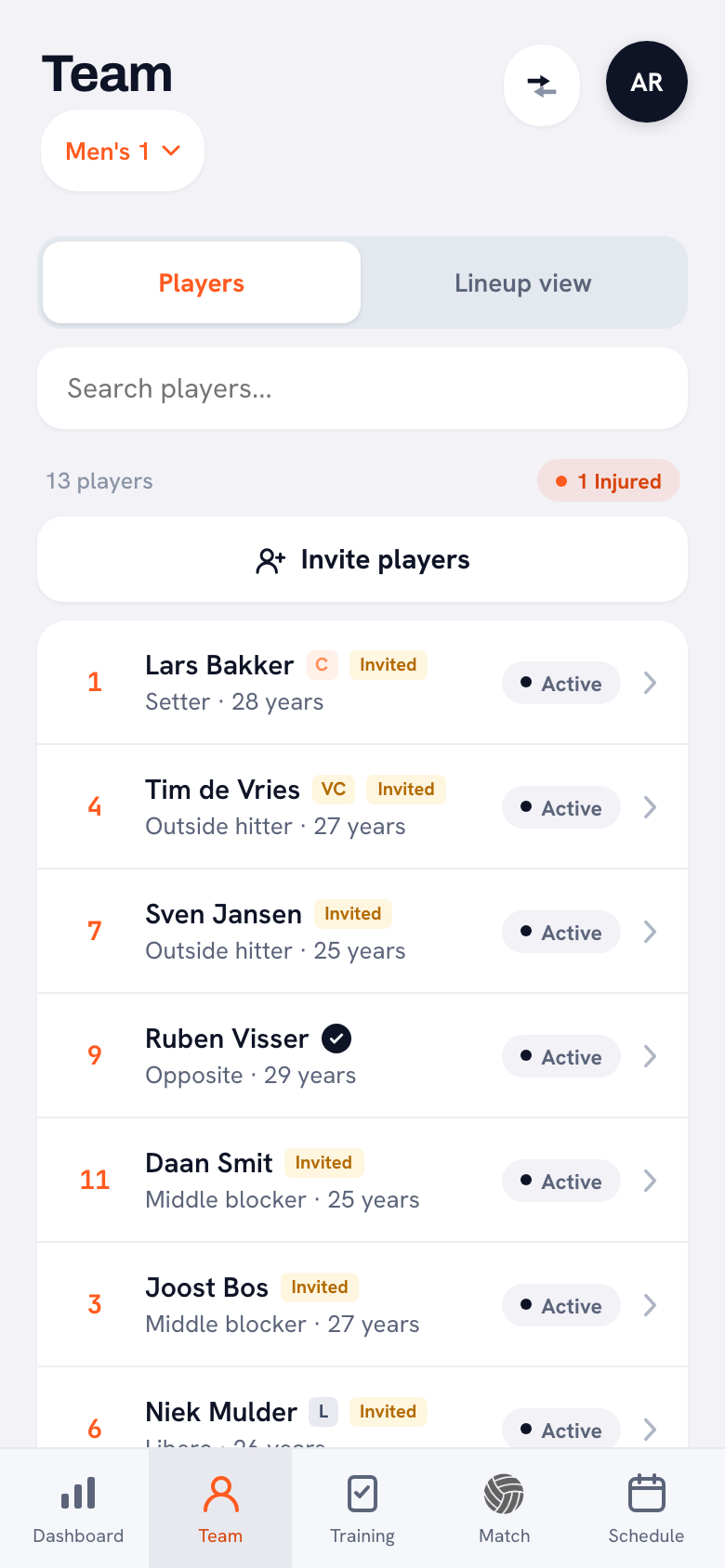
What a saved lineup keeps: your system, the six positions, the setter and the libero. What it doesn't keep: where your players stand in serve receive, which plays you run or how you defend. That is what the tactics board is for.
With View all 6 rotations you see for each rotation who stands where and who serves. That is the starting point for your serve receive: in every rotation you see where your setter and your passers come from.
14 days free, no credit card. Put your starting lineup in tonight, draw your serve receive for rotation 1 and see after your next practice whether your playbook works better in the app than in your bag.
Start your playbook in KoachServe receive, attack plays and defense on the tactics board
Pages 2, 3 and 4 you draw in Koach on the tactics board. You find it at the top of the Training tab, and on a scheduled match under the Start button. For a playbook it works like this:
- One board per situation. Tap New board and under What is this board about? enter a name you will recognize later, such as "Serve receive rotation 1", "Play 2" or "Defense vs their position 4". That name shows in the list and goes along when you share the board.
- Pick the court. Half court for serve receive and your own attack, Full court when it also matters where the opponent's ball comes from.
- Draw. You have Pen, Arrow, Dashed and Erase. Keep the same legend as on the template: a solid arrow (Arrow) is a player's run, a dashed line (Dashed) is the ball.
- Save and share. Save tactics board adds it to your team's list. Share as image turns it into a picture you post in the team group chat, so players can look at it again at home.
If you create a board from a scheduled match, it belongs to that match. There you only see that match's boards, and in the list on the Training tab it says For this match. That way your standing playbook stays separate from the plan you make for one opponent.
To be honest about the limits: the board is a still image on an empty court. There are no player markers to drag around, and nothing plays back. If you want an attack play to move step by step, you can build it as your own exercise (New exercise), with players, phases and playback. It then sits among your exercises, not with your boards.
Who is Koach a good playbook app for, and who not?
It suits you well if:
- you want your starting lineup, your rotations and your drawn situations in one place, in the same app you use to prepare and score your matches;
- you have an assistant coach who needs to see the same thing you do;
- you want to send a situation after practice instead of explaining it all over again the next week.
Choose something else if:
- your playbook is mostly plays in motion, or you want to drag six player markers around a board: a separate whiteboard app is built for that;
- you want one bound booklet for the whole team: print the template, because Koach doesn't make a PDF;
- you coach beach volleyball or a small-sided youth format: Koach is built for indoor volleyball with six players on court.
What does it cost?
The template is free, and you may copy and adapt it as you like. You can try Koach free for 14 days, with no credit card and every feature. After that you choose Coach for €2.99 per month (one team, two coaches) or Club for €9.99 per month (unlimited teams and coaches). With a yearly plan you pay €2.49 or €8.33 per month. In the App Store and Google Play you see the price in your own currency. Players and parents use the app for free. The prices are on the pricing page.
Start small. A playbook with one starting lineup and six serve receive rotations that everyone knows is worth more than twenty plays only you understand. Add a new play only once the last one works at practice.
Frequently asked questions
What is a playbook in volleyball?
A volleyball playbook is the team book where you record what your team has agreed on: the system and roles, the starting lineup, serve receive for each rotation, attack plays, defense and signals. It helps new players and subs most of all, and it stops agreements from drifting from one practice to the next. On paper or in an app, what matters most is that it matches what you do at practice.
Is the volleyball playbook template free?
Yes. You download the PDF template without an account or email address, and you may copy and adapt it freely. If you want to keep your playbook in Koach, you can try the app free for 14 days with no credit card. After that Coach costs €2.99 per month for one team with two coaches; players and parents use the app for free.
Can I save serve receive formations in Koach?
Yes, as a drawing on the tactics board. You make one board per rotation, give it a name such as Serve receive rotation 1 and tap Save tactics board. A saved lineup only keeps your system, the six positions in rotation order, the setter and the libero, not where your players stand in serve receive.
How do I share a volleyball playbook with my players?
On paper, by copying it or taking a photo. In Koach you tap Share as image on a board: the app turns it into a picture you post in the team group chat. That way players can look at a serve receive formation or a play again at home before you walk through it at practice.
Can I animate volleyball plays in Koach?
Not on the tactics board: that is a still image you draw on, save and share. You can build a play as your own exercise via New exercise, with players, phases and playback. If your playbook is mostly plays in motion, a separate whiteboard app is the better fit.




Put your starting lineup in Koach tonight
14 days free, no credit card. After one practice you know whether your playbook works better in the app.
Get started with KoachOr read first what the volleyball coaching app does.