
Volleyball player report card: free end-of-season template
The short answer
A volleyball player report card is one sheet per player at the end of the season: the season's numbers, a score for each skill and, in plain words, what went well and what the goal is next. Download it here for free as a PDF or Word file. If you use Koach, attendance, effort and points come straight from the app.
If you're looking for a volleyball player report card, you usually want one thing: a sheet you fill in for each player at the end of the season and hand over. Here you can download that sheet for free, see what belongs in each section and find out how Koach supplies the numbers.
Download the free volleyball player report card
First, what you came for: an end-of-season report template for volleyball, free and without handing over your email address.
- Printable volleyball player report card (PDF): A4 portrait, two pages. Page 1 is a blank report card for one player, page 2 a filled-in example.
- The same report card in Word (.docx): to type in for each player on your laptop, with room for a comment on every skill, or to change the rows.
The template is free to use, copy and adapt. Use one sheet per player.
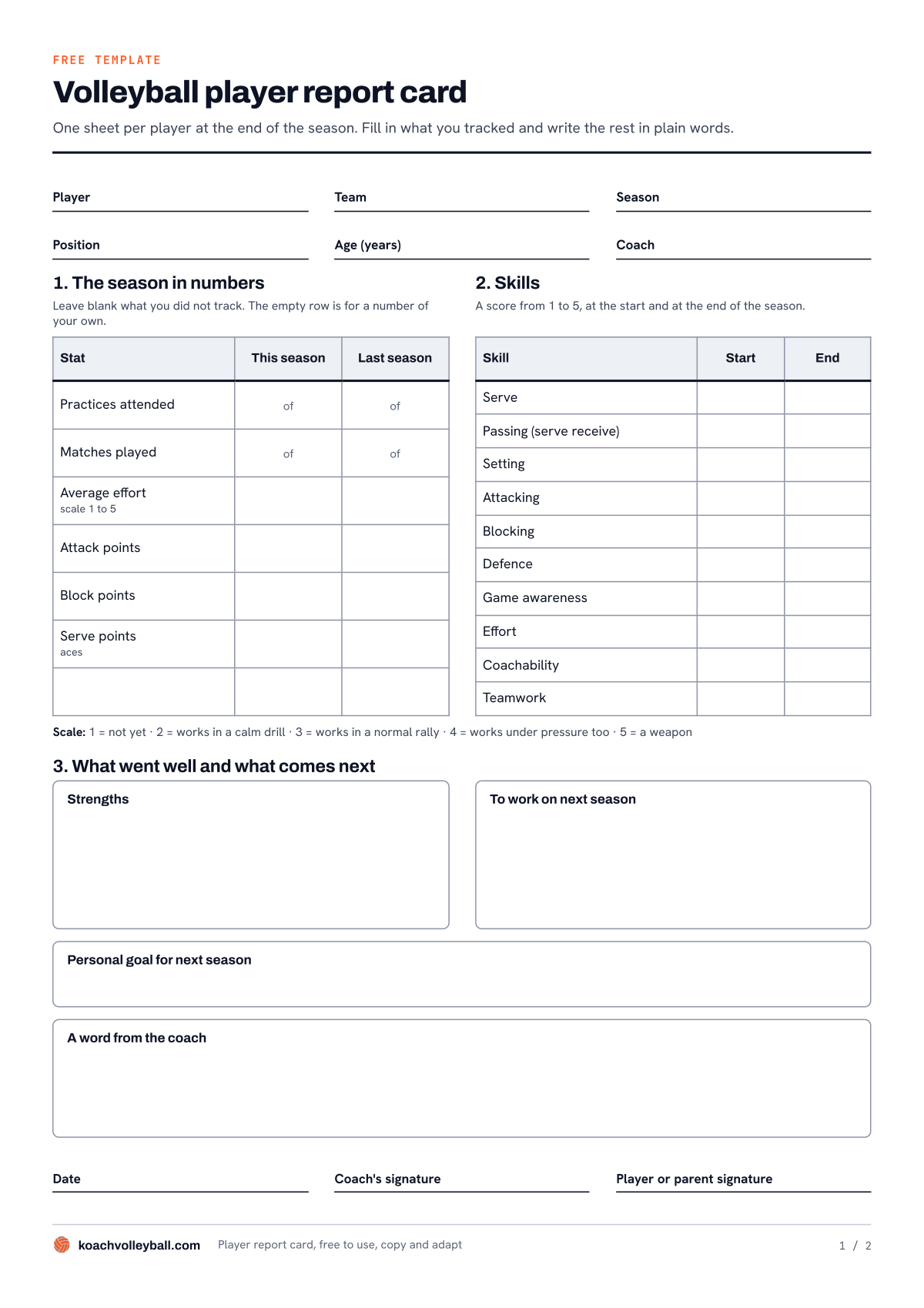
Page 1 of the report card: the player's details at the top, the numbers and skills in the middle, the plain-language boxes at the bottom.
What goes on a player report card?
An end-of-season report shows what happened and points to where next season is heading. That's why the sheet has three sections, moving from hard numbers to plain words.
- The header. Player, Team, Season, Position, Age (years) and Coach.
- Section 1, The season in numbers. This season and last season side by side, in six rows: practices attended (x of y), matches played (x of y), average effort on a scale of 1 to 5, and attack, block and serve points (aces). An empty row is for a number of your own, such as serve errors.
- Section 2, Skills. Ten skills, each scored from 1 to 5 at the start and at the end of the season: Serve, Passing (serve receive), Setting, Attacking, Blocking, Defence, Game awareness, Effort, Coachability and Teamwork. Below the table is what each score means: 1 = not yet, 2 = works in a calm drill, 3 = works in a normal rally, 4 = works under pressure too, 5 = a weapon.
- Section 3, What went well and what comes next. Four boxes: strengths, what to work on next season, a personal goal for next season and a word from the coach.
- At the bottom. The date and the signatures of the coach and of the player or a parent.
Page 2 of the PDF shows the report card filled in for a made-up player: Maya, 15, outside hitter. Her strengths don't say "good hitter". They say her approach from position 4 is right and her serve has become more reliable: 18 errors instead of 29.
A report card is not the same thing as a volleyball player evaluation form. You use that form with other coaches to measure players against the same yardstick. The report card is written for the player, and it goes home with them.
How to fill in the report card, section by section
- Start with section 1, and leave blank what you don't know. A number you guess after the fact isn't a number. If you didn't track block points, that row stays empty.
- Give two scores in section 2, and look at the difference. A 2 that became a 3 is a season's worth of work. Go by the descriptions under the table, not by gut feeling: if it works under pressure too, it's a 4. Ideally you write down the starting score at the start of the season.
- Write strengths and things to work on as something you saw. One situation per point, speaking to the player directly. "Passing a hard serve: you start moving too late" gives a player something to work on. "Passing needs work" doesn't.
- Pick one personal goal that's within reach. Take the biggest thing to work on, and the report card becomes the start of next season. How to make a goal specific is covered in setting a personal goal for every player.
- Write the word from the coach last. This box is about the player, not the numbers: what they gave you and what you're counting on next season, in two or three sentences that could only be about this player.
Don't just hand the report card over in an envelope. It works best when you go through it briefly with the player; how to structure that conversation is explained in holding the evaluation talk with a player.
Where do the end-of-season numbers come from?
You write sections 2 and 3 from memory and from your notes. For section 1 you have to look up how often someone showed up and how many points they scored. There are three ways to do that.
- A paper attendance sheet and a scoresheet. Costs nothing and works in any gym. At the end you add up the tally marks, and every forgotten sheet leaves a gap.
- A spreadsheet. Does the math for you, as long as you update it after every practice and match. That updating is the weak spot: after a few busy weeks it falls behind.
- An app that tracks it during the season. You record everything in the gym, and at the end the totals are ready. The downside: you have to keep it up all season, and after the free trial it costs money.
We make Koach, so read this table as a comparison by someone with a stake, and pay special attention to the rows that say "No".
| What you need | Template on paper or in Word | Koach |
|---|---|---|
| Cost | Free | 14 days free, then Coach at €2.99 per month |
| Practices attended (x of y) | No, you count back yourself | Yes, if you take attendance |
| Average effort (1 to 5) | No, you estimate it yourself | Yes, if you give stars at practice |
| Attack, block and serve points | Only if you wrote them down | Yes, if you score live or enter them afterwards |
| Comparison with last season | Your old report card next to it | Yes, from your second season in Koach |
| Strengths, things to work on, word from the coach | Yes | No, you write those on the template |
| A sheet to hand over | Yes | No, the app makes a CSV, not a PDF |
In short: the template is still the report card. Koach fills in section 1, the rest is up to you.
Section 1 from Koach: attendance, effort and points per player
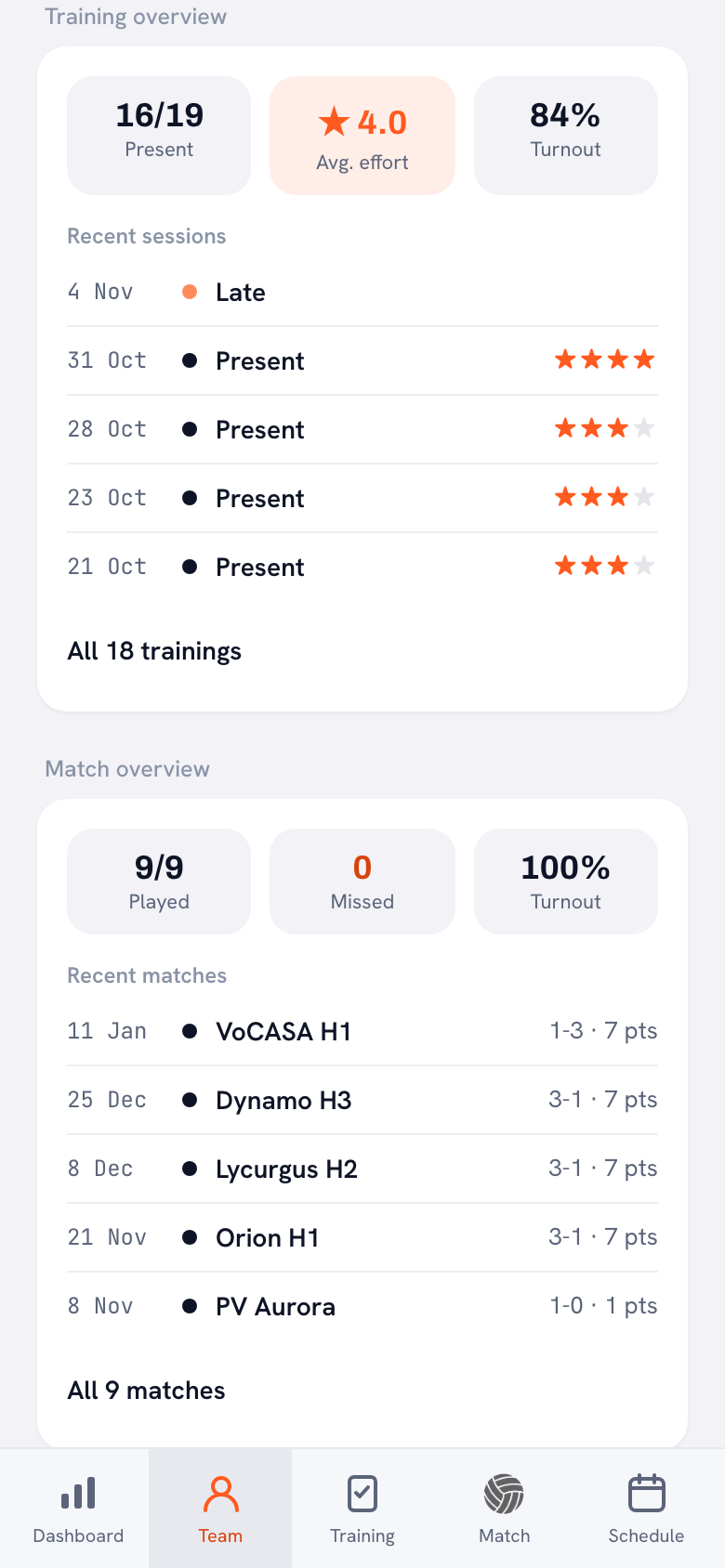
You'll find the numbers for section 1 per player in Koach: on the Team tab, tap the player's name.
14 days free, no credit card. Add your team this week and take attendance at every practice: after a few practices you'll see each player's turnout.
Track your season stats in Koach- Practices attended. Under Training overview, Present shows how many practices the player attended out of the total, with Turnout next to it as a percentage. Late counts as present.
- Matches played. Under Match overview you'll see Played, also as x of y, and Missed. Koach only counts matches where it's known who played.
- Average effort. At a practice you can give every player who's there 1 to 5 stars for Technique, Game awareness, Coachability, Work ethic and Effort. Koach averages those five per practice and then across the season: that number appears at Avg. effort, on the same scale as the report card. So it's an overall score for how someone trains, not just the Effort category; mention that on the report card. How to give those stars fairly is covered in scoring effort after practice.
- Attack, block and serve points. If you score live, you link every point to a player and a type. Didn't score live? With Enter stats afterwards you add the points per player later. Under Season stats you'll find Attack, Block and Serve / Ace.
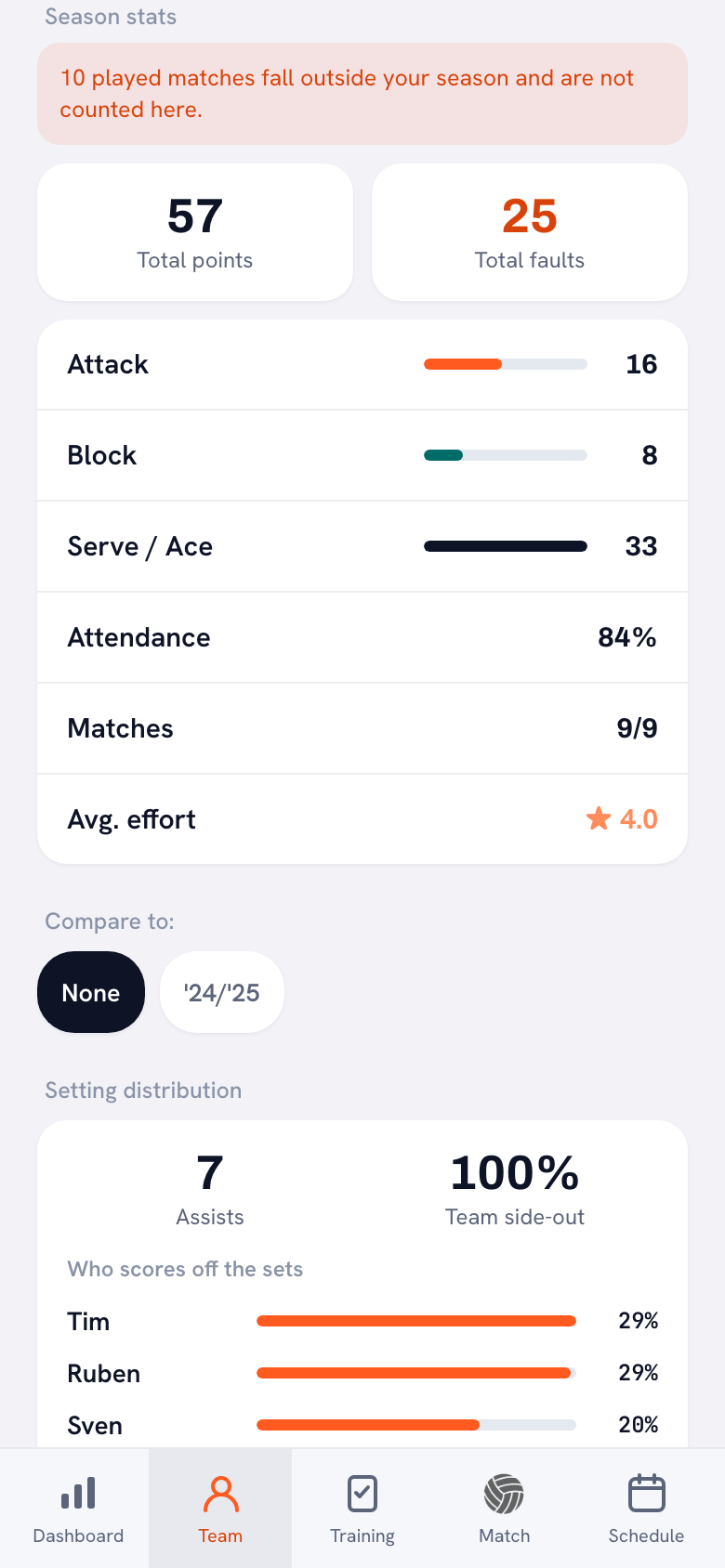
For the last-season column, tap the name of your season at the top of your dashboard and pick the previous season in Choose season; the same screens then show the numbers from back then. With Compare to: below the season stats you instantly see the difference with an earlier season for points, faults and attendance. That only works for seasons you tracked in Koach: in your first season with the app, fill in that column from your own notes or leave it blank. For your own row, check Fault distribution in the same profile, which lists Service fault among others.
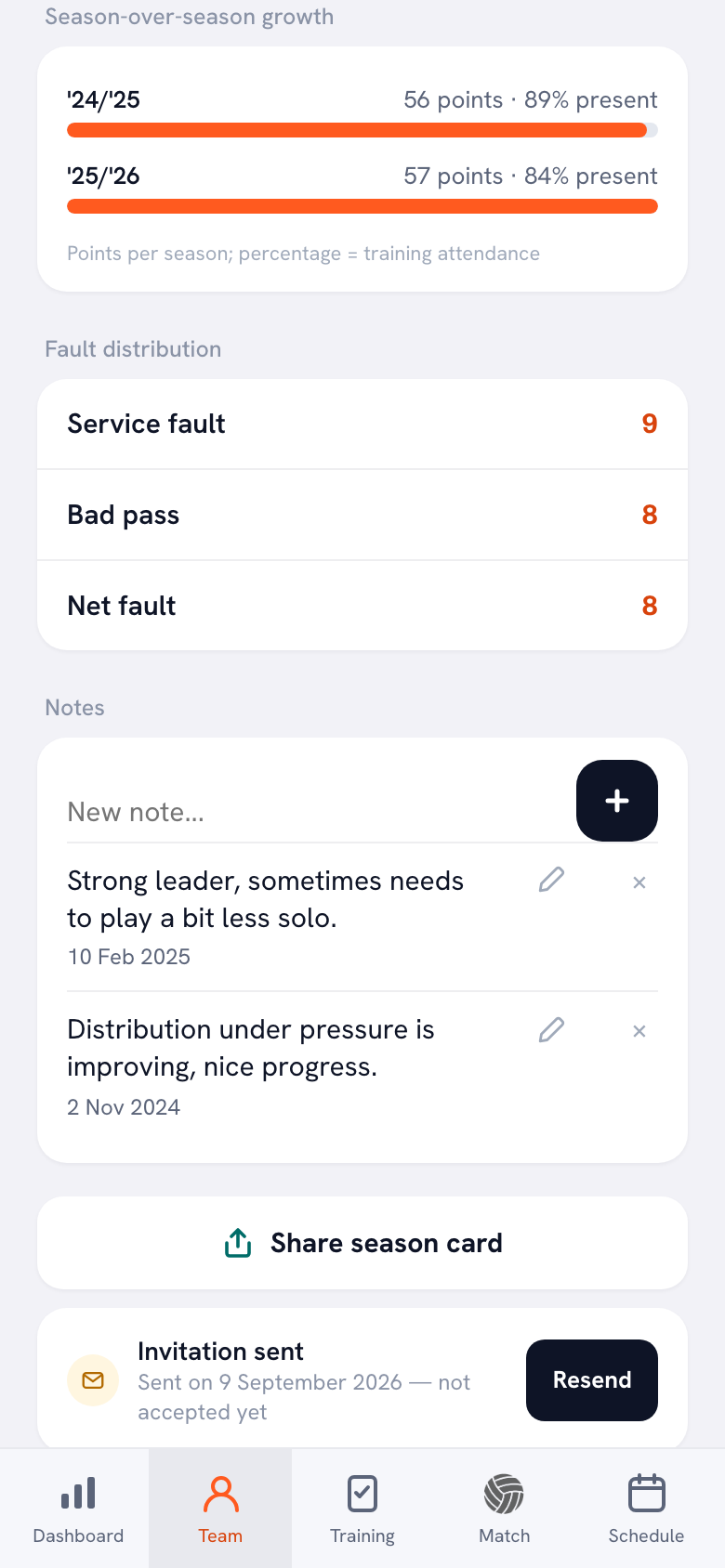
If you've used Koach for more than one season, Season-over-season growth lists the points and practice attendance of every season, one below the other: handy for the long view in the word from the coach. More on that in tracking player development in volleyball. With Share season card you turn a player's season into an image, the lighthearted little sibling of the report card; see the season card.
All players at once: the season report as a CSV
If you're writing a report card for your whole roster, you don't want to copy everything off the screen. Three exports help, all as a CSV file you can open in any spreadsheet program:
- Download season report (CSV). When you finish the season (on your dashboard, tap Manage next to Season, then go to the Start a new season block), this switch is on by default. With Finish and start new season you get a file with one row per player, including Attendance %, Avg. effort, Attack, Block, Serve, Total points, Total faults, Played, Missed and the faults per type, followed by the matches and the practices. How the rest of finishing a season works is in setting up a new season.
- Export season (CSV). The same file at any time, without finishing the season. The button is on your dashboard under Season.
- Export player (CSV). At the bottom of a single player's profile. It also includes the personal goal and your dated notes on that player: material for strengths and things to work on.
One difference from the report card: the CSV gives practice attendance as a percentage. If you want x of y on the report card, copy it from Training overview in the profile.
Write it down when it happens. If on a Tuesday you see a player finally dare to serve under pressure, put it in that player's notes right away. At the end of the season, a dated line like that is a strength you can back up, instead of a vague feeling.
Who it suits, what Koach doesn't do and what it costs
The template on its own is enough if you write a report once a year and don't track much during the season. Sections 2 and 3 are then the report card. It also works as a starting point for another sport: in the Word version you swap out the skills.
The template plus Koach suits you if you coach volleyball and already take attendance or score matches. Then section 1 is ready at the end of the season, and you have time left for the words.
What Koach doesn't do: the app doesn't create a PDF report and doesn't write any text for you. It doesn't fill in section 2 either: the five stars per practice combine into one average, and the app has no 1 to 5 score per skill like the one on the report card. The judgment stays yours. And Koach is built for volleyball only.
You can try Koach free for 14 days, with no credit card. After that you choose Coach for €2.99 per month (one team, two coaches) or Club for €9.99 per month (unlimited teams); with a yearly plan you pay €2.49 or €8.33 per month. In the App Store and on Google Play you see the price in your own currency. Players and parents use the app for free. The prices are on the pricing page.
Frequently asked questions
Is the volleyball player report card free to download?
Yes. The PDF and the Word version are free, with no sign-up and no email address, and you can copy and adapt them. You can try Koach itself free for 14 days, with no credit card. After that Coach costs €2.99 per month for one team with two coaches; players and parents use the app for free.
Is there a player report card example I can look at?
Yes, on page 2 of the PDF. It shows the report card of a made-up 15-year-old outside hitter, with this season's and last season's numbers, a score per skill at the start and at the end, plus strengths, things to work on, a personal goal and a word from the coach. Use it as a benchmark for how specific your own writing should be.
Can Koach make the player report card for me?
Not entirely. Koach tracks the numbers that belong in section 1: practice attendance, matches played, average effort and points from attack, block and serve. You see them per player in the profile and can download them as a CSV. The app doesn't create a PDF report and doesn't write text: skills, strengths, things to work on and the word from the coach are yours to fill in on the template.
Does this end of season report template work for other sports?
Partly. Sections 1 and 3 fit any team sport: attendance, matches played, effort, strengths, things to work on and a personal goal. The ten skills in section 2 are volleyball skills, such as serve, passing and setting. In the Word version you replace them with the skills of your sport. Koach itself is built for volleyball only.
When should you give players their end-of-season report card?
At the end of the season, once the last practice and match are behind you and your numbers are complete. Ideally don't just hand it over, but go through it briefly with the player, with a parent present for younger players if you like; that's also what the box for the player or parent signature is for. How to structure that conversation is explained in holding the evaluation talk with a player.


Let Koach track your season stats
14 days free, no credit card. After a few practices you'll already see each player's turnout.
Get started with KoachOr read first what the volleyball coaching app does.