
Your season has ended — setting up a new season
It's mid-July, you open Koach and your dashboard reads zero. No top scorer, no attendance percentage, no involvement. Meanwhile your calendar is full of the practices you scheduled for September. It's the most confusing moment of the year — and it means exactly one thing: your season is over.
What happens once your end date has passed
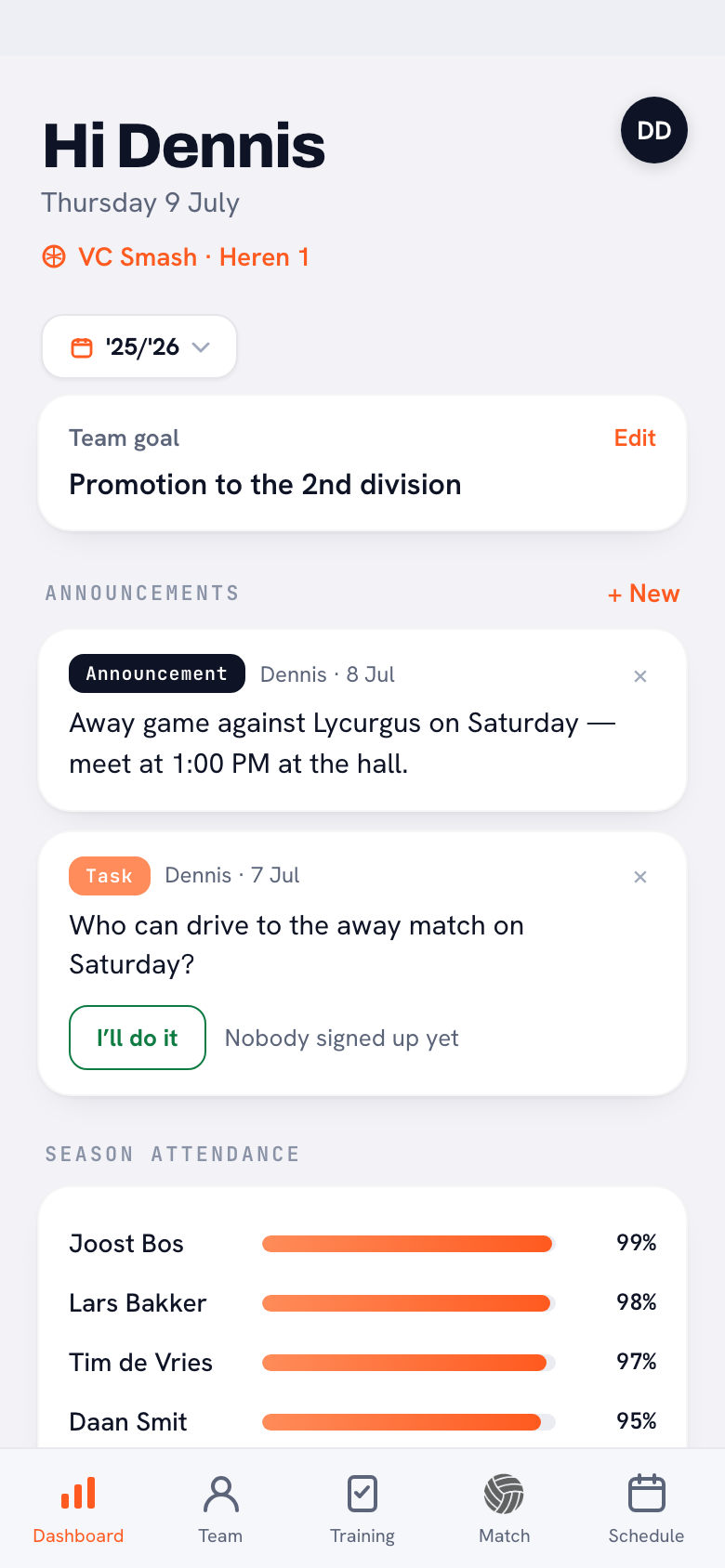
In Koach your season has a start date and an end date. If that end date is in the past and your view is set to Current season, an orange card appears on your dashboard headed Your season has ended. Underneath it says which season it was and when it ran until, for example: “Season 2025/26 ran until 30 June 2026. Set up your new season — your statistics will then start from zero again.” At the bottom of that card sits the Set up season button.
The card is for coaches only. Players and parents don't get it: setting the season is team management, and there's nothing a player can do with it. All they notice is that their own figures start again once you've set the new season.
Zero in the figures, but nothing lost
Koach works out statistics per season. Points, faults, playing time, practice attendance and average involvement only count within the period you set. That's exactly the intention: without that boundary, last year's top scorer would stay top of the list all season and a player joining in September could never catch up.
If your old season is still running as the current one and its end date has passed, everything you schedule now falls outside that period. Hence the zeros. Not because anything is gone, but because the counter is looking at a window that has closed.
And here's the part that catches coaches out most often, because it works the opposite way round to what you'd expect. As soon as the season is over, your practice list and your match list show everything from the start date, instead of nothing. They used to run empty while the calendar stayed full, and that reads like data loss. Now your whole history simply stays put.
The figures at the top, meanwhile, keep counting neatly per season. So you get the best of both: complete lists to page back through, and statistics that don't quietly add two seasons together.
How to set up your new season
Tap Set up season and a sheet called Set season opens. Under the heading Current season sit two lines: Starts on and Ends on. Set them to your new period and tap Save in the top right. The view then jumps back to the current season by itself, so you can see straight away that something has changed. The sheet also carries the tip the app gives you: “Tip: run your season from your first to your last training. That keeps your stats and attendance spot on.”
You don't have to wait for the banner. At the bottom of your dashboard sits the Season heading, with Season period underneath it and the Manage button — which opens the same screen. And at the bottom of the season picker sits Start a new season, with the note “Wrap up the current season, keep its results and start fresh”.
Just changing the dates, or really wrapping the season up
There are two routes, and the difference is bigger than it looks.
- Change the dates and save — you stretch or shift the same season. Nothing goes into the archive; it all stays one continuous period. Handy if you simply set the end date too early.
- Finish and start a new season — the old season is kept as a season of its own and you start clean. This is what you want at the end of a league year.
For that second route you fill in three things in the same sheet: Name of finished season and, under New season, Starts on and Ends on again. Those two dates are already filled in for you — the day after your old end date and a year later — so usually you only have to confirm them. Next to that sits the Download season report (CSV) switch, which is on by default. At the bottom you tap Finish and start new season.
The app asks you to confirm first, with the numbers included, along the lines of “You are finishing Season 2025/26 (18 matches · 34 trainings). The season stays saved and you start fresh. Continue?” Confirm and you get the message “Season finished — new season started”, and the old season appears under Past seasons. That CSV file, incidentally, is exactly the material you prepare a season review with.
Which start and end dates make sense
Most leagues run from September to April or May. Even so, 30 April is rarely the best end date: cup matches, a tournament in June and the last practice nights all fall outside it, and the “Your season has ended” banner turns up while you're still in the hall every week. A period running from 1 September to 30 June covers everything for most teams.
Stick to the app's own tip: from your first to your last practice. If you start with a pre-season week in August, put the start date there. Everything inside that period counts towards your figures and your season goals; everything outside it doesn't. When in doubt, go a little wider — an empty week at the end costs you nothing, a month cut off does.
Setting the season while it still has to start is no problem either: on 4 August for a season beginning on 1 September, the practices you schedule for September simply fall inside the season and the banner doesn't appear.
Looking back at last season with the season picker
At the top of your dashboard sits a small button with a little calendar on it and the name of your current season. Tap it and you get the Choose season sheet with three kinds of choice: Current season, every finished season with its period behind it, and All seasons. Pick an earlier season and every figure on your dashboard is worked out over that period — top performances, fault load, attendance and involvement.
So in two taps you can compare how your team was doing this time last year, which is the basis for a proper season analysis and for following development across several years. Parents don't see this choice; nothing filters for them, because they don't get the team statistics on screen in the first place.
Set your end date right once and it looks after itself all year. The banner isn't an error message but a reminder: you're done with this year and your new figures are waiting for a clean start. Wrap it up, keep the CSV file and set your new team goal alongside it straight away.
Frequently asked questions
Why does my dashboard read zero while my calendar is full?
Because your season's end date has passed. Koach works out statistics inside the period you set, and everything you schedule after it falls outside. Your data is all still there: your practice and match lists even show everything from the start date. Set up your new season and the figures start again neatly.
Do I lose my old matches and statistics if I set up a new season?
No. Everything is kept. If you wrap the season up it goes under Past seasons and you pick it back out with the season picker on your dashboard. The matches, results and attendance stay exactly as they were; only the counter on your dashboard starts again.
What's the difference between changing the dates and finishing the season?
Changing the dates shifts the same season, with no archive. Finish and start new season keeps the old season under a name of its own, sets up your new period and offers a season report as a CSV. At the end of a league year you want to finish it; if you'd only set the end date wrong, changing the dates is enough.
Which start and end dates should I choose?
Run your season from your first to your last practice. For most teams 1 September to 30 June is a safe choice: cup matches, tournaments and the last practice nights still fall inside it. Pick 30 April and the message that your season has ended turns up while you're still training.

Try it yourself in Koach
Less admin, more coaching.
Get started with KoachOr read first what the volleyball coaching app does.