
Volleyball end of season team review: the numbers on one screen
The short answer
An end of season team review for volleyball puts a whole season's numbers side by side: results, how your side-out developed, errors, playing time and attendance. In Koach that is in Season insights, with the conclusion first in every block, and you export the season as a CSV for the meeting.
You do not build an end of season team review for your volleyball team from loose lists on the last evening, but from what you tracked all year. Below you read which numbers belong in it, where to find them in Koach and how to take them into the season meeting and the next season.
What belongs in an end of season review of your team?
An overview is something other than an analysis or an evaluation. The overview says what happened. The season analysis then looks for trends and causes, and in the season evaluation you discuss it with your team. Without an overview, both start with the match everyone remembers, which is usually the last one or the most painful one.
For a volleyball team six parts are enough. For each part you need one number and one sentence:
- Results. Matches won and lost, sets won and how the points per match developed.
- Development. Did the team get better at the things that decide matches, such as side-out (winning the rally when the opponent serves) and break point (scoring on your own serve)? What side-out measures exactly is covered in side-out percentage in volleyball.
- Errors. Who gave away the most points, and which type of error came back most often?
- Playing time. Who played the least? Especially in a youth team that is a question parents ask, so you want the answer ready.
- Attendance. Turnout at practices and matches, and who was often late.
- Effort. If you rate it per practice: who worked hardest?
What does not belong in it: individual judgements about players. Those belong in a one-to-one conversation, not in an overview you show the whole team.
Where is the season overview in Koach?
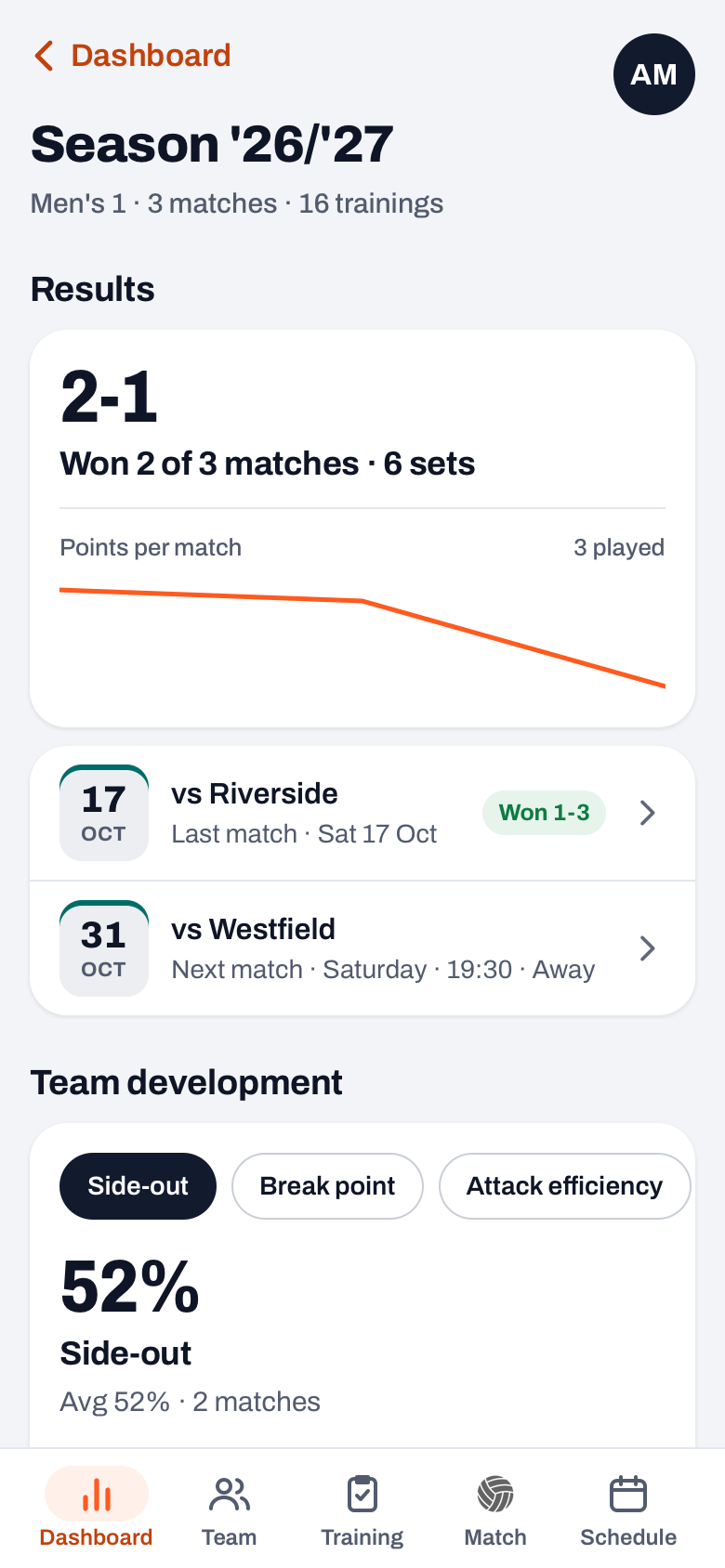
As a coach you have a season card on your dashboard with the essentials: how many matches you won, the side-out number (if you track live), the sets won and the number of practices, plus at most four lines about what stands out (the lowest attendance, who plays least, who makes the most errors). At the bottom of that card is All season insights. That opens the full overview, titled with the season, for example "Season '26/'27". If you tap one of the lines on the card, you jump straight to the matching block.
14 days free, no credit card. Add your team, track a few matches and watch your season overview fill itself.
Try Koach with your teamSeason insights consists of ten blocks. Each block starts with its own one-sentence conclusion, and only appears if there is data for it:
- Results: won against lost, the number of sets, the line of points per match and your last and next match.
- Team development: choose Side-out, Break point or Attack efficiency (and with Expert matches also the 0-5 ratings per skill). You see one point per match, the dotted line of the season average and the average of the last three matches with an arrow up or down. How to read those numbers per rotation is in side-out and break point per rotation.
- Serve pressure: how much side-out you make on their serve, and your players' longest serving runs.
- Most errors: who makes the most errors and which type comes up most often.
- Top performers: the top scorer, and the best player in attack, serve, block and reception.
- Playing time: the number of rallies and sets per player, with the Start first? label for whoever played least. More on that in tracking playing time.
- Attendance: turnout per player, switchable between Trainings and Matches, with the team average.
- Often late: who was late most often, and at how many practices.
- Effort: who got the highest average effort rating per practice.
- Season: the Manage season and Export season (CSV) rows.
Side-out, serve pressure and playing time come from matches you tracked live. If you only entered the result of a match, it counts in Results, but not in those blocks. You can tap any name in the overview: that opens the player's profile. Before version 3.0 most of these numbers were separate blocks on the dashboard; since 3.0 they have their own screen with a conclusion per block.
How do you use the review in your season meeting?
A season meeting with your staff or your team runs better if each agenda item belongs to one block. Then you talk about the same number instead of five memories. An agenda that works:
- Where do we stand? Results. Short, everyone knows it already.
- Did we get better? Team development with the Side-out chip. Are the last matches above or below the dotted line?
- Where did we leak points? Most errors and Serve pressure. Pick one thing here to work on next season; how to turn such a number into drills is in turning match stats into practice.
- Did everyone get chances? Playing time and Attendance, side by side. Someone who played little but always turned up deserves a different conversation from someone who played little and was often missing.
- What do we take with us? Three agreements for next season, no more.
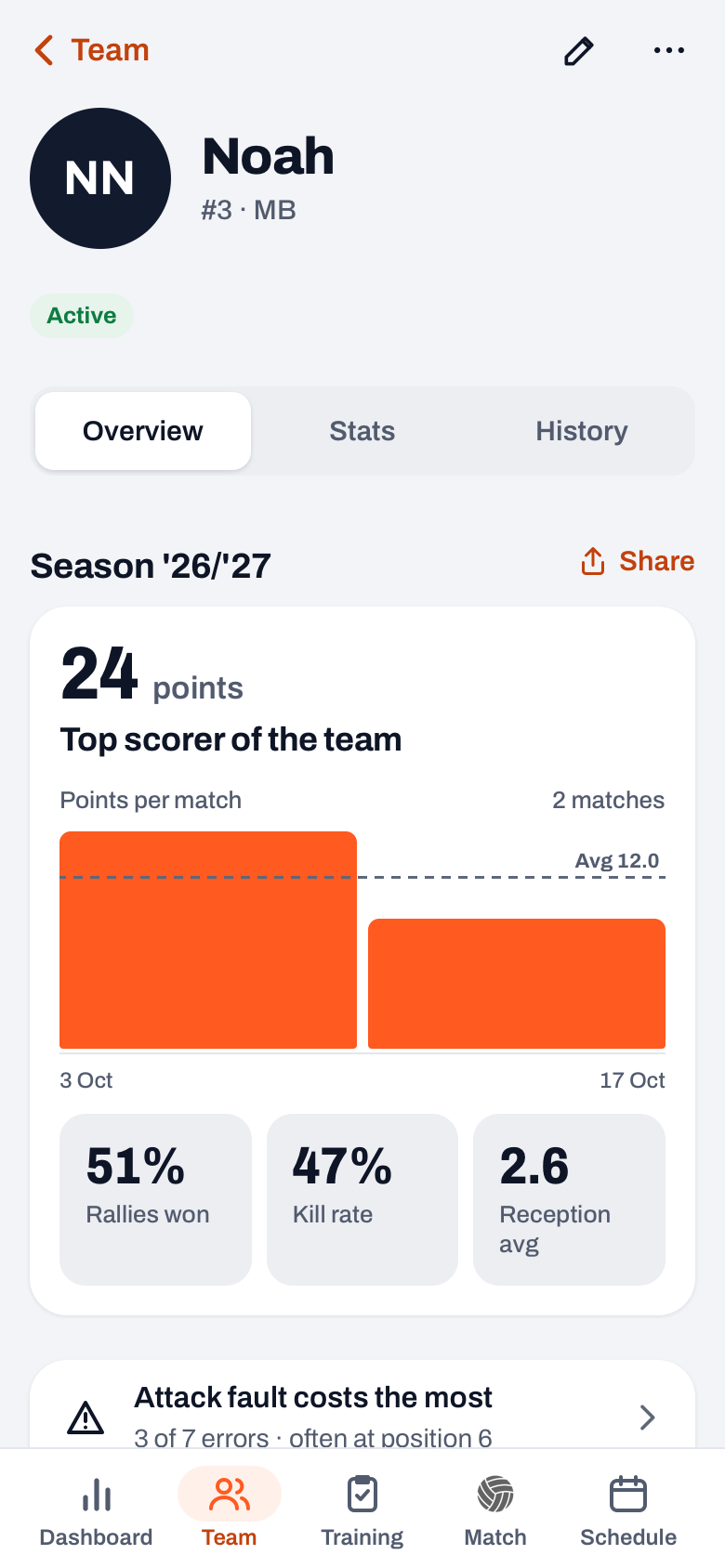
How to lead such a session with the team, when to hold it and what does not belong in it is in running a season evaluation. For the individual conversations you open each player's profile. The Overview tab has that player's season card, with their points per match and their key numbers.
Looking back at an earlier season
At the top of the dashboard is a button with your team and the season, for example "Men's 1 · '26/'27". Tap it, and under Season you choose the current season, a previous season or All seasons. The season card and Season insights follow that choice, so you can put this year's overview next to last year's.
Mind the season dates. If you never set a start and end, the app counts all matches and "this season" is really "everything ever". You set the dates under Manage season.
What do you take into next season?
With Export season (CSV) you get a file you can open in Excel or another spreadsheet program. Per player it holds the attendance, average effort, points from attack, block and serve, errors by type and the number of matches played and missed. Below that come the matches with their set scores, the performance per match and an overview of the practices. That file is your archive, even if you coach a different team next year.
When the season is over, choose Start new season under Manage season. You archive the old season under a name, can have an End report (CSV) created with it and enter the dates of the new season. Your matches and practices are kept; the old season is then listed under Previous seasons. The steps are in setting up a new season, and how the overview fits into the rest of your season planning is in organising the volleyball season.
Take three things from the overview: one team number to work on (usually the weakest line in Team development or the error type at the top), one agreement about playing time and one about attendance. Nobody holds on to more than that for a whole season.
Season insights is for coaches only. Players and parents do not see this screen; a player sees Your season and Your stats on their own dashboard. What Koach costs after the 14 free days is on the pricing page.
Look at the last three, not at the average. In Team development, set the chip to Side-out and compare the big number (the last three matches) with the dotted line. If it is above the line, your team finished stronger than it started, and that tells a different story for the meeting than the season average does.
Frequently asked questions
How do you make an end of season review without an app?
With a spreadsheet: a tab with the result and set scores per match, a tab with who was there per practice, and a tab with points, errors and sets played per player. At the end, work out one number per part and write one sentence with it. Side-out and playing time only work if you track every rally during the match, and on paper that takes a second person on the sideline.
Why don't I see side-out or playing time in Season insights?
Those numbers come from matches you tracked live, rally by rally. If you only entered results, they count in the Results block, but Serve pressure, Playing time and the side-out in Team development stay empty. A block only appears once there is enough data; a match with too few rallies does not count in the chart.
Can players and parents see the team's season review?
No. Season insights and the season card on the dashboard are for coaches only. A player sees Your season and Your stats on their own dashboard, and their own season card in their profile, without comparison with teammates. Parents do not see Season insights or the season card.
Can I export the season review to Excel?
Yes. At the bottom of Season insights is Export season (CSV). You can open that file in Excel, Numbers or Google Sheets. Per player it holds attendance, effort, points, errors by type and matches played, followed by the matches with set scores and an overview of the practices. When you close a season you can also have an end report created as a CSV.
What does Koach cost if I only want the season review?
Koach has no separate feature for the season review: the overview fills itself with what you track all season. You can try the app free for 14 days, with no credit card and every feature. What it costs after that per month or per year is on the Koach pricing page. Players and parents use their own account for free.

Let your season review fill itself
14 days free, no credit card. After a few matches the first lines are already there.
Get started with KoachOr read first what the volleyball coaching app does.