
Volleyball scouting report template: free PDF with game plan
The short answer
A volleyball scouting report template fits on one sheet: on the left what you see in the opponent, on the right what you do about it, with serve targets, your starting rotation and a time-out plan. Download it free here as a PDF or Word file. In Koach, the plan lives with the match itself.
A volleyball scouting report template doesn't have to turn into a dossier. What you need on the sideline on match day is one sheet: who you're playing, what you'll do against them and when you'll step in. Below you'll find that sheet as a free download, with what goes in each box, and how the same game plan attaches to the match in Koach.
Download the free volleyball scouting report template
First, what you came for: a scouting report and game plan on one page, free, and without leaving your email address anywhere.
- Printable volleyball scouting report and game plan (PDF): one A4 sheet with the opponent on the left (starting rotation, attackers, servers, serve receive) and your own plan on the right (serve targets, starting rotation, time-out plan). Printing on US Letter? Choose "fit to page" in the print dialog.
- The same template in Word (.docx): to fill in on your laptop, or to change the boxes if your team needs something different.
The template is free to use, copy and adapt. Print a few at once: you use one sheet per opponent, and the sheet from your first meeting is worth its weight in gold when you face the same team again later in the season.
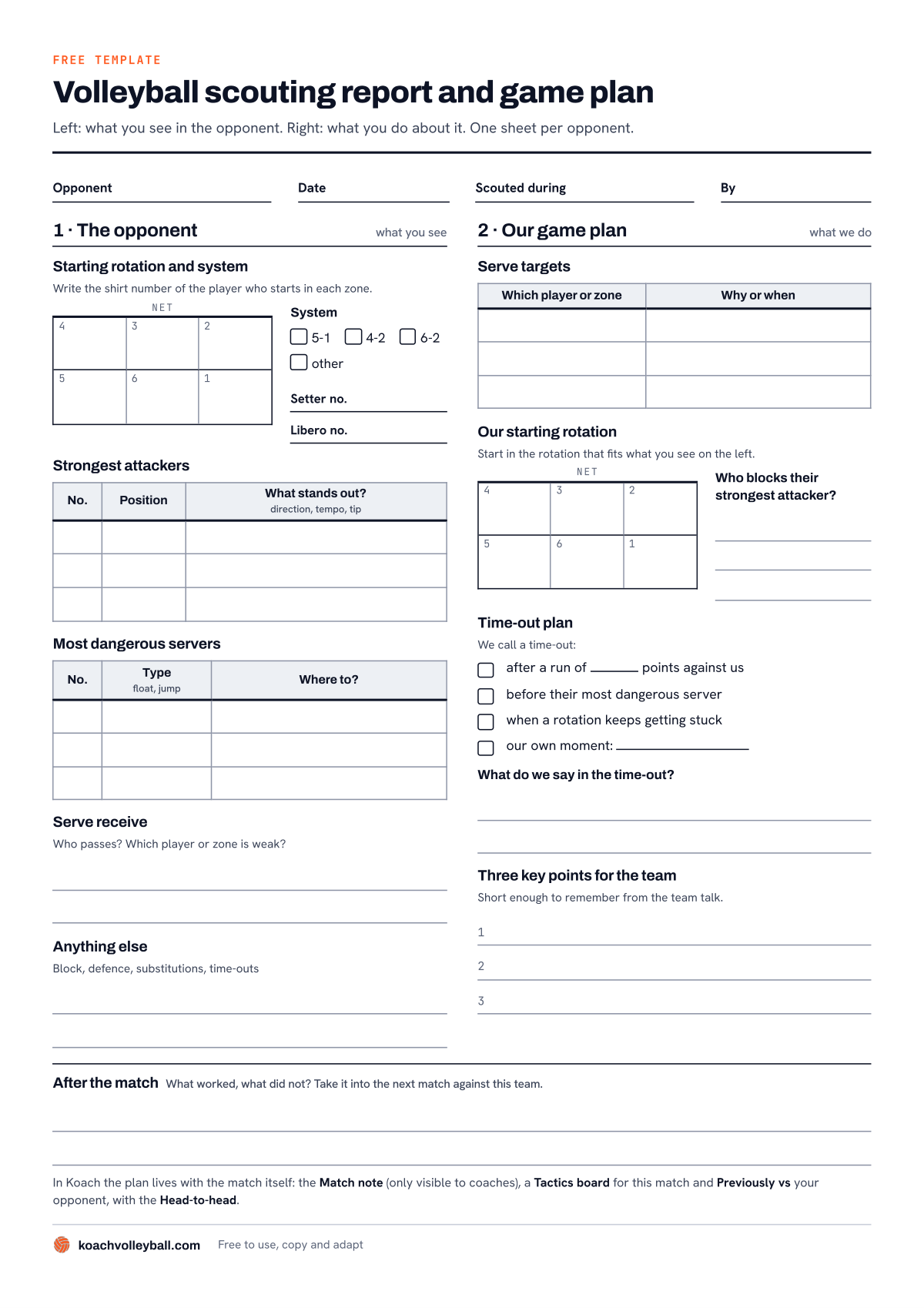
The template: what you see on the left, what you do on the right, and the After the match strip along the bottom.
What's on the template?
The sheet is split in two. The left side is what you see in the opponent, the right side is what you do about it. That split is the whole trick: a scouting report without a plan stays a list of trivia, and a plan without scouting is a guess. Across the top you fill in the opponent, the date, who did the scouting and, under Scouted during, which match you watched.
Left: the opponent
- Starting rotation and system. A court with the six zones, where you write the shirt number of whoever starts in each zone. Next to it you tick 5-1, 4-2, 6-2 or other, and note the setter's and the libero's numbers.
- Strongest attackers. Three lines for number, position and what stands out: direction, tempo, whether someone likes to tip.
- Most dangerous servers. Three lines for number, type of serve (float or jump) and where the ball goes.
- Serve receive. Who passes, and which player or zone is weak?
- Anything else. Room for their block, their defense and how they handle subs and time-outs.
Right: our game plan
- Serve targets. Three lines: which player or zone you serve at, and why or when.
- Our starting rotation. A second court with the six zones, plus the question you have to answer alongside it: who blocks their strongest attacker?
- Time-out plan. Four boxes to tick in advance for when you call a time-out: after a run of points against you (you fill in how many), before their most dangerous server, when a rotation keeps getting stuck, or at a moment of your own. Below that are two lines for what you'll say in that time-out.
- Three key points for the team. Short enough to still remember after the team talk.
Along the bottom, across the full width, runs the After the match strip: what worked, and what didn't? That's the line you'll read first the next time you play this team.
How to fill in your volleyball game plan
What to look for while you watch is covered in depth in how to scout an opponent in volleyball. This section is about the sheet itself, and three habits that keep it useful.
- Fill in the left side with what you saw, not what you think. A shirt number with "hard jump serve to zone 1" is something you can use in the match; "good team" isn't. If you don't know something, leave the box empty. An empty box tells you where to look in the first few rallies.
- Keep the right side smaller than the left. Three serve targets is already a lot; one target everybody remembers works better than three nobody remembers. The same goes for the three key points. What to say in the locker room, and how to keep it short, is in the pre-match team talk.
- Decide your time-out plan at home. In the gym, down a few points, you think less clearly than at the kitchen table. Tick in advance when you'll step in, and during the match all you have to do is recognize that the moment has come. How to use a time-out and when to sub is covered in match coaching: time-outs, substitutions and your role on the sideline.
Take the sheet to the bench and fill in the After the match strip while it's still fresh, ideally before you leave the gym. Those few lines are exactly what you'll want to read next time.
A paper game plan or one in an app?
We make Koach, so read this with that in mind. Paper is a genuinely good choice for this job: it's free, you don't have to look at your phone on the sideline, and an assistant can hold the sheet. Where paper falls short is the second half of the season. By then the sheet from your first meeting is in a different bag, or with last year's coach, and nobody remembers the exact score from back then.
| What you want | Paper template | Koach |
|---|---|---|
| Cost | Free | 14 days free, then from €2.49 per month (yearly plan) |
| On the sideline without a phone | Yes | No |
| Sketch the opponent's starting rotation | Yes, with a pen | Yes, with the pen on the tactics board |
| Plan linked to the match | No | Yes |
| Past results against this team at hand | No, you keep them yourself | Yes, under Previously vs |
| Shared with an assistant coach | Copy or photo | Yes, in the same team |
| Stats per opposing player | Only what you tally yourself | No |
You can also use both: the sheet in your bag before the match, and the results and your note in the app for the next time.
How your game plan attaches to the match in Koach
Koach doesn't have a separate scouting form. The plan is spread across places you already open around a match.
Before the match: a tactics board for this match
Open a planned match and you'll find the Tactics board row under the Start button. Create a board there with New board and it belongs to that match, with the label For this match in the list. Choose Full court or Half court, give the board a name and draw with Pen, Arrow and Dashed: the shirt numbers of their starting rotation, where their strongest attacker lines up and where your block needs to be. Tap Save tactics board to keep it, and use Share as image to send it to your team's group chat, for example. What else a drawing board can do, and when a standalone board app is a better fit, is in our comparison of volleyball tactics board apps.
When you start: Previously vs and the head-to-head
If you've played this team before and you tap Start, the Previously vs block with the opponent's name appears above the Starting lineup. At the top you'll see the Head-to-head, and below it up to five earlier matches against that team with dates and set scores, including from previous seasons. Tap one of those matches to open it with all the numbers from back then. Do that before you set your lineup: the app warns that your lineup will be lost if you open the old match. The same block also appears under every completed match against that team, so you can look back midweek too.
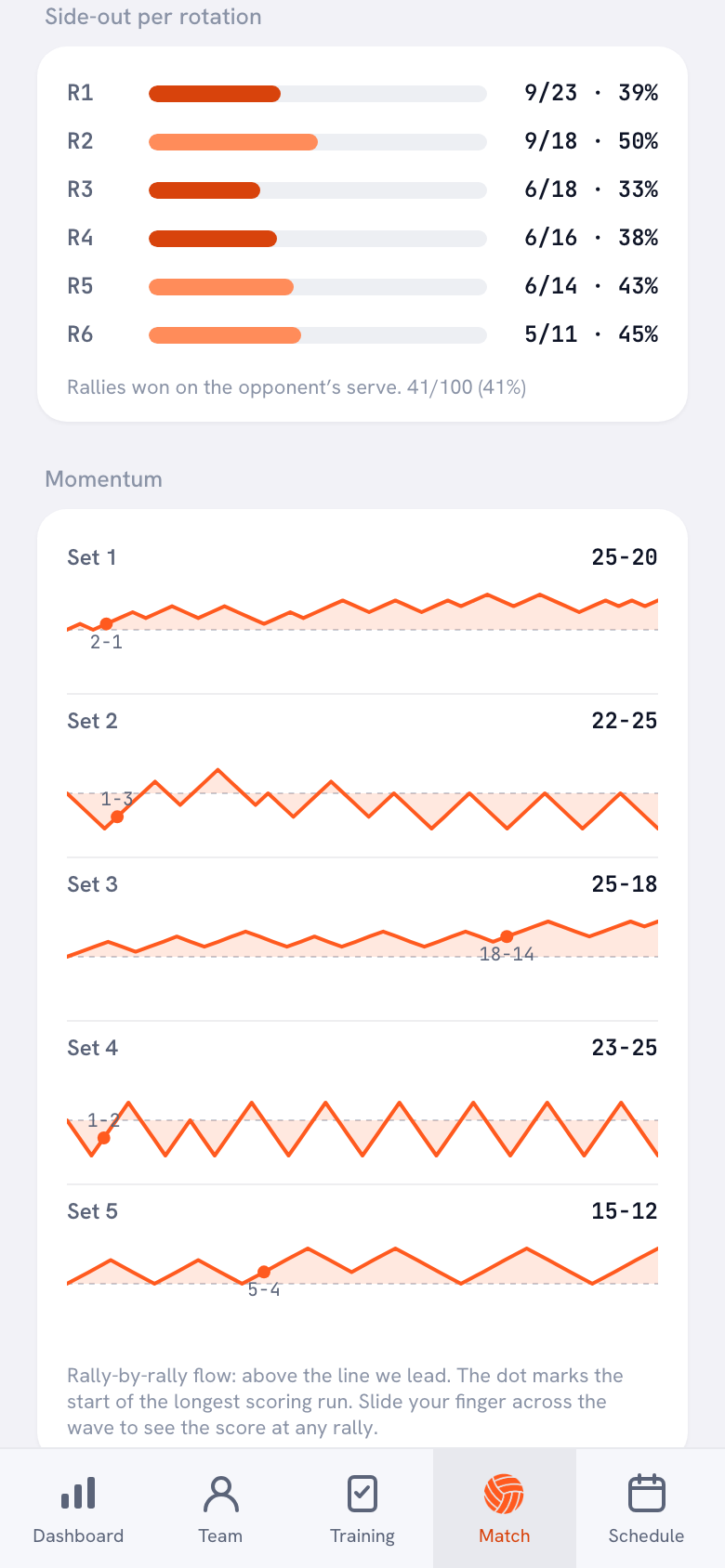
In that old match, look mainly at Side-out per rotation: in which rotation did your team win the rallies on the opponent's serve, and where did you get stuck? That's exactly the question you answer on the sheet under Our starting rotation. What that number tells you and how to read it rotation by rotation is in what side-out means in volleyball. This only works if the opponent has the same name every time; the opponents the app remembers take care of that.
14 days free, no credit card. Add your next opponent, draw the board and see after the match whether your note helps you the next time.
Try Koach at your next matchDuring the match: the time-out card
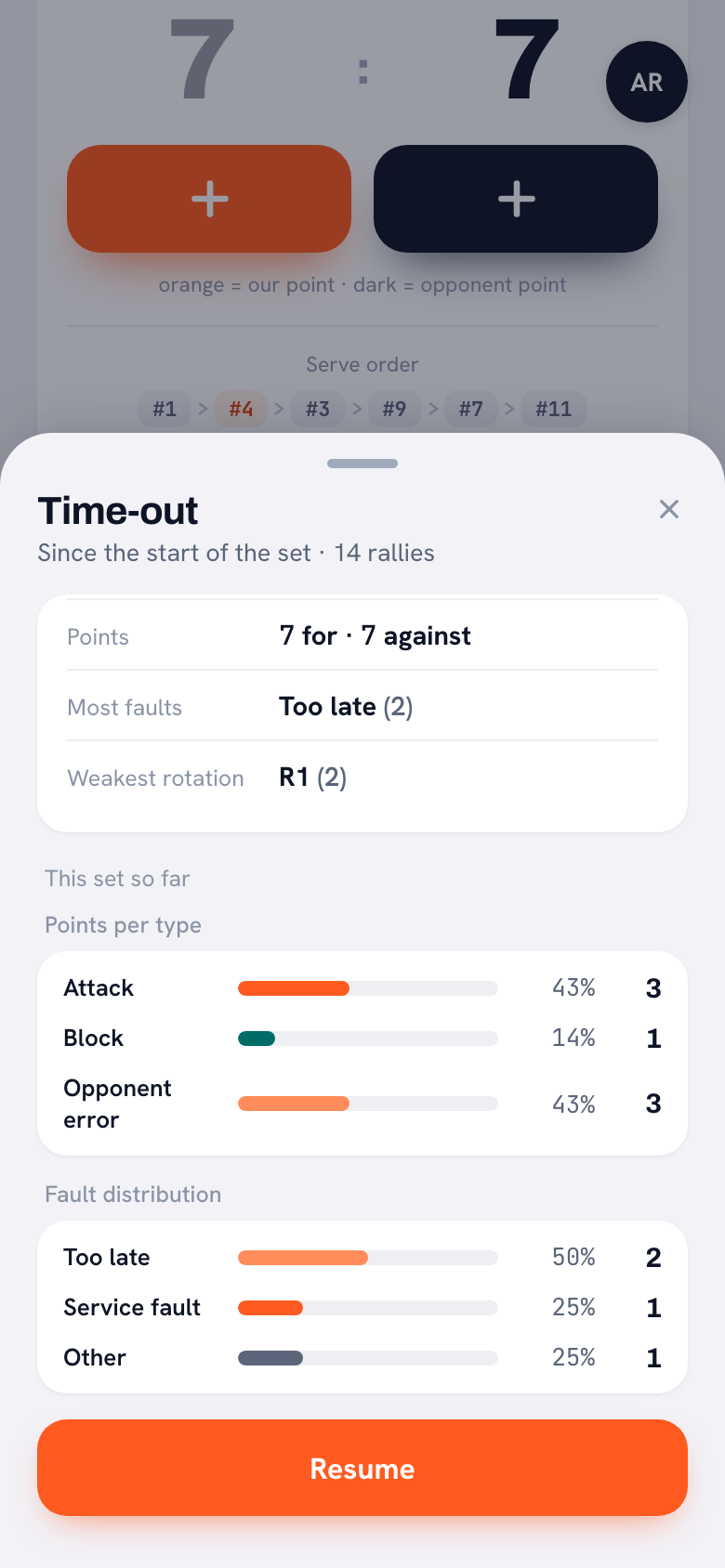
If you score live, tapping a time-out brings up a card with what has happened since the start of the set, or since your previous time-out: points for and against, Most faults and Weakest rotation. So you still choose when to call the time-out, with your plan as a guide; the card then gives you what to say in it. If you ticked that you'd step in when a rotation keeps getting stuck, this is where you see in black and white which rotation that is.
After the match: the match note
Under every completed match there's a Match note box, with the placeholder text Short evaluation or focus points…. That's where you write what would otherwise go on the After the match strip: did the serve target work, did their number 7 really attack from zone 4? The note is only visible to coaches, so players and parents can't read along. When you play this team again, you open that match through Previously vs and your note is still there.
What Koach doesn't do
Koach doesn't keep stats per player for the opponent; what the app does measure for your own team, and how to read those numbers, is in understanding and using volleyball stats. When you score live, all you record about the other team is whether a point came from their error or from a good play of theirs; attack directions, heat maps and video aren't in the app. So you write down the opponent's shirt numbers, attackers and servers yourself, on the board or in the note, just as you would on paper. There's also no button that prints your game plan as a PDF: if you want a sheet in your bag, print the template above. And if you want every action tallied per player, a dedicated scouting app is the better choice. Those are compared side by side in our comparison of volleyball scouting apps.
Which game plan suits which coach?
- The template on its own suits you if you want to prepare a few matches a season thoroughly, like working with a pen, or don't want to use a phone on the sideline.
- Koach suits you if you face the same opponents several times a season and want last time's results, numbers and notes at hand, or if you work with an assistant coach who needs to see the same thing.
- Neither suits you if you want to code every touch the opponent makes, like an analyst at a top team. For that you need a dedicated scouting program.
What does it cost?
The template is free, as a PDF and as a Word file. You can try Koach free for 14 days, with no credit card and every feature. After that you choose Coach for €2.99 per month (one team, two coaches) or Club for €9.99 per month (unlimited teams and coaches); with a yearly plan you pay €2.49 or €8.33 per month. All prices are on the pricing page. In the App Store and Google Play you'll see the price in your own currency. Player accounts are free.
Read last time's sheet before you fill in a new one. The After the match strip from your first meeting often tells you more than another round of scouting: you already know what worked. In Koach, that same note sits under the previous match, one tap away from Previously vs.
Frequently asked questions
What should a volleyball scouting report include?
A useful scouting report has two sides. On the left, what you know about the opponent: their starting rotation and system, their strongest attackers, their most dangerous servers and how their serve receive is set up. On the right, what you do about it: which player or zone you serve at, which rotation you start in and who blocks their best attacker, when you call a time-out, and three key points for the team. Anything longer than one page won't get used during the match.
What is the difference between a scouting report and a game plan?
A scouting report describes the opponent: who serves hard, who passes poorly, which system they run. A game plan is what your team does about it: serve targets, your starting rotation and a time-out plan. The template puts them side by side on one sheet, so every point on the right can be traced back to something you saw on the left.
Can I keep a volleyball game plan in an app?
In Koach the plan lives with the match itself. For a planned match you create a tactics board that belongs to that match, when you start you see the head-to-head and past results against that team under Previously vs, and afterwards you write a match note that only coaches can see. Koach doesn't keep stats per player for the opponent.
Can my players see the game plan in the app?
Not the match note: that's only visible to coaches. Players don't open the tactics board themselves either, but you can send it to your team's group chat with Share as image. That way you decide what the team gets to see, which is usually a lot less than what's on your own sheet.
Is the template free, and what does Koach cost?
The template is free, as a PDF and as a Word file, with no sign-up. You can try Koach free for 14 days, with no credit card and every feature. After that Coach costs €2.99 per month for one team with two coaches, and Club €9.99 per month for unlimited teams; a yearly plan costs less. Player accounts are free.

Attach your next game plan to the match
14 days free, no credit card. After your next match, your note is ready for the rematch.
Get started with KoachOr read first what the volleyball coaching app does.