
Coaches meeting agenda template: 5 items and team-by-team prep
The short answer
A workable coaches meeting agenda template has five fixed items: last meeting's action points, a round of the teams, one coaching topic, practical matters, and new agreements with a name attached. Prepare the team round in advance: in Koach Club you read each team's attendance, session reports and signals.
You want a coaches meeting agenda template you can reuse every time, and a way to stop losing half the meeting to everyone explaining how things are going. Below is the template, followed by how to pull what you need to know out of the teams before anyone sits down.
Coaches meeting agenda template: the five items
A coaches meeting is when all of the club's coaches sit down together: the head coach or youth coordinator, the coaches of the senior and youth teams, sometimes an assistant. The aim is to align and to flag issues, not to make decisions about teams; that is the job of the technical committee. This template fits into 75 minutes:
- Welcome and last meeting's action points (10 minutes). Go through what was agreed last time: what is done, what carries over and what gets dropped. Start here, or the same items come back every time without anyone noticing that they never get done.
- Team round (25 minutes). Not every team tells its full story. The teams where something stands out get proper time, in an order you set beforehand. A team with nothing to report gets one sentence.
- One coaching topic (20 minutes). One subject, announced in advance: the youth warm-up, training serve receive with a small squad, or a coach demonstrating a drill that works for them. You can finish one topic; you can't finish three.
- Practical matters (10 minutes). Court time, equipment, match days and who covers when a coach is away. Anything that only concerns two people, you sort out with those two afterwards.
- Agreements and next date (10 minutes). Every action point gets a name and a deadline. Fix the date of the next meeting on the spot. Today's action points are item 1 next time.
That adds up to 10 + 25 + 20 + 10 + 10 = 75 minutes. The weight sits deliberately on the team round and the topic: that is why you meet at all. If you want the meetings in your annual plan, include them in your season planning, so the dates are fixed before the league starts.
Why the team round always runs over
Everyone talks about their own group, from the new libero to the gym that was too cold, and after eight teams nobody remembers what was going on with the second one. The problem is not that coaches talk too much. The problem is that nobody knows in advance what the conversation should be about.
The fix is preparation. Whoever chairs the meeting knows four things about each team beforehand:
- Attendance. Has it been dropping over the last few weeks, or was it one bad night?
- The plan. Is the team getting through what the coach planned, or is part of it always left over?
- What the coach wrote down. The short session reports from the last few practices say more than a summary from memory.
- Players to follow up on. Someone who has missed three in a row, or a note the coach has marked for follow-up.
And one thing no overview shows: how the coach is doing. That is what the table is for.
Check-in or team log: two ways to gather it
The familiar way to gather that information is a check-in. A week before the meeting, each coach gets an email or a message in the group chat with a few questions. It works without an app, and it catches things no log will ever hold: a coach who is struggling, friction with parents, a player going through something at home. The downside is that it costs the coach a form every time, and the busiest coaches don't fill it in. Often that is exactly the team you want to talk about.
The team log in Koach Club turns that around. You don't collect anything; you read what the coaches already record: attendance, how much of the plan got done, their report and their notes. But if a coach records nothing, there is nothing there, and a feeling never shows up in it. The best preparation is therefore both: the log for the facts, and one open question to every coach.
| What you want to know beforehand | Check-in by email or group chat | Team log in Koach Club |
|---|---|---|
| Attendance per practice | If the coach tracks it and sends it back | Yes, the number present, if the coach records it |
| What got done from the plan | From the coach's memory | Yes, each block marked done, partly done or not done |
| The coach's report | If they answer the questions | Yes, if they write a report after practice |
| Which teams need attention | Work it out yourself from the replies | Yes, the signals are at the top |
| How the coach is doing | Yes, if you ask | No |
| Extra work for the coach | A form per meeting | None, if they already keep track |
How to prep a coaches meeting in Koach Club
Step 1: put the meeting in the schedule
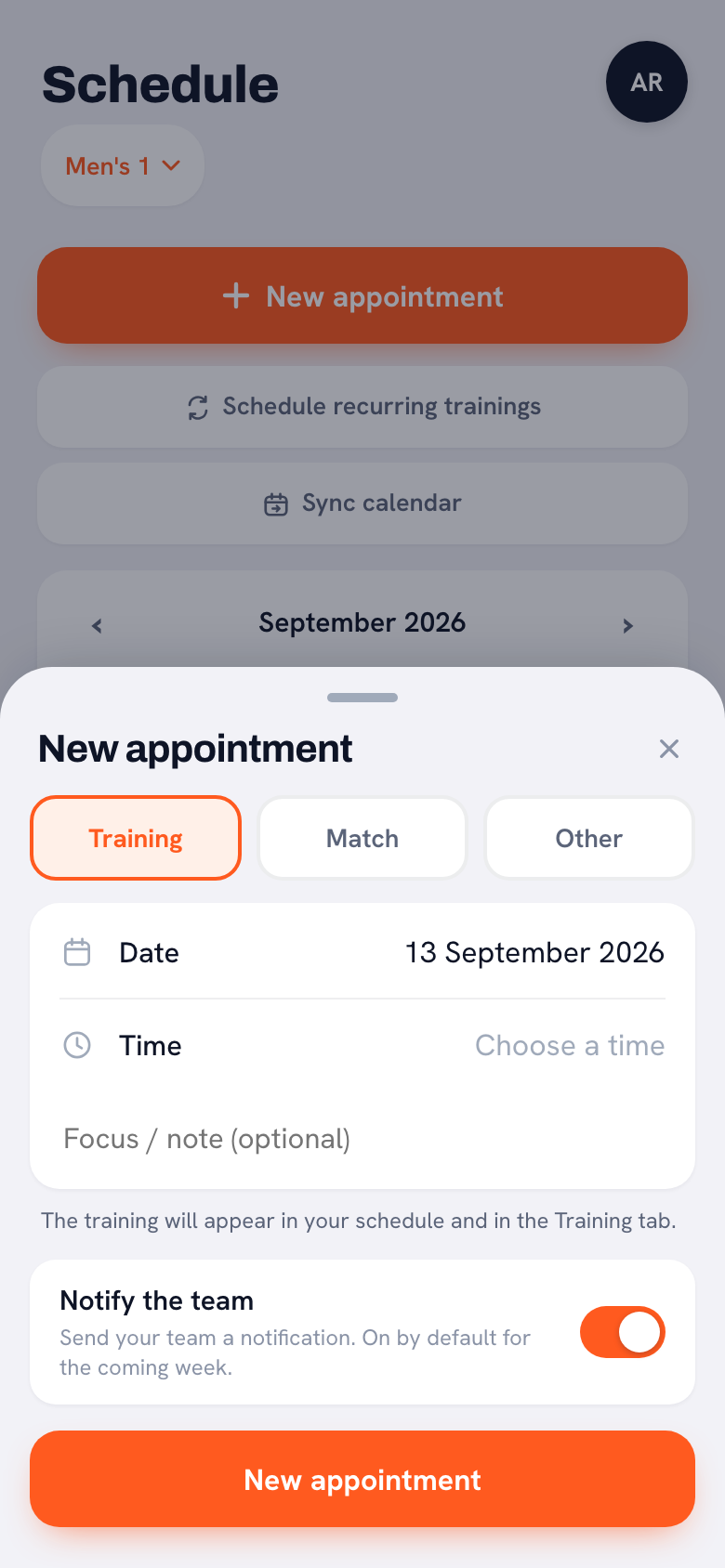
Open Schedule, tap New appointment and choose Other. Fill in the date and a title, pick Coaches meeting as the type and enter the venue under Location. In the information or instructions box, add the five agenda items. Anyone who has linked the team schedule to their phone with Sync calendar sees the meeting there too.
Three things to know. A one-off appointment sits in one team's schedule and is for the whole team or for one team member; there is no coaches-only option. So your players and their parents see the coaches meeting in their schedule, with the title and the location, and when you save it the team gets a notification with the title; they can't open the appointment itself. The description does go through to the linked phone calendar of anyone who subscribes to the team schedule, so put only the agenda items there, no comments about teams or players. And there is no club calendar that adds one appointment to every team at once: each coach adds the meeting to their own team schedule. How such an appointment works in more detail is covered in a one-off appointment in the team schedule.
Step 2: read the signals a few days ahead
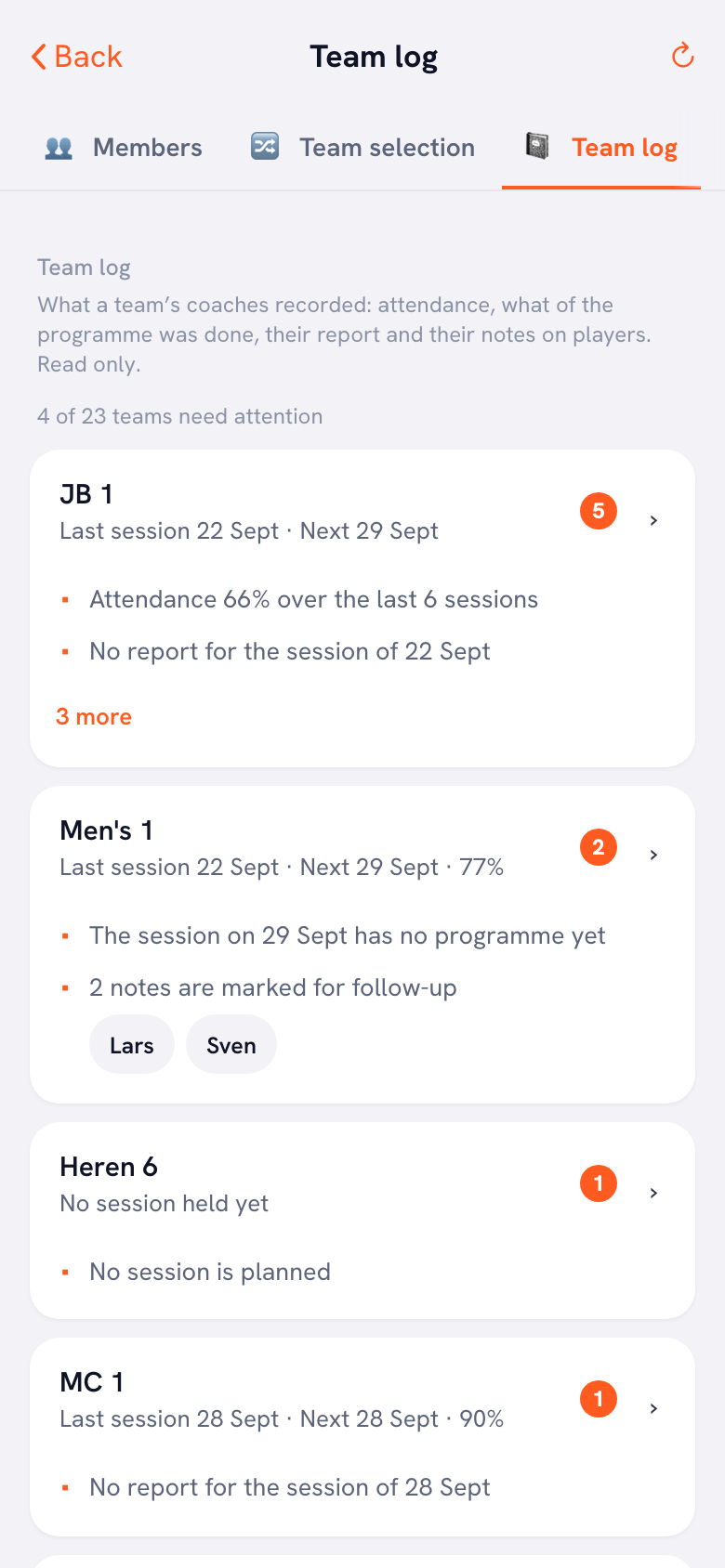
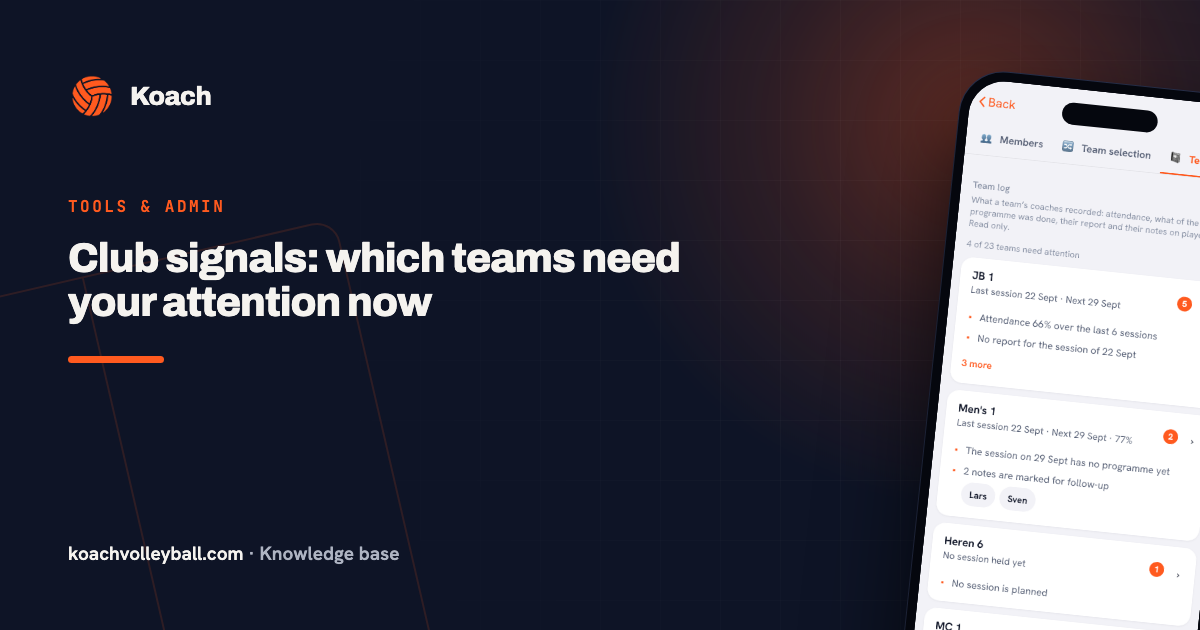
Go to Profile, then Club dashboard, and open the Team log tab. At the top you see how many of your teams need attention, and below that the teams with the most signals first, such as low attendance, a practice without a report or players who missed three sessions in a row. That order is your team round, ready made. A team without a signal gets no orange number and no signal lines: under its name you only see the last and the next session, plus attendance if it has been recorded. That team gets its one sentence at the table. What each signal measures exactly is explained in the signals block of the club dashboard.
We set up Koach Club with you. Club has no free trial: leave your details and we'll show you how the team log and the signals work, then set up your club together. If you coach a single team yourself, you can try the app free for 14 days.
Book an intro call Start with your own teamStep 3: open the log of the teams at the top
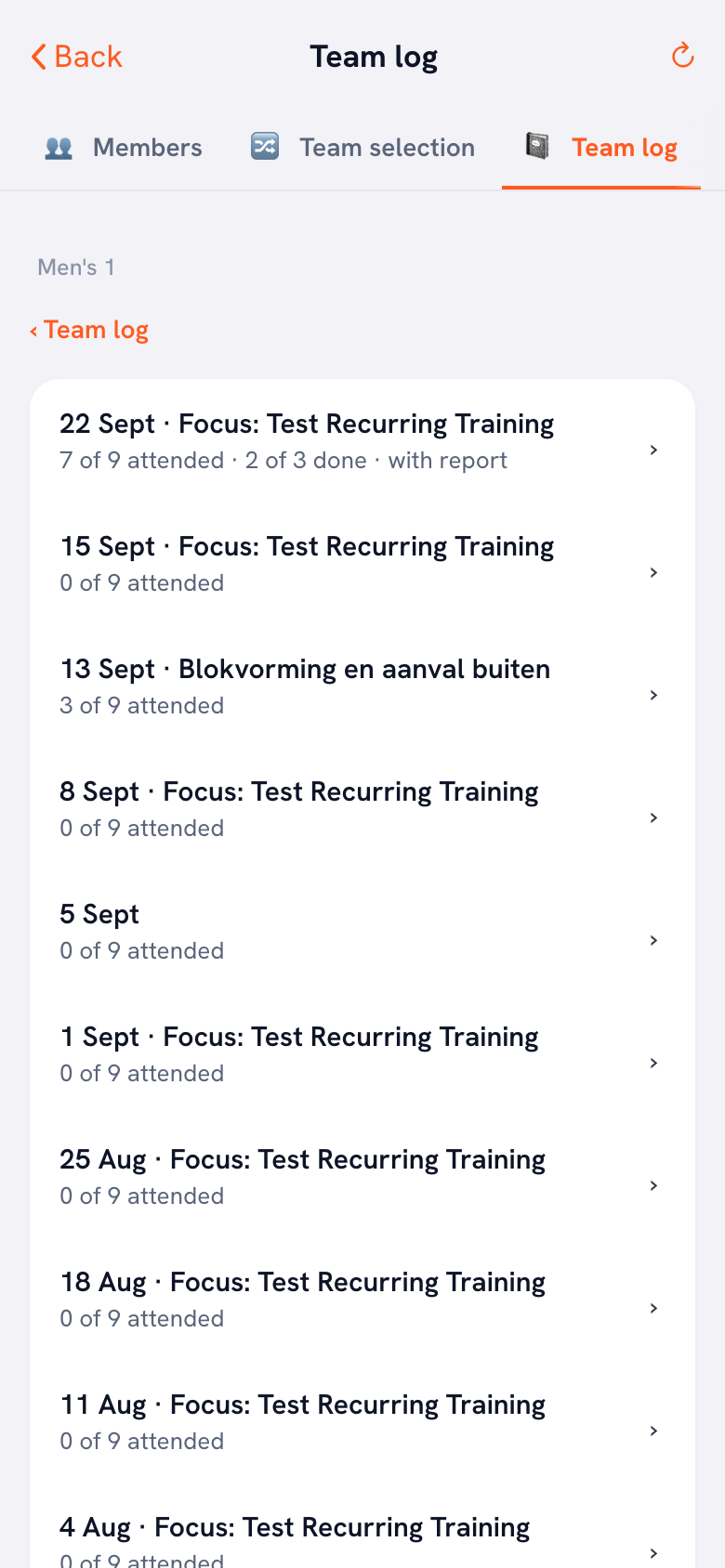
Tap a team name. If practices are scheduled, you first see under Coming up how many blocks the plan has, or No programme yet. Below that, under Sessions held, are the last twelve practices, newest first; you load older ones with Show older sessions. Each night has one line: how many players were there, how many blocks of the plan were done and whether there is a report. Expand a night to see the plan with what was done, the report and the notes the coaches made about players that evening. For attendance you only see the number, not who was missing, and player ratings are not included.
Step 4: boil each team down to one line
For item 2 of the agenda, write one line per team: what stands out, and what question you will ask the coach. For example: attendance has been dropping for a few weeks and the plans are only ever partly done; ask whether it is the practice slot or an overloaded plan. That way the conversation opens with a question rather than a verdict, and the coach knows what it is about.
The topic can carry on after the meeting too. Ask the coach who showed a practice that works to save it with Save as template. The other coaches in the club can pick it up through Copy plan, under From other teams in the club.
Who can read it: the technical manager
The team log and the signals are visible to three club roles: the club manager, a board member and the technical manager. The last one fits a coaches meeting best. They can read the practices, reports and notes of every team, change nothing and see no contact details. If the person preparing the meeting is not yet a club manager or board member, have the club manager give them the Technical manager role under Admins. Then they can read everything without being able to change anything. What that role can and cannot do is explained in the technical manager as a club role.
Also tell your coaches plainly that the club's leadership can read their reports and their notes on players. The app already says so under After the session and under Notes from this session, but hearing it in the meeting tells people where they stand. And read it as the coach's work, not as their appraisal.
Look three days ahead, not on the night itself. That gives you time to call a coach separately about something that doesn't belong in front of the group, such as a note about one player they have marked for follow-up. Not everything in the log belongs on the agenda.
What Koach doesn't do for a coaches meeting
- No minutes and no action list. You keep the agenda and the agreements in your own document; Koach provides the preparation, not the record of the meeting.
- No RSVPs for the meeting. A one-off appointment is for information only: it has no sign-up buttons.
- No appointment for coaches only and no club calendar for all teams at once, as step 1 explains.
- No content without input. The log shows what coaches record. If a coach doesn't tick off attendance or write a report, there is little to see.
- No editing from the club area. Whoever has read access can't add to a report or remove a mark; that stays with the team's coach.
Who this suits, and what it costs
It suits a club with several teams where one person prepares the coaches meetings (the head coach, the youth coordinator or the technical manager) and the coaches already keep their practices in Koach. Then the team round is prepped before the first coach walks in.
It doesn't suit you if all you need is an agenda template: that is at the top of this article and free to use. Nor does it suit you if the coaches don't record attendance or reports, because then the log has nothing to show.
The team log, the signals and the technical manager role are part of Club: €9.99 per month, or €8.33 per month on a yearly plan, for unlimited teams and coaches. Club has no free trial: use the form on the clubs page to book an intro call. Coach, for one team, costs €2.99 per month and you can try it free for 14 days; the Coaches meeting appointment type is included there too, the club module is not. All prices are on the pricing page; in the App Store and Google Play you see the price in your own currency.
Frequently asked questions
How often should you hold a coaches meeting?
Pick a fixed rhythm rather than meeting only when something comes up, for example once every six to eight weeks during the season, plus one meeting before the start and one after the last match. Put all the dates in the calendar at the start of the season. A meeting that only gets scheduled when something goes wrong almost always comes too late.
What is the difference between a coaches meeting and a technical committee?
A coaches meeting brings all the club's coaches together to align, share experience and flag what is going on in the teams. The technical committee is a small group that makes the decisions: how many teams there are, who coaches which team and how players are placed in teams. The coaches meeting feeds that committee with what it sees, but does not decide on team placements itself.
Can coaches see when the club reads their session reports?
They know it can happen, not when it happens. Under After the session and under Notes from this session, the app says that the club's leadership (club manager, board, technical manager) can also read the report and the notes on players if the team belongs to a club. Nobody is notified when someone opens the log. So say it in the meeting itself as well, so nobody finds out only when their report comes up at the table.
Can I schedule an appointment for coaches only?
Not as a separate group. A one-off appointment is for the whole team or for one team member, and the team's coaches always see it. The Coaches meeting type does make it clear straight away what it is about, and players can't open the appointment. To invite all the club's coaches at once, the club manager or the board can send a club email to Coaches only, if club email has been set up.
How much does the team log in Koach cost?
The team log, the signals and the club roles are part of Club: €9.99 per month, or €8.33 per month on a yearly plan, for unlimited teams and coaches. Players and parents use Koach for free. Club has no free trial; you book an intro call through the form on the clubs page. Coach, for one team, can be tried free for 14 days, but it does not include the club module.

Prep your next coaches meeting with Koach Club
Club has no free trial: request an intro call on the clubs page and we'll set up your club with you. Coaching one team yourself? Start your 14-day free trial below.
Get started with KoachOr read first what the volleyball coaching app does.