
Club signals: which teams need your attention now
A club with twenty teams has twenty coaches recording something every week. For the coach themselves that is enough, they know their own group. For whoever is responsible for all those teams it is unusable as long as it stays twenty separate screens: you would have to open every one of them to find out that at seventeen of them nothing is wrong.
The question that repeats itself every week
The block at the top of the team log turns the order around. Not looking first and then seeing whether there is anything, but seeing first where something is and only then looking. The question it answers is small and comes back every week: where do I need to look now? As long as nobody answers it, it gets answered by whoever shouts loudest — the parent who emails, the coach who quits halfway through the season. Both of those are late signals.
What the block does not do is take over the looking. How you handle eight teams you never see train, in what rhythm you work through them and how you raise something with a coach that you have not seen yourself, is covered in the job of a youth coordinator. This piece is about the page that answers that question before you ask it — and therefore about the part of that job you no longer have to scrape together yourself.
Where it sits and how it is built up
You find it in the club part of the app: Profile, then Club dashboard, and in the bar at the top the Team log tab. What is in that club part and how you get there is covered in the club dashboard for your club. The signals sit at the top of that tab, with the team list underneath.
That it is one page rather than a second tab is a choice. The question “where do I need to look” and the question “what does it say inside that team” belong one after the other, not in two places. You read at the top that there is something, you tap the team name, and you are in that team's log. No detour through a menu.
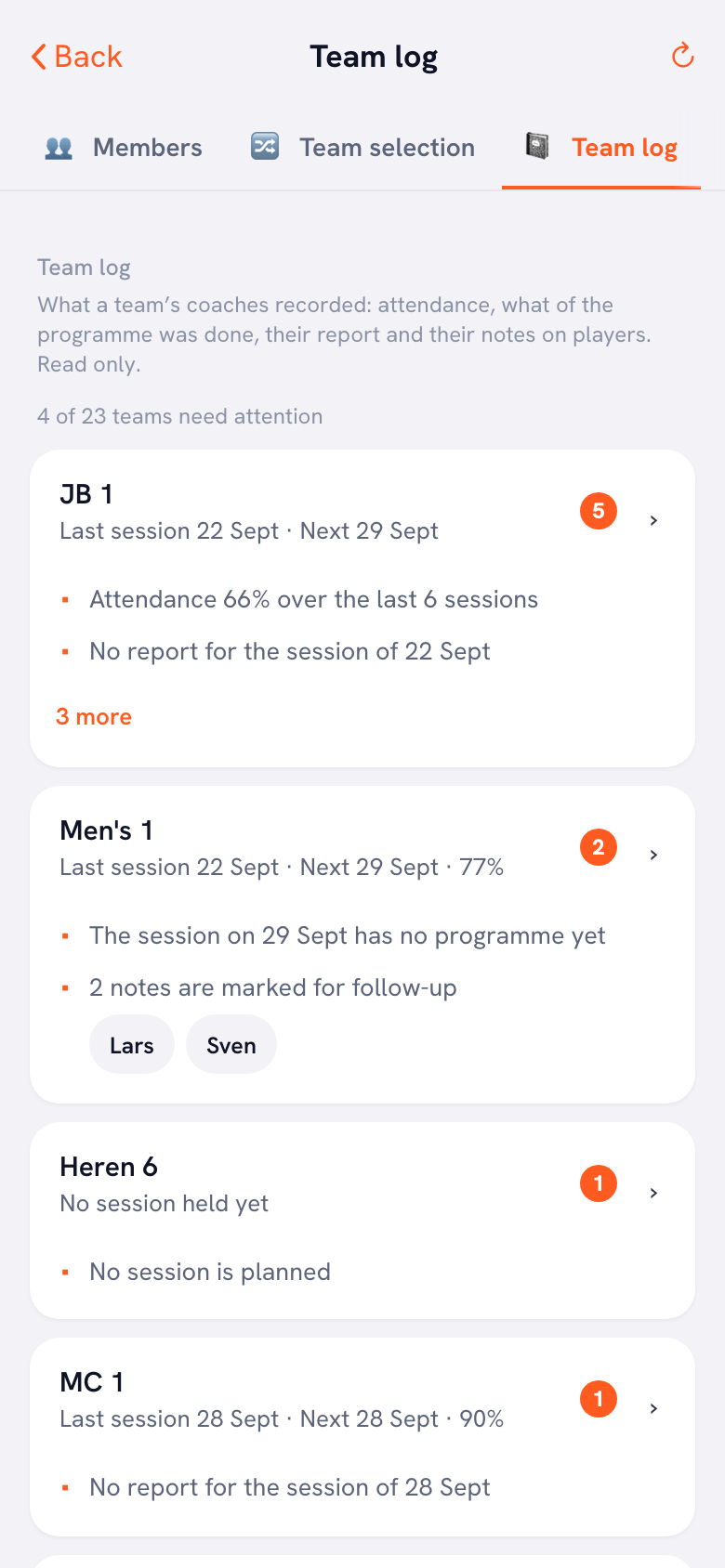
At the very top there is one line with a counter: so many of so many teams need attention. If it is none, it says instead that there is nothing needing attention right now. Below that comes the team list, and it is not sorted alphabetically but by the number of signals: the teams with the most sit at the top, and where the number is equal they are alphabetical. Alphabetical is nicer to search, but this page answers one question, and then the answer belongs at the top.
Per team you see the name, below that a line with when the last session was and when the next one is, and on the right a small round number if there are signals. The first two signals are written out under the line; if there are more, you expand them. If a team's attendance percentage is not in the row, that is not a fault: it only appears there when attendance is not itself a signal, because otherwise the same figure would sit twice on the same line.
The six things it looks at
There are six signals, and they only appear when they genuinely apply. They are listed below in the order in which you meet them on screen, with the sentence the app puts next to them and the threshold underneath.
- Attendance is low. The sentence reads, for example, “Attendance 58% over the last six sessions”. The threshold sits at 70 per cent, and the signal only appears once at least three sessions fall below it — one or two thin evenings are not yet a pattern, and a block in which half the group was ill does not belong on your screen as a problem. It looks back over the last six sessions held.
- There is no report. “No report for the session of 12 September”. This is about the last session held: there was an evening, but nothing has been recorded about what happened.
- There is no programme. “The session on 26 September has no programme yet”. This looks the other way: there is a session in the schedule, but nothing has been prepared for it.
- Somebody missed three in a row. “2 players missed three sessions in a row”, with the names directly underneath. Three times is a pattern, twice is a bug going round. If there are more than five names, five are shown.
- Notes are waiting for follow-up. “3 notes are marked for follow-up”, again with the names next to it. The coach sets that mark on a note themselves, and it counts for ninety days. After that it drops out of the block, even if nobody has removed it — a mark from last season that nags for ever mostly teaches you to look past the whole block.
- No session is planned. “No session is planned”. This is the signal you expect least and that says the most: a team with nothing left in the schedule is a team where something has stopped.
Two of those six are administrative in nature, and that is deliberately not a reason to leave them out. A coach who has been keeping it up for a month and did not do it this week is often a coach with too much on their plate — not somebody who has forgotten how the button works. So the signal is rarely about the report.
An empty space is an answer too
Most overviews in sport show everything: a row per team, a handful of figures per row, and it is up to you to work out which number matters. That does not work with twenty teams, because then you are looking at a wall and you remember nothing.
This block does the opposite. A team without a signal gets no colour, no figure and no warning you have to click away; there is simply nothing under the name. That is good news, and it should come out that way. The result is that you can see at a glance how many of your teams you can skip this week, and that is the part of the time saving you think about least.
That is also why the counter is there. If three out of twenty-two teams carry a signal, you know immediately that the evening is going to be manageable. If seventeen do, that probably does not mean there are seventeen problems, but that something in the club itself is not running — a coaches' meeting that did not happen, or a group that has only just started using the app.
Why two signals carry a name
With four of the six signals a number travels and nothing else. With two, a player's name travels: with the signal about missing three sessions in a row, and with the notes waiting for follow-up. That is a deliberate exception to the rule that club management only sees attendance as a number.
The reason is practical. A manager who knows that two players missed three sessions but not which two can do nothing. They cannot raise it with the coach without it being about “somebody”, they cannot check whether it is the same player as last month, and they certainly cannot arrange for someone to call. That is precisely the signal with which a club keeps a child rather than losing one — and why that matters is covered in keeping young players in the game. A number without a name is worthless there.
With the follow-up mark something else plays a part: the coach sets it themselves, with the intention that somebody from the club picks it up. Passing it on anonymously makes it unusable and ignores the coach who took the trouble to set it. How such a note comes about and what you do and do not put in one as a coach is covered in keeping notes on players.
A name in a signal can be tapped. Do that and you land straight in that player's notes inside the team log — not in a list you have open across the whole club, but with that one player, because you came in through their name.
What does not go out is just as important. No email addresses. No sign-off messages and no reasons why somebody signed off. No assessments and no ratings. And from the notes only the number that is marked, never the text: anyone who wants to read the note itself has to go into the team log for it.
Who sees it, and what it is not
Three roles in the club get to see this block: the club manager, a board member and the technical manager. Not the treasurer, because they deal with money. Not the confidential adviser, because that role works confidentially and one to one, and reading along in what a coach writes about a child would blur their role with that of the technical leadership. What that fifth role may and may not do otherwise is covered in the technical manager as a club role.
The block only looks at teams attached to your club name right now. If a coach moves their team to another club, it disappears from your list; a team that is not under it never comes into it. That is no detail: without that rule you could be reading along inside another club's team through an old reference.
And it is not a performance overview. There is no league position in it, no set ratio and no rating per player. It is exclusively about whether the ordinary work around a team is carrying on. What a coach sees about their own teams — the figures, the attendance per player, the comparison between two groups — is something else, and that is covered in managing several teams as a coach.
One technical detail is worth mentioning because you notice it. The app builds the sentences itself, in the language of whoever is looking; what comes from the server is only the type of signal with the facts underneath. So a German or Polish board member sees the same six signals in their own language, and nobody is served a half-translated message.
What you do with a signal
A signal is a question, not a verdict. That sounds like hedging, but it is the only way to keep a block like this usable. Attendance of 58 per cent over six sessions can be a team that is sinking, and it can be a team where three players are injured at the same time. You only know the difference once you ask.
In practice that means three things. With an attendance signal you first look at whether it is one evening or a line, and what a coach can do about it themselves is covered in raising practice attendance — that is their job, not yours. With three sessions missed in a row it is about that one player, and the coach is the one who knows whether there has already been contact. And if a team has had nothing planned for a month, that is the one signal where you do not have to wait before you call.
What you then say, and how you do it without it sounding like an accusation, is a craft in itself. That does not belong here but in the article about the coordinator role, and it is worth reading before you call the first coach.
In short. Profile, Club dashboard, Team log tab. Six signals, only when they apply, teams with the most at the top. Two of them carry a name, and that name can be tapped. The conversation that comes after is covered in the job of a youth coordinator.
Frequently asked questions
Why do I see no percentage in the row for a team with low attendance?
Because it is already in the signal sentence. That sentence names the percentage together with the number of sessions it was calculated over, and that is more context than a loose figure. If it also appeared next to it, the line would get longer without getting clearer. For teams where attendance is not a signal, the percentage does sit behind the date line, so that you see it anyway.
A player has just joined the team. Are they reported as missing three sessions straight away?
No. Per player the block only looks at sessions from the day they were added to the team. For the evenings before that no attendance exists for them, and without that boundary it would read as three absences in a row. Guest players do not count in this signal at all: they belong to another team and must never turn up there as absent.
How long does a note marked for follow-up stay in the block?
Ninety days, counted from the date of the note. After that it drops out of the signals block, even if the coach never removed the mark. That is deliberate: otherwise a mark stays until somebody touches it, and an alert from last season that returns every week teaches you to ignore the whole block. In the team log itself the note simply stays.
Can I change anything from the signals block, for example add a report?
No, the whole club part only reads here. You can click through to a team's log and to a player's notes, but there is no button to write a report, prepare a programme or remove a mark. That stays with the coach of that team, in the team screen, where their own permissions apply.

Try it yourself in Koach
Less admin, more coaching.
Get started with KoachOr read first what the volleyball coaching app does.