
Organise a volleyball home match day: courts, times and helpers
The short answer
You organise a volleyball home match day from one day plan: which match on which court and at what time, within the hall booking, with a referee and a scorer for each match, plus hall duty and the bar. In Koach the board sets this up in the day plan, assigns the officials automatically and shares the schedule as a PDF.
To organise a volleyball home match day with four or five teams on one Saturday is mostly a question of order: first the hall and the courts, then the times, then the people. Here you will find a checklist, a sample schedule that adds up, and how to get the day sorted in Koach.
What do you need to arrange for a home match day?
A home day stands or falls with a list that is finished before the season starts. This belongs on it:
- The hall and the booking. From setting up to clearing away, not just the playing time.
- The courts. How many courts you can fit, with nets, posts, antennas and a table per court.
- The start times. Sometimes the federation or league fixes them, sometimes you choose them yourself within the rules.
- Officials. A referee and a scorer for each match. Who provides them and what training they need differs by country and by league; check your own regulations.
- Hall duty and the bar. Someone who is the point of contact in the hall, and a staffed bar or concession stand.
- Communication. Address and start time to the visiting teams, the schedule to coaches, players and parents.
- Afterwards. Reporting the results where the federation asks for it, and leaving the hall tidy.
The officials and the bar are the most work, because they involve people. How to assign referees is in referee scheduling; what a scorer does exactly in volleyball scorekeeper duties; and how the bar rota fills itself in a concession stand schedule.
A sample schedule for one Saturday
Allow two hours per match, from the start until the court is free again. For three or four sets that is usually enough; a five-setter can run over, and you keep room for that at the end of the day. Where that time goes is in how long a volleyball match lasts. An example with two courts and a hall booking from 9:00 to 18:30:
| Time | Court 1 | Court 2 |
|---|---|---|
| 9:00 | Set-up | Set-up |
| 10:00 | U15 Girls | U17 Boys |
| 12:00 | Women's 3 | Men's 3 |
| 14:00 | Women's 2 | Men's 2 |
| 16:00 | Women's 1 | Men's 1 |
| 18:00 | Clear-up | Clear-up |
That is eight matches. With a referee and a scorer per match, you have sixteen official duties. Add two hall duties (morning and afternoon) and the bar, for example two shifts of three people: six spots. Together that is 24 duties for one Saturday. The logical split: whoever plays at 16:00 referees or scores the youth matches at 10:00 in the morning, and whoever plays at 12:00 does a duty at the 16:00 matches.
Do not plan a match tightly behind a long one. If the 12:00 match runs on until a quarter past two, everything on that court shifts a quarter of an hour and the last match ends outside the hall booking. Two things help: put the matches that take the least time early in the day, and after the last start time plus two hours, keep half an hour for overrun and clearing up. In the example that is 18:00 to 18:30.
Match day and the day plan: two screens in Koach
In the club dashboard, under Planning, there are two things that look alike but do something different.
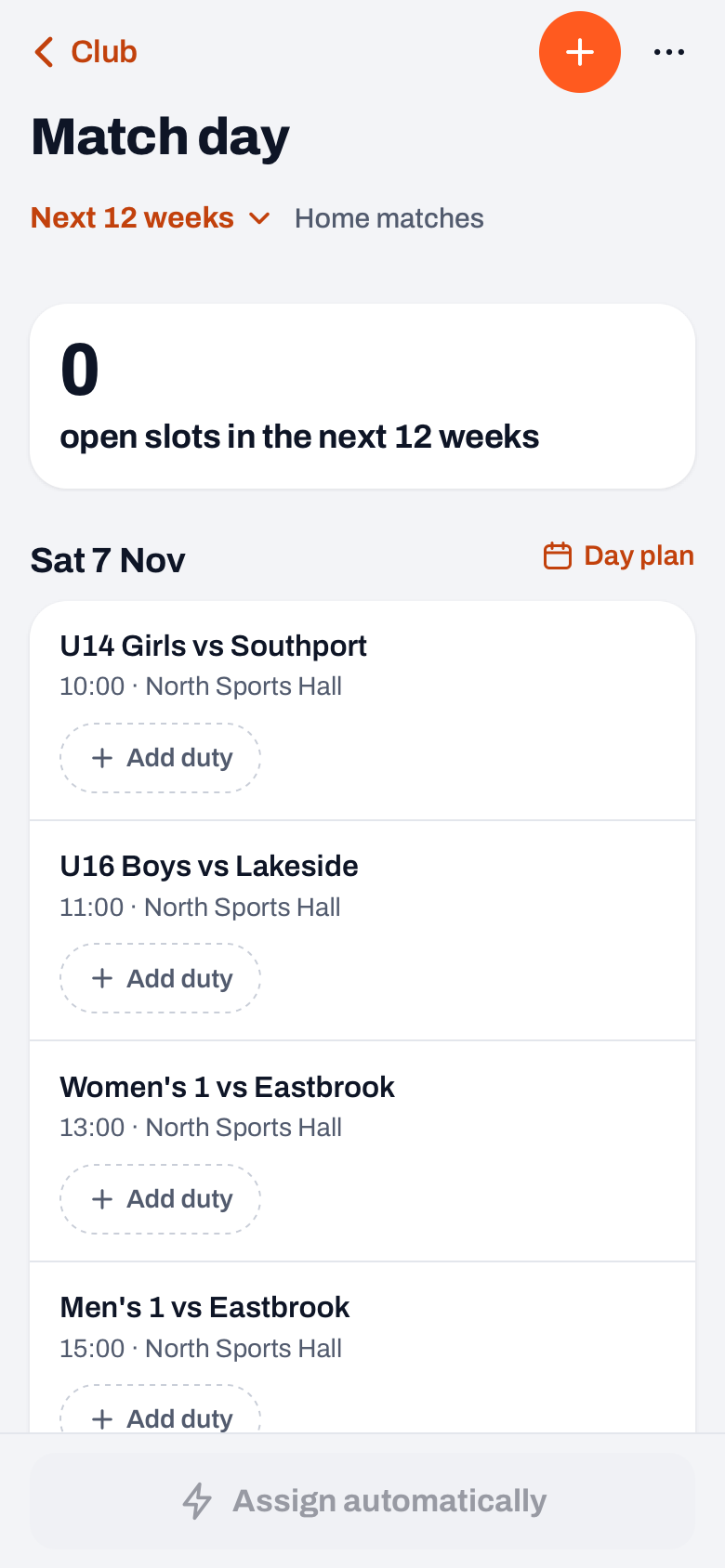
- Match day is the overview of all home matches in a period: the next 4 or 12 weeks, or the whole season. For each match you see the duties, at the top how many spots are still open, and at the bottom the Assign automatically button.
- The day plan is the planning for one day. You open it in Match day with the Day plan link next to a date. For each hall you see the courts and start times as a grid, and at the top Hall booked with the times.
Both show home matches only. Away matches and cancelled matches are not included. Tournament matches are, but for those you only arrange the duties: time and court come from the tournament.
Courts, times and duties in a few taps
- Record the hall booking. In Halls, place a block of the Match type on the day you play at home. The day plan works with it and warns with Outside hall booking when a match (with two hours of play) does not fit.
- Share out the courts. Assign courts puts every match without a court, in order of time, on the lowest-numbered court that is free for two hours at that point. Anything that already has a court stays put.
- Move a time if you need to. Tap a match and choose a different time, hall or court. If you move the time, the coach of that team gets a card on their dashboard ("Home match now at" the new time), not a push notification. With Let the team know they then send their team a notification themselves. If the match comes from the federation schedule, the app reminds you to pass the new time on to the federation too. You cannot change the date here.
- Assign the officials. Assign officials sets up a referee and a scorer for every match that day and assigns them straight away. Nobody gets more than two duties a day, with at least two hours between the start times, and anyone who plays around that time or plays away that day is skipped. Anyone already assigned stays.
- Share the schedule. With Share you choose Share as PDF (a table per hall with match, time, court, referee and scorer) or Share as text (WhatsApp).
Is a team playing that does not use Koach, or is a match not in the schedule yet? With Add match the board adds it themselves, as a home match of that team.
14 days free, no credit card. Start with your own team; Match day and the day plan come with the Club plan.
Try Koach with your teamOfficials and volunteers: who does what?
At the bottom of Match day is the Officials list. For each person you use the Referee and Scorer switches to set what they can do, and a level if you want. Only people on that list can be assigned automatically. Assigning automatically looks first at who has had the fewest duties this season. In Match day it only fills the open spots of duties that already exist; with Add duty you first put a role on a match and choose straight away who does it.
Anyone who is assigned sees the duty in their schedule and can withdraw there; their name then shows "declined" in the chip, and at the next round of assigning they are not put on that duty again. That day's bar duty appears as a separate Bar chip on the match. More about Match day and the duty chips per match is in the referee and scorer rota for home matches.
Match day, the day plan and Halls are available to the club manager and board members, and belong to the Club plan. What that costs is on the pricing page, and what else it does for a club on the page for clubs. How home days fit into the whole club year is in organising the volleyball season.
Share the schedule on Thursday, not on Saturday morning. Then anyone with a duty still has two days to swap, and the visiting team knows in time when to arrive. After that, only share changes.
Frequently asked questions
How much time should you plan per volleyball match?
Allow two hours from the start until the court is free again. For three or four sets with the breaks that is usually enough; a five-setter can run over, so keep half an hour free at the end of the day. Koach's day plan also works with two hours per match, both when sharing out the courts and when checking against the hall booking.
Who provides the referee and scorer for a home match?
That differs by country, federation and league. Often the home club provides them, sometimes another team or the federation itself. Check the regulations of your league to see which officials are needed and whether they need training or a licence.
Can someone do two duties on one day?
Yes, but do not overdo it. When assigning automatically, Koach gives each person at most two official duties per day, with at least two hours between the start times. Anyone who plays at home around that time, or has an away match or tournament that day, is skipped.
What does the day plan in Koach cost?
Match day, the day plan and Halls are part of the club dashboard and belong to the Club plan. The amounts are on the pricing page. Officials and volunteers see their duty in their own app; for players and parents Koach is free.
Start with your own team in Koach
14 days free, no credit card. The match day planner comes with Club.
Get started with KoachOr read first what the volleyball coaching app does.