
The set break in your volleyball app: the numbers and your lineup for the next set
The set is over. Your players come to the side, you have a few minutes, and in those few minutes you have to work out what went wrong, who is on court next and who starts serving. That is exactly when you have no time to go hunting through screens. So in Koach the set break opens by itself the moment the set is decided: a screen of its own with the numbers from the set just played, the lineup for the next one, and the button that starts it.
The moment you have the most to decide
Between two sets lies the only break in which you have both time and something you can still change. A time-out is short and about one thing. A set break is longer, your whole team is standing around you, and the set to come starts with a clean slate and with a lineup you get to choose. How long that break lasts and what the rules allow in that time is in how long the break between sets is; this article is about what happens on your screen.
The trap is filling those minutes with an impression instead of with what actually happened. "We passed badly" is almost always true and almost never usable. Whether the set fell apart on service errors, on attacking errors or on an opponent who simply hit well, you only know once you see it written down. And looking it up during the break does not work: then you are standing there scrolling on your phone while your team waits.
The set break opens by itself the moment the set is over
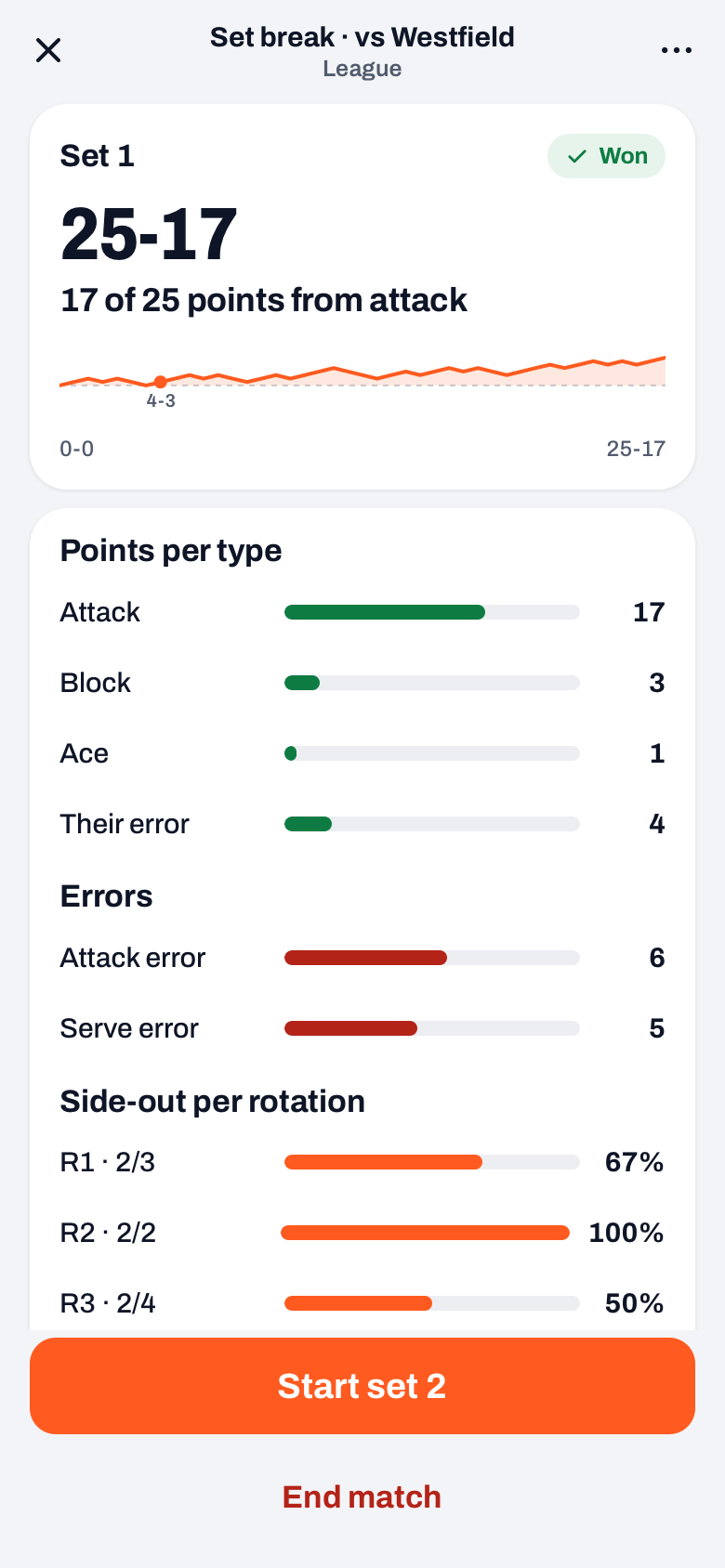
As soon as the score is a set win, on the default setting 25 points with two clear, the set break opens as a screen of its own, with Set break · vs and the opponent's name at the top. You do not have to tap anything for it and you do not have to work out how to open it. At the top sits a card with the number of the set, the badge Won or Lost, the final score in large type and one sentence with the conclusion of the set, for example which point type brought in the most points.
Worth knowing: this is not an extra step in your scoring. The button at the bottom, Start set 3, is the only tap you need to open the next set; you just get information before you give it.
Close the set break with the cross at the top left and nothing happens to the match. The set is not closed off, the score stays where it is. That is deliberate: a misplaced tap in a noisy hall must never end a set. On the live screen, in place of the two point buttons, a single button with the set result and Next set stays put, and that opens the set break again. The set break belongs to the live screen, so it never slides over your dashboard or calendar if you look something else up during the break.
The numbers from the set just played
The card also shows the momentum wave of the set: how the score developed point by point. From the second set break onwards the score in sets and a row with every set score in this match are added, with the sets you won highlighted. That way you can see at a glance whether you are 2-0 up or it is 1-1, without reaching for your match report. How those set scores build up during the match and where they end up afterwards is in keeping track of set scores and set wins.
Below that come three small blocks, all three about the set that has just been played and nothing else, not about the whole match. That is precisely what you need in a set break: the set you have just watched happen, not the average across the evening.
- Points per type. Attack, Block, Ace and Their error. Each line has a bar and the number of points. Types that did not occur are left out, so you never get a row of zeroes.
- Errors. Serve error, attack error, bad pass, late, net or touch and other error, sorted by size, so whatever cost the most is at the top. If no errors were recorded the block simply drops away.
- Side-out per rotation. For each rotation how many rallies you won while the opponent was serving, with a percentage. That shows you in which rotation your reception got stuck this set; how to read such a row is explained in side-out and break point by rotation.
These numbers come from the same source as the match report you read back an hour later. So what you see in the set break is still there afterwards. That sounds obvious, but it is the reason you dare to base a decision on it: you do not have to check whether the screen you get later will contradict the screen you have now.
Key point: pick one thing out of the fault distribution and name it. Nobody remembers four points for improvement delivered in two minutes; the top line of the fault distribution they do.
What you do with that one line depends on the kind of fault. Five service errors in a set is an instruction ("serve in, put the pressure on number four"), seven poor passes is more of an adjustment to who receives serve where. How you make that kind of call from the sideline — and when you should change nothing at all — is covered in more detail in match coaching: time-outs, substitutions and your role on the sideline.
The lineup for the next set
Under the numbers sits the block Lineup set 3. Along the top a row of buttons: the lineups you started the earlier sets with (Set 1, Set 2) and your saved lineups, with the one currently queued up highlighted, and a counter showing how many of the six spots are filled. Below that the court in the order of the hall: 4, 3 and 2 at the net, with 5, 6 and 1 underneath. Each spot shows the shirt number, the name and the role of the player who starts there; a spot with nobody in it says Empty. Under the court sits the Bench, with the players who signed up for the match first, and below it the buttons Rotate back and Rotate forward and the serve order.
You do not have to do anything here. Choose nothing and the next set starts with the same six as the last one, exactly as it always did. Want one player different? Tap a position on the court and then the player from the bench who starts there; tap two positions one after the other and those two swap places. Tap a saved lineup and the app takes it over in one go as the starting lineup for the coming set, including the setter and the libero you recorded with that lineup. As soon as you change something, the Undo changes button appears: it puts the six and the roles back the way they were when the set break opened. The setter, middle blockers and libero for the coming set are chosen in the Roles block below the court. How to set up lineups so they are waiting here when you need them is in saving and reusing lineups.
One thing that often causes confusion: a different starting lineup at the beginning of a set is not a substitution, not even when you bring a player in from the bench here. So it does not use up any of your allowed substitutions, and the app does not record it as one either: the new set starts with 0 of 6 substitutions. The substitution sheet under Sub on the live screen is for once the set is running, and there every substitution does count. If you want a different six, do it here.
If you have not saved any lineups yet, the board works exactly the same: the court and the bench are there as usual, and the row of buttons then only holds the lineups of the earlier sets. A saved lineup is a shortcut, not a requirement.
Who serves first — and the toss for the deciding set
In the Set 3 block at the bottom, the First serve row shows which team starts the next set serving. The app works that out itself: whoever started the previous set receives the next one, so you do not have to count back to whose turn it is. Underneath it the button Start set 3, and that is you done.
Above the serve row, under Set 3 to, you choose whether the next set goes to 25 or to 15. Set 5 is on 15 by default; if you play best of 3, put the third set on 15 here. From set 3 onwards a set to 15 is the deciding set, with the badge Deciding set, and before it things go differently. There a new toss is held, so the app cannot guess it. Instead of the start button you get two buttons side by side under Toss · who serves first?: Us and Them. You tap whatever the toss produced, and that starts the set. Close the set break without choosing and the set does not start yet: the button with Next set stays where it is and brings you back to the same two buttons. What else changes in a deciding set — among other things that it is played to fifteen, and when you change ends — is in live scoring at two sets all.
When the match is already decided
After every set, End match sits below the start button. You do not pick a match format in advance: you decide in the set break whether another set follows. When the score says the match is over, the set break looks different. That is after the fourth set unless it is 2-2, after the fifth set, and after a deciding set to 15. The lineup block and the roles disappear, End match becomes the main button, and below it you get, for example, Play set 5 anyway, in case you do play on. The numbers from the last set do stay, so you can still look at them before you wrap up. The app then asks you to confirm, because finishing locks in the result and the statistics.
That is also the reason you never have to worry halfway through about whether you are counting correctly: as long as you do not finish, the match stays live and you can still go back within the running set with Undo. Across a set boundary that deliberately does not work, otherwise you could reverse a set that has just been closed off while it is already in the set scores.
Do you play by the international rule, in which the match is over as soon as a team has three sets? Then at 3-0 Start set 4 is still the main button; in that case tap End match below it. On the live screen End match is always ready under ⋯ (More); that is how you finish, and a set that is still at 0-0 does not go into the result.
The scorer on the bench gets a set break too
If you hand the counting to a player or a parent on the bench, that person sits in their own simplified scoring screen on their own phone. There too a Set break card appears after every set: whether the set was won or lost, one sentence of conclusion and the same points per type and errors you see. The card stays for as long as the new set is still at 0-0 and disappears by itself at the first point: no button, no extra step for someone who only wants to keep score.
What the scorer does not get is the lineup block. That choice belongs to you: the scorer does not know your lineups and does not need to be touching them. He cannot fill in the toss for the deciding set either; if an authorised scorer closes out that set, the app applies the alternating rule and you adjust it if need be as soon as you are watching along again. How you grant and withdraw that authorisation is in authorising a player to keep score.
The effect of all of it is small and dull, and that is exactly the intention. You walk over to your team with one sentence about what went wrong, you know who is on court next and who starts serving, and you tap Start set 3 the moment the referee whistles. No searching, no scrolling, and no set starting while you are still in the wrong screen.
Frequently asked questions
My phone died during the set break — have I lost everything?
No. The match stays live as long as you have not finished it, so after reopening the app the score is still there. If you come back to the match screen while the set is still showing as decided, the set break opens again, or you tap the Next set button. A lineup you had already tapped for the next set has been kept as well.
We play best of three — does the card still get it right?
Yes, because you decide in the set break how the match goes on; you do not pick a match format in advance. At 2-0, tap End match. At 1-1, put Set 3 to on 15: the third set is then the deciding one, with the two toss buttons Us and Them instead of the ordinary start button. After that set, End match is at the top.
I tapped the wrong saved lineup — can that be undone?
Just tap a different lineup and it takes the place of the previous one. In the grid of six boxes underneath you can see straight away who starts where, so you notice before the set is running. It uses up no substitutions. If the six you want is not saved as a lineup, tap the position on the court and then the player from the bench who comes in; that costs no substitution either. Undo changes puts the six and the roles back the way they were when the set break opened. If you only want a different setter or libero, do that in the Roles block below the court.
Somebody was counting along on a second device and already started the set — why do I not see the card?
If the set has already been closed off on another device, the set number no longer matches what the card would show. The card then closes itself, so that you never get the numbers of one set under the heading of another. You do not lose the numbers themselves: they are in the match report per set once the match is over.


Try it yourself in Koach
Less admin, more coaching.
Get started with KoachOr read first what the volleyball coaching app does.