
Volleyball season plan template: free Excel and PDF
The short answer
A volleyball season plan template puts your whole season on one overview: for every week the period, the block, the week theme, the load and the measurement week. Download it free as an Excel file and a PDF, with a filled-in example. Koach has no periodization planner; in the app you put the week theme into the focus of every practice.
This volleyball season plan template is the blank sheet for planning your year: one row per week, with blocks, week themes, load and measurement weeks. Below you can download it as Excel or PDF, read how to fill it in, and see what you track in the Koach app afterwards, and what you don't.
Download the volleyball season plan template (Excel and PDF)
The volleyball season plan template is free, with no account and no email address required. Copy it, change it and pass it on to the other coaches at your club.
- Volleyball season plan (Excel): to type in. 44 week rows, 8 blocks and a weekly rhythm, plus the same sheets filled in as an example. Weeks, practices and load per block calculate themselves.
- Volleyball season plan (PDF): to print. The season in 36 weeks on one sheet, the blocks and the weekly rhythm, two pages of week-by-week planning and a filled-in example. A4 landscape, 5 pages.
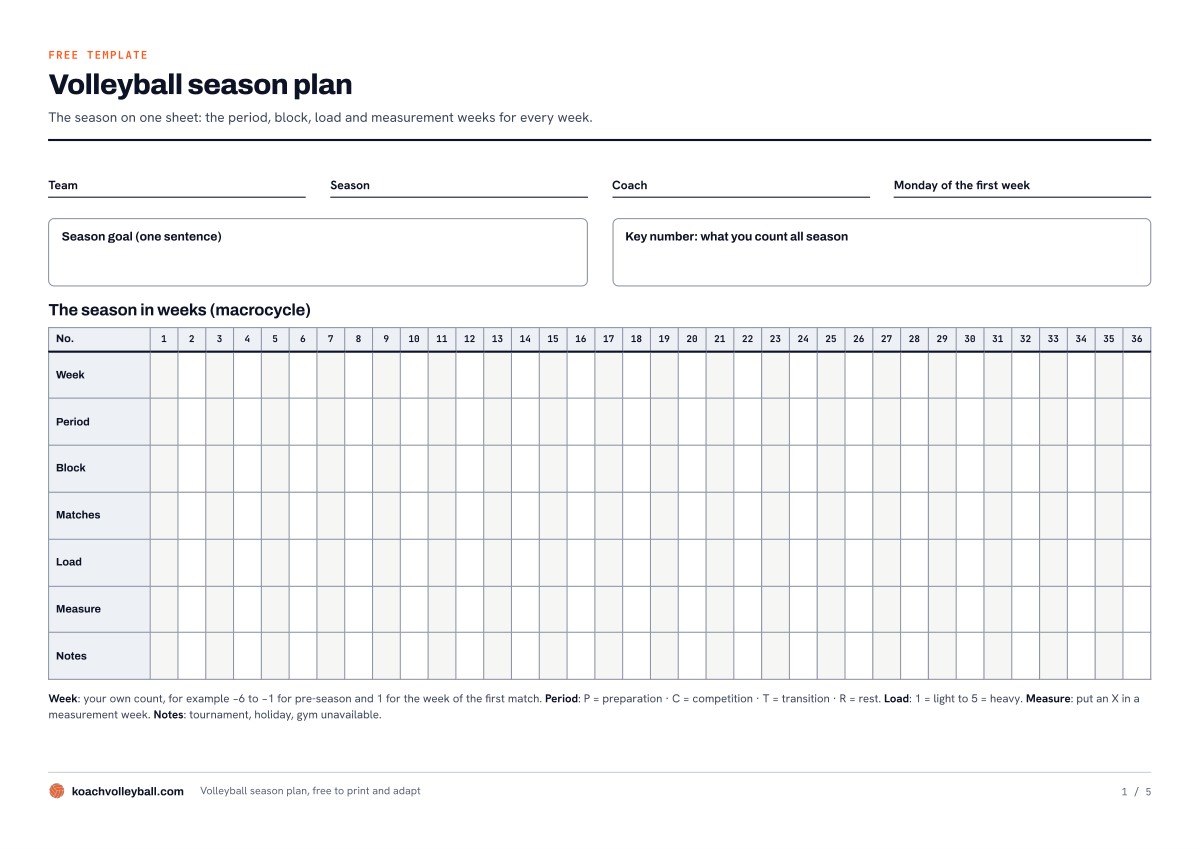
Page 1 of the PDF: the whole season on one sheet, with the period, block, matches, load, measurement week and anything special for every week.
The Excel file is a plain .xlsx with standard formulas and no macros. The PDF is the same plan for coaches who would rather plan with a pen. Printing on US Letter paper? Choose fit-to-page scaling in your print settings.
What's in the season plan template?
The template follows the three layers coaches usually split a season into:
- Macrocycle: the whole season. One row per week: the period (preparation, competition, transition or rest), the block letter, the week theme, the practices and matches, the load from 1 to 5, an X for a measurement week, whether the week was done, and a note.
- Mesocycle: the block. A run of weeks with one block goal and one measurement, with the result of that measurement at the start and at the end.
- Microcycle: the week. What each day is for (practice, match or day off), the job of that day and how much new material fits into it.
The Excel file: seven tabs
The first tab, How it works, explains how to fill it in. Season plan, Blocks and Weekly rhythm are blank; the three tabs that start with Example are filled in. At the top of the Season plan tab you'll find yellow boxes for team, season, coach, season goal and key number, with a summary next to them that keeps itself up to date: weeks, practices, matches, measurement weeks, weeks done and the average load. Enter a date under Monday of the first week and every week gets its own date automatically. A chart below the table shows the load per week, so you can see whether you are stacking heavy weeks back to back.
On the Blocks tab you type the letter, the name, the block goal and the measurement for each block. The number of weeks, the first and last week, the practices, the average load and the weeks done are pulled from the season plan, and the sheet works out the difference between your two measurements. The gray cells contain a formula: leave them as they are.
The PDF: five pages
- Page 1: the season in 36 weeks on one sheet, with fields for team, season, coach, season goal and key number.
- Page 2: the blocks with block goal, measurement and the result at the start and the end, and below that your normal week.
- Pages 3 and 4: week-by-week planning, 18 weeks per page, with week theme, load and a box for done. Need more weeks? Print an extra page.
- Page 5: the filled-in example.
How to fill in your volleyball season plan
- Start with the fixed dates. The week of your first league match, weeks without league play, tournaments, holidays and weeks when the gym is booked. The Week column is your own count: in the example, the week of the first league match is week 1 and pre-season runs from week -6 to week -1. That way the plan works no matter when your season starts.
- Split the weeks into blocks. Give every week a period and a block letter. Keep the weeks of one block directly below each other, or From week and To week on the Blocks tab will be wrong.
- Give each block one block goal and one measurement, on the Blocks tab.
- Write one week theme per week: what you put in the focus of every practice that week. Fill in the number of practices and matches too.
- Give every week a load from 1 (light) to 5 (heavy). Decide what you rate, for example the amount of new material or the training volume, and keep it the same all season.
- Put an X next to every measurement week and enter the result after that week.
- After every week, record whether it was done: Yes, Partly or No. Looking back, you'll see which blocks actually happened.
Which blocks and week themes to choose, and why every block has a measurement week, is explained in the season plan for volleyball training. That article is the method; this template is the blank sheet you fill it in on. Everything that goes on around the season, from calendar to review, is in organizing the volleyball season.
The filled-in example: 36 weeks, five blocks
The example is filled in for a team with two practices a week and, during the league, one match a week: six weeks of pre-season, 28 league weeks and two rest weeks. The season goal: "We no longer fall apart the moment we come under pressure." The key number is side-out: the rallies the team wins on its own serve receive, divided by the number of serve receives.
| Block | Weeks | Block goal |
|---|---|---|
| A Foundation | -6 to -1 | Basic skills without match pressure, and a settled lineup |
| B Side-out | 1 to 7 | Win the rally on your own serve receive |
| C Applying pressure | 8 to 14 | Score points on your own serve |
| D Closing out | 15 to 21, with a rest week in between | Finish sets you are already winning |
| E Staying sharp | 22 to 28 | Nothing new, everything faster |
The first rest week sits between blocks C and D; the second is a holiday week in block D that was planned in advance. Block A ends with a baseline measurement in the last friendly; every block after that has a measurement week, where you put the result next to the one from the start of the block. The example stops at the end of block B: up to week 7 it shows what was actually done, and week 5 is set to Partly because the gym was unavailable once. All names and numbers in the example are made up.
What goes into Koach, and what doesn't?
We make Koach, so read this with that in mind. The honest answer first: Koach has no periodization planner. The app has no 36-week overview, no block letters, no load curve and no measurement weeks. You keep the plan itself in this template; the app records what actually happens, practice by practice.
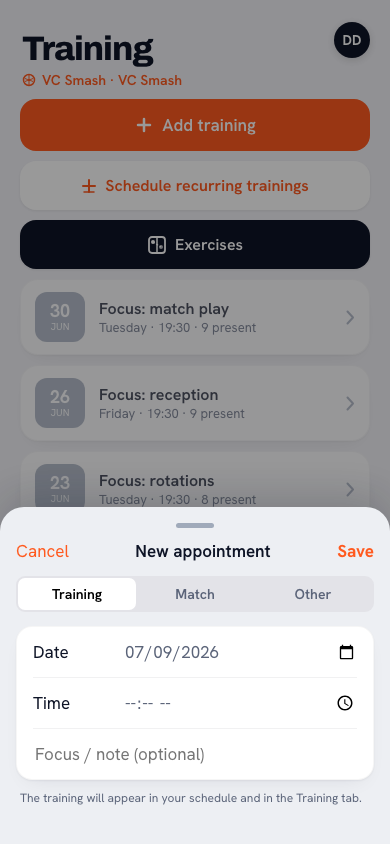
The week theme in the focus of every practice. When you add a new practice, you fill in the date, time and location, plus the field Focus / note (optional). Put the week theme from your plan there; in the practice it then shows right below the date. When you scroll back later, you see week by week what your practices were about. Practices on a fixed day go into the calendar in one go with Schedule recurring trainings.
14 days free, no credit card. Put the week themes of your first block into the focus of your practices tonight, and two weeks from now see how much of the plan actually got done.
Put your practices in KoachOne practice template per season block. In the first week of a season block, build your practice from training blocks and drills, and tap Save as template below the program. The next week, tap Copy plan above the program and pick that template: the training blocks are ready, and you only change what the new week theme calls for. More on that in reusing your practice plan with templates. Want to write out a single practice on paper? Use the volleyball practice plan template.
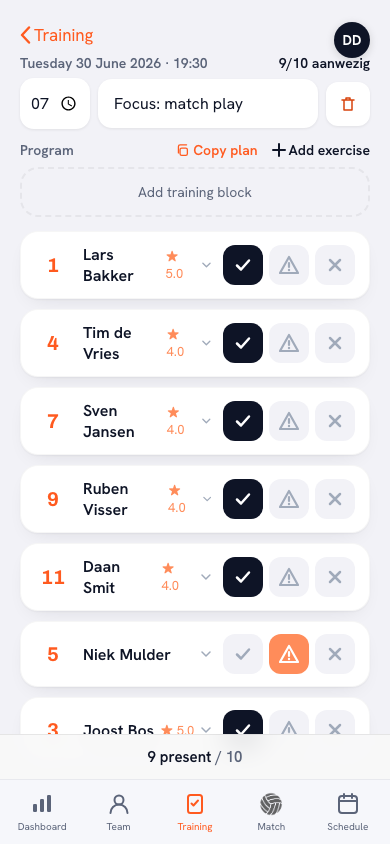
Season and team goal. On the dashboard you'll find the Manage button under Season. In Set up season you choose when your season starts and ends. The app adds a tip there to run your season from your first to your last practice, so make the first week of pre-season the start. Your season goal goes into the Team goal card on the dashboard; how to choose that goal together with your team is covered in setting and tracking season goals with your team.
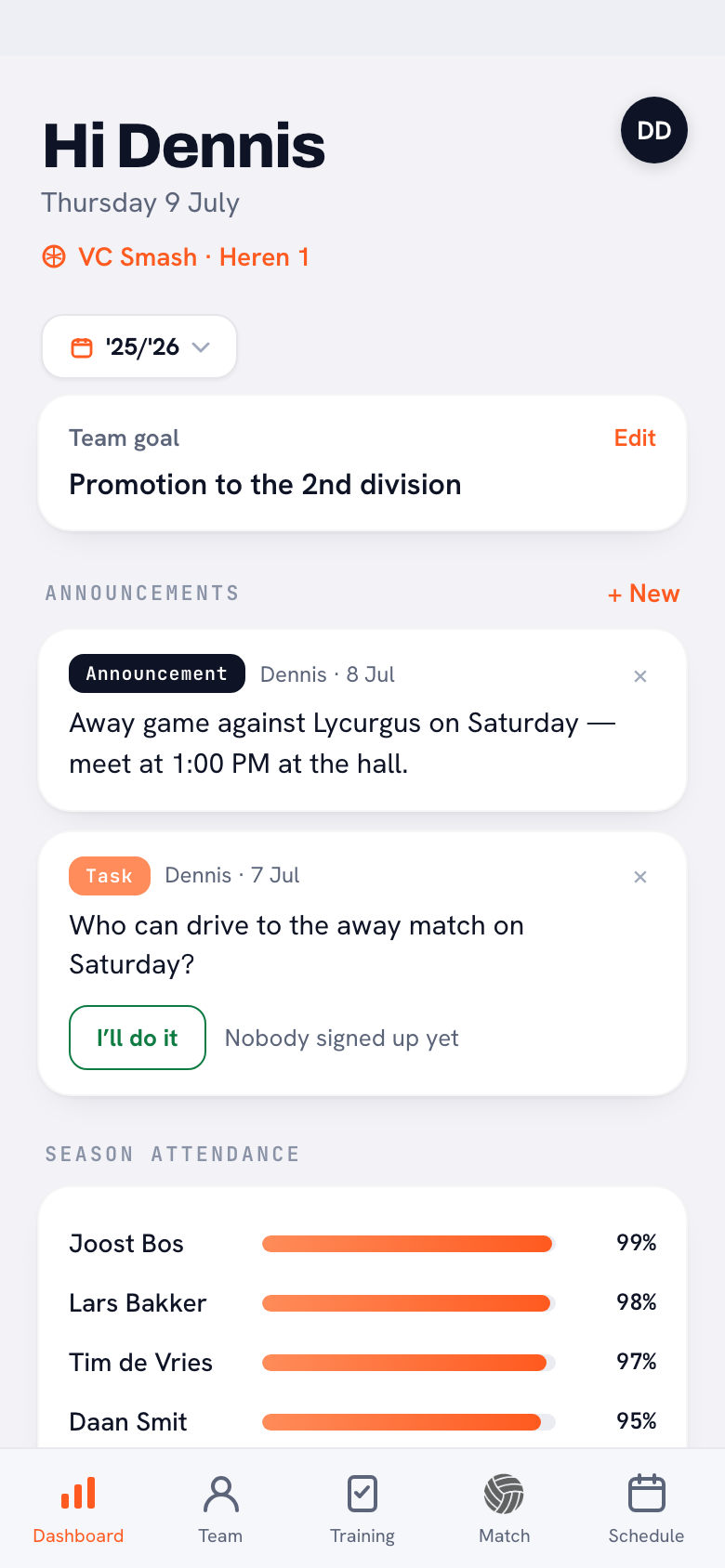
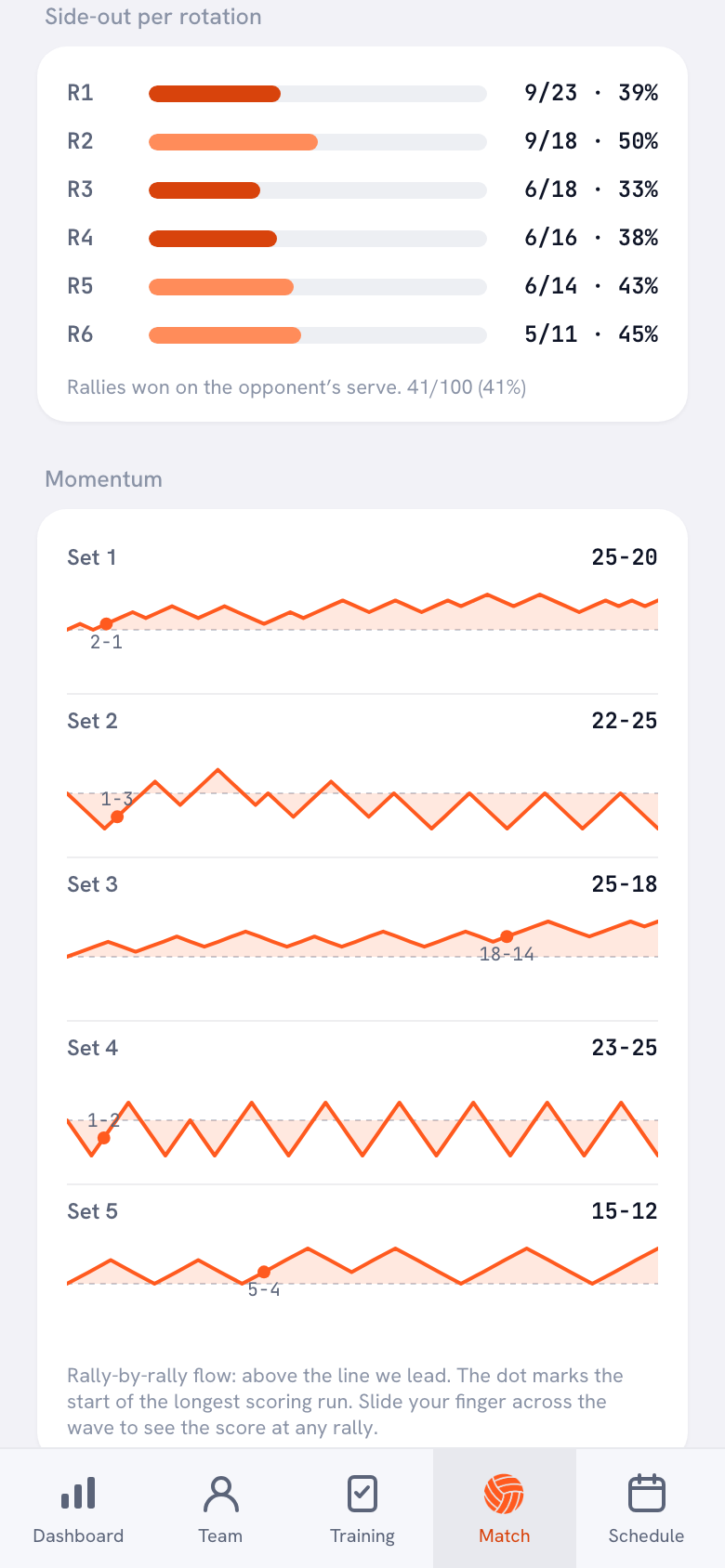
Done and measured. After practice you mark each training block as Done, Partly done or Not done, and under After the session you write down the Focus for the next session. That is the Done column of your plan, only per practice. If side-out is your key number, as in the example, you don't have to tally it during matches: if you score live in Koach, Side-out per rotation is waiting for you with the match afterwards. Koach counts the rallies won on the opponent's serve. That differs slightly from the measurement in practice, so compare matches with matches.
What Koach doesn't do: read your Excel file, because the app can't import Excel or CSV. The app doesn't make a PDF of your plan either, although you can export your season as a CSV with Export season (CSV). And Koach doesn't put blocks, themes or practices together for you: you choose those yourself.
Template or app: which fits you?
A template is strong on the big picture, an app on the follow-through. That is why they work well side by side.
| What you want | Template (Excel or PDF) | Koach |
|---|---|---|
| The whole season, week by week, on one overview | Yes | No |
| Blocks with block goal, measurement and load | Yes | No |
| Record the week theme | One row per week | In the focus of every practice |
| Build a practice with animated drills | No | Yes |
| Reuse last week's practice | No | Copy plan or a template |
| Track what was actually done | Per week: Yes, Partly or No | Per training block, after every practice |
| Assistant coach sees the same plan | If you share the file | Yes |
| Cost | Free | 14 days free, then €2.99 per month (Coach) |
The template alone is enough if you practice once a week or prepare your practices on paper. The template and Koach together fit you if you practice two or more times a week, work with an assistant coach, or want to look back practice by practice at what was really done in a block. You can use the template for any kind of volleyball; Koach is made for indoor volleyball. Looking for a worked-out plan rather than a blank one? Have a look at the free volleyball practice plans: ten plans from 8 to 28 weeks, for youth and adult teams, with a PDF.
What does it cost?
The template is free, in Excel and in PDF. You can try Koach free for 14 days, with no credit card and every feature. After that you choose Coach for €2.99 per month (one team, two coaches) or Club for €9.99 per month (unlimited teams). With a yearly plan you pay €2.49 or €8.33 per month. Players and parents use the app for free. In the App Store and on Google Play you see the price in your own currency. All prices are on the pricing page.
Fill in the Done column on the evening of your last practice of the week. A month later nobody remembers whether week 5 ran fully or only halfway, and it is exactly that column that shows at the end of the block whether your measurement means anything.
Frequently asked questions
Is there a free volleyball season plan template?
Yes. You can download this season plan as an Excel file and as a PDF, with no account and no email address, and you are free to copy and change it. If you also want to track, practice by practice, how much of the plan got done, you can try Koach free for 14 days with no credit card. After that Coach costs €2.99 per month for one team and two coaches.
What is the difference between a macrocycle, a mesocycle and a microcycle?
The macrocycle is the whole season, one row per week in the template. A mesocycle is a block of several weeks with one block goal and one measurement; in the filled-in example a block lasts six to eight weeks. The microcycle is one week: which day is a practice, a match or a day off, and how much new material fits into each day.
My season is longer than 36 weeks. Does it fit in the template?
In the Excel file it does: the Season plan tab has 44 week rows, and the Blocks tab has room for 8 blocks. The timeline on page 1 of the PDF covers 36 weeks. For the week-by-week planning on pages 3 and 4 you simply print an extra page; each page has room for 18 weeks.
Can I import my season plan into Koach?
No. Koach can't import Excel or CSV files and has no periodization planner with weeks and blocks. You keep the plan in the template. In the app you put the week theme into the focus of every practice, save one practice per season block as a template and, after every practice, mark what was done for each training block.
Can I adapt the template to my team?
Yes. Rename blocks, pick your own measurements and write your own week themes; only leave the gray cells with a formula alone. If you sometimes play two matches in a week, make a second version for that kind of week on the Weekly rhythm tab. You can overwrite the week numbers, for example with -6 to -1 for pre-season.

Put your week themes into Koach tonight
14 days free, no credit card. In two weeks you'll see, practice by practice, how much of your plan got done.
Get started with KoachOr read first what the volleyball coaching app does.