
Volleyball skills checklist: free PDF and Excel by level
The short answer
A volleyball skills checklist lists, level by level, the skills you can see a player perform, and you tick each one: can do or not yet. Download one free here as a PDF and an Excel file, with four levels of eight skills each. In Koach you also rate five fixed points with stars after every practice.
If you're looking for a volleyball skills checklist, you want to know what a player can already do and what they still need to learn. Below you'll find one to print and one for Excel, free and with no account needed. After that: how to fill it in, and what an app keeps track of for you alongside it.
Download the volleyball skills checklist: PDF and Excel
First, what you came for. Both files are free, with no account and no email address required. You're free to print, copy and adapt them.
- Volleyball skills checklist (PDF): for printing. Two A4 portrait pages per player, with four levels of eight skills each. For every skill you tick whether the player can do it yet or not, and add the date. Printing on US Letter? Choose Fit to page in the print dialog.
- Volleyball skills checklist (Excel): the team overview. Up to 14 players side by side and all 32 skills down the page, and the sheet counts what already works per skill and per player.
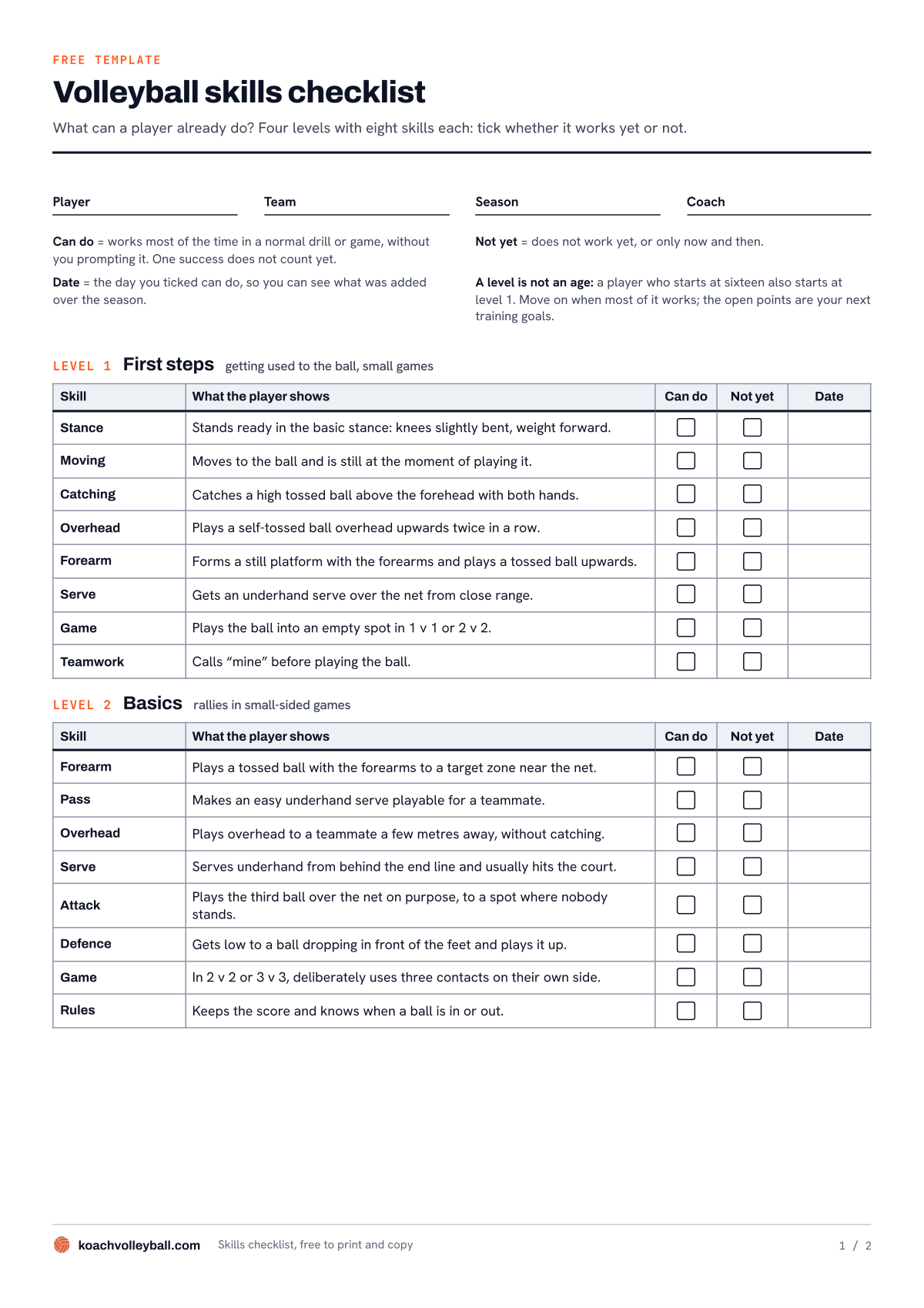
Above is the first page of the PDF, with levels 1 and 2. The second page has levels 3 and 4, with space underneath for what the player is working on now and for notes.
What's on the checklist?
At the top you fill in the player, team, season and coach. Below that are the ground rules that make the sheet usable: what counts as can do, what counts as not yet, and why each tick gets a date. Then come four levels. Each level has eight rows, each with a skill area, such as pass, set or serve, and one sentence describing what you see the player do.
- Level 1, First steps. Getting used to the ball and small games: standing ready in the basic stance, catching a high tossed ball, forming a still platform with the forearms, getting an underhand serve over the net from close range, and calling "mine" before playing the ball.
- Level 2, Basics. Rallies in small-sided games: forearm passing to a target zone near the net, playing overhead to a teammate without catching, serving underhand from behind the end line, and deliberately using three contacts on your own side in 2 v 2 or 3 v 3.
- Level 3, Six v six. The full court: passing a serve high to the setter's spot, setting to the outside of the net, serving overhand, attacking after an approach, blocking without touching the net, rotating correctly and covering your own hitter.
- Level 4, Advanced. Specializing and tactics: keeping a hard serve or a float serve playable, serving to a target, choosing between a hard hit, a placed shot and a tip, forming a double block, playing a fixed position and not carrying a mistake into the next rally.
Every row describes behavior you can see in practice, not a technique lesson. How to teach those techniques, from the forearm pass to the attack, is covered in learning volleyball technique.
A level is not an age
The levels go up in difficulty, not in years. Someone who takes up volleyball at 16 starts at level 1 too, and a young player with a few seasons behind them can be further along than an older teammate. Move on to the next level when most of it works; whatever is still open becomes your next set of training goals. What to expect from each age group in practice is covered in coaching youth volleyball by age group.
How to fill in the volleyball skills checklist
- Pick the level the player is at now. When in doubt, start one level lower. A row that already fits takes seconds to fill in, and the player sees right away what they have mastered.
- Watch during a normal drill or game. Can do means: it works most of the time, without you prompting it. One success doesn't count yet. Not yet means: it doesn't work yet, or only now and then.
- Add the date. Next to every tick in the Can do column, write the day you saw it. At the end of the season you can see what was added, and when.
- Pick two or three open points. Write them at the bottom of the second page, under What we are working on now. No player remembers more than that at once.
- Come back to the sheet after a few weeks. Tick what's been added and pick new points.
The Excel file works the same way, but for the whole team. The How it works sheet explains it. On the Checklist sheet you type your players' names in the yellow row at the top and enter an X (can do) or an N (not yet) for each skill; an empty cell means you haven't seen it yet. The Can do and Not yet columns count, per skill, how many players can already do it and how many can't. If a skill has few X's, that's a training goal for the whole team. At the bottom, under Can do per player, you see for each player how many of the eight skills per level already work, and the total out of 32. It's a plain .xlsx file without macros, so you can rewrite the descriptions if your team needs something different.
Skills checklist or evaluation form?
A checklist and a player evaluation form look alike, but they answer a different question. The checklist asks: can this player do this yet? The answer is yes or not yet, and the list shows what the next step is. That makes it a good fit for a skills progression, and for going through together with the player: "not yet" lands very differently with a young player than a low score does.
An evaluation form rates skills on a scale and is built for comparing, for example when several coaches watch the same group and want to line up their judgments. If that's what you need, the player evaluation form with nine skills on a 1 to 5 scale is a better fit.
Paper, Excel or app: an honest comparison
We make Koach, so keep that in mind as you read this. For ticking off individual skills, the checklist itself is the best tool. An app only becomes more useful when you want to see how a player develops over a whole season, without hunting for a sheet after every practice.
| What you want | Excel | Koach | |
|---|---|---|---|
| Free, no account | Yes | Yes | 14 days free |
| Tick off individual skills | Yes | Yes | No |
| Team overview per skill | No | Yes | No |
| Rewrite the descriptions yourself | No | Yes | No |
| Stars after every practice | No | No | Yes |
| Season trend line per player | No | No | Yes |
| Match points per player | No | No | Yes |
In short: the checklist wins on detail and simplicity, the Excel file gives you the whole-team overview, and Koach follows the bigger picture without you having to add anything up. They don't get in each other's way, so you can easily use them side by side.
What Koach tracks alongside the checklist
Koach is an app for volleyball coaches. You can't tick off individual skills in it: the app works with five fixed points that you rate after a practice. That's broader than the checklist, but it takes a few taps per player and adds itself up.
After practice: stars on five fixed points
On the Training tab you mark each player as present, late or absent. Then tap the name of a player who was there, and a panel opens with five rows: Technique, Game awareness, Coachability, Work ethic and Effort, each with 1 to 5 stars. The average appears next to the name. The app tells you so right below the list: "Tap a player’s name to rate their effort".
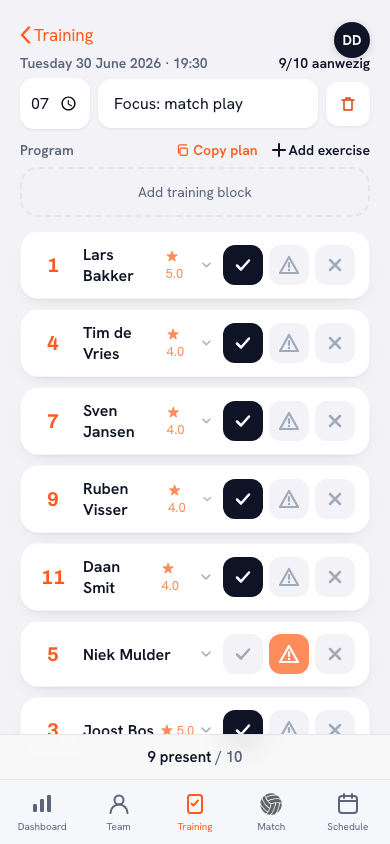
14 days free, no credit card. After your next practice, give every player stars on the five points, then look at the trend a few weeks later.
Try Koach with your teamOver the season: a trend line per player
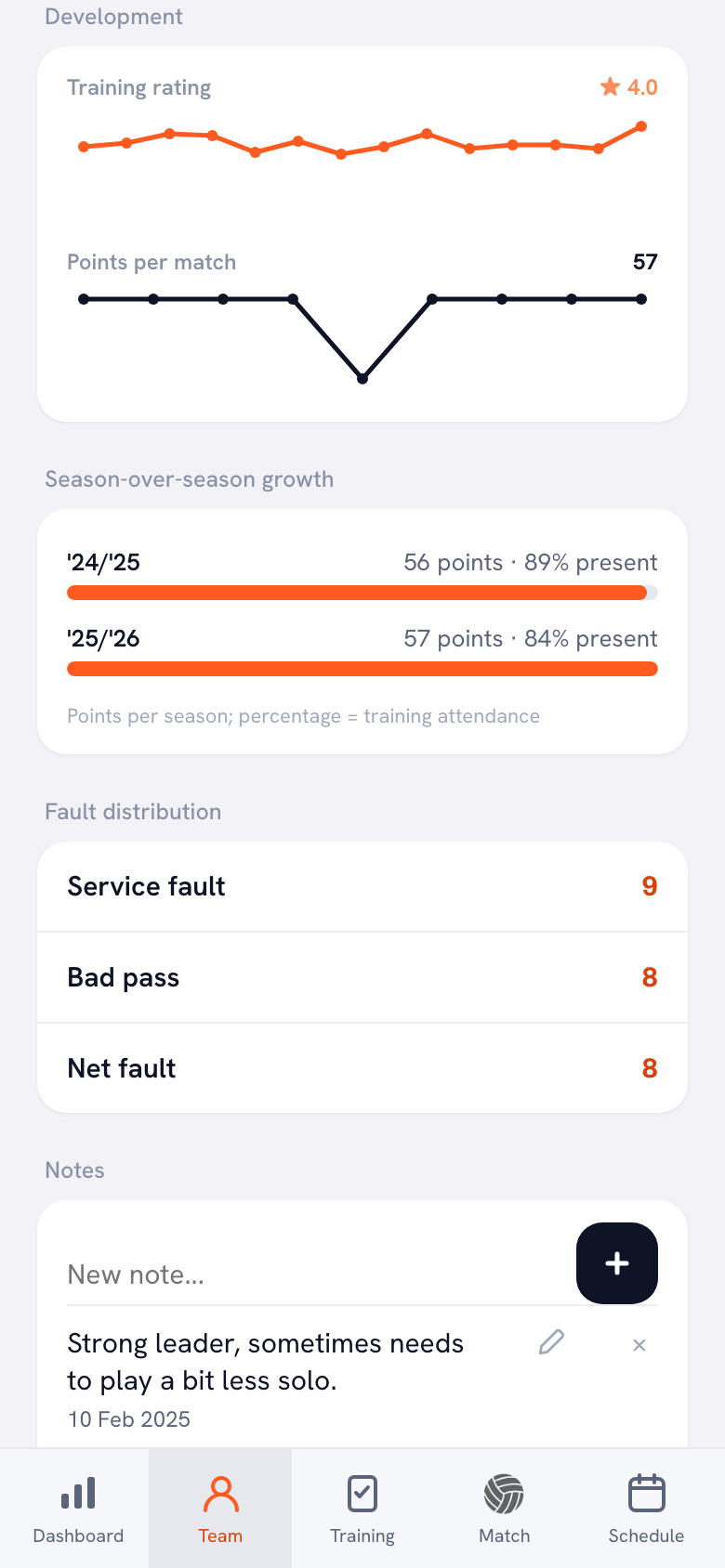
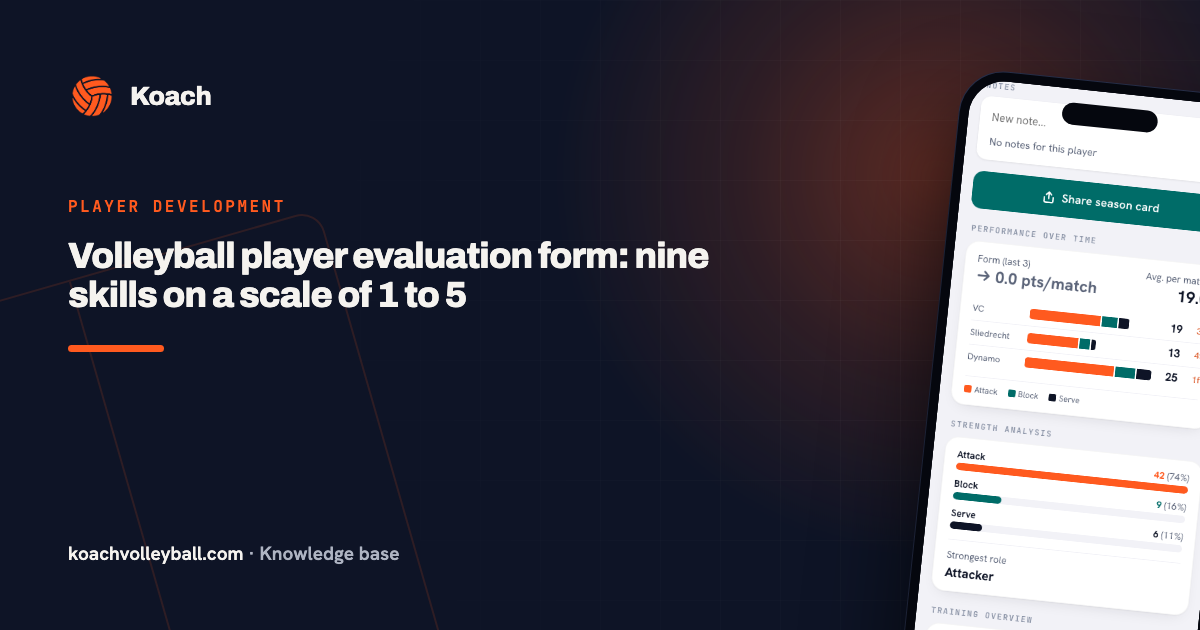
On the Team tab, open a player. Under Development you see the Training rating as a line across the season, with the Points per match below it. Under Season-over-season growth your seasons are listed one below the other, each with points and training attendance; that section appears from your second season in the app. Under Notes you write down what you see, and every note gets a date; that's also a good place for an open point from the checklist. The training rating is for the coach only: players and parents never see it. How to read that line and what it tells you is covered in tracking player development in volleyball.
In matches: the Strength analysis
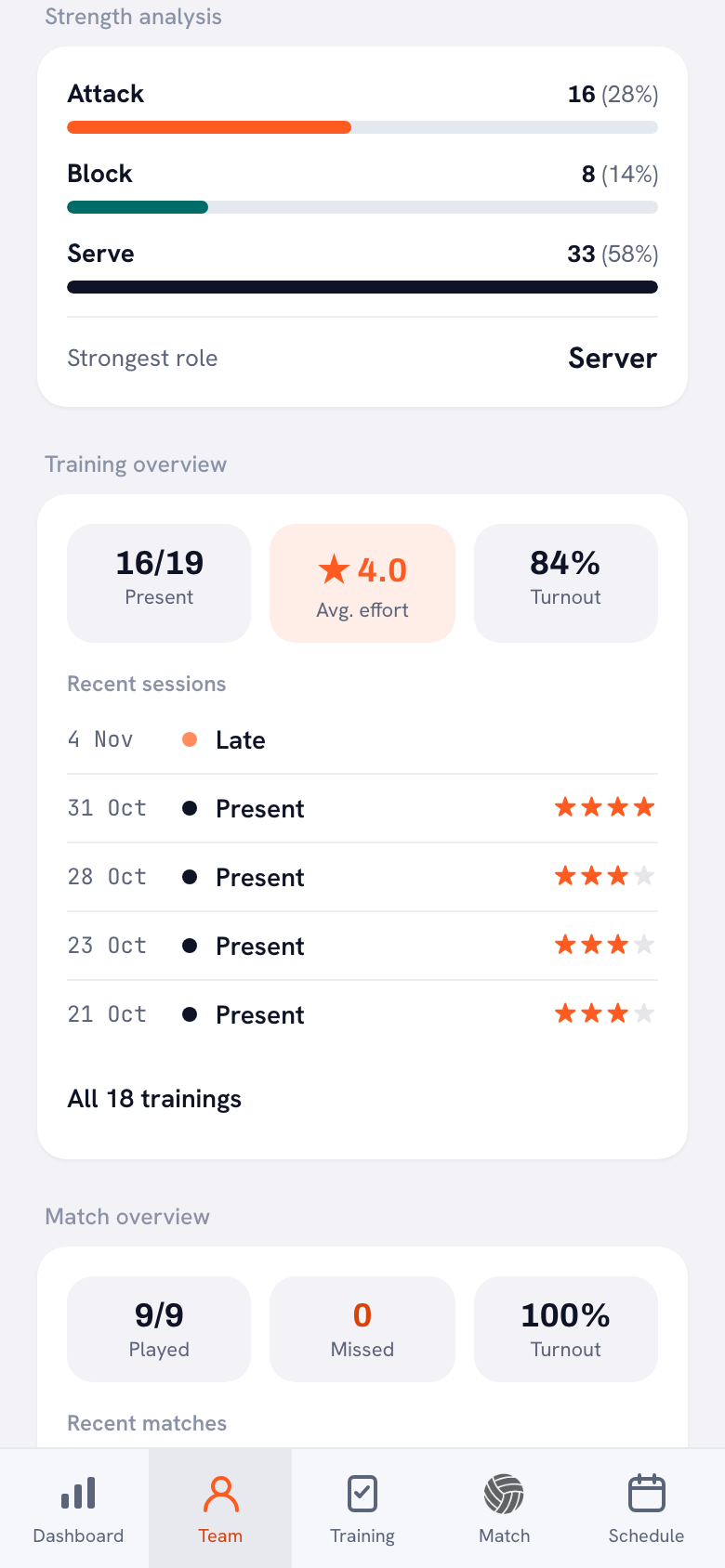
If you track points per player in matches, live or afterwards, the Strength analysis shows where a player's points come from: attack, block or serve, as a count and as a share of the total, with the Strongest role underneath. Below that is the Training overview, showing how often the player was Present, their Avg. effort and their Turnout. Those aren't ticks, but you do see whether what works on the checklist also wins points in matches. More about this section in a player's strength analysis.
What Koach doesn't do
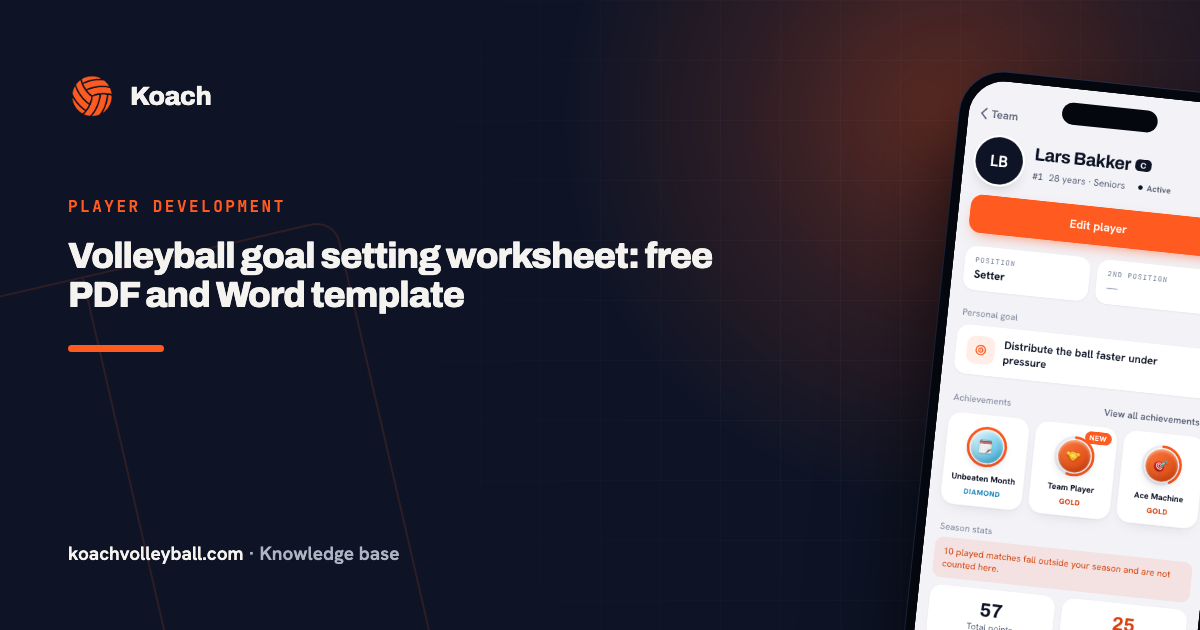
Koach has no checklist of individual skills, and you can't change or add to the five rating points. You also can't create a PDF of a player in the app; players are exported as a CSV. What you can do: add the most important open point to the player as their Personal goal, find a matching drill in the app and use Assign as homework so they can practice it at home. The same drills, animated, are also free in the volleyball drills on this site. Want to work out a goal with the player first? Use the goal-setting worksheet.
Who the checklist suits, and who the app suits
- The checklist fits if you want to know exactly which skills each player has down, if you coach youth players and want to show them their progress, or if you're preparing a conversation with a player or a parent.
- Koach fits if you want to log a quick rating after every practice and see each player's trend over a season, with attendance and match stats in the same app.
- Koach doesn't fit if you only want to tick off skills digitally or set your own rating points. The checklist and the Excel file do that better.
What does it cost?
The checklist is free and stays free. You can try Koach free for 14 days, with no credit card and every feature included. After that you choose Coach for €2.99 per month (one team, two coaches) or Club for €9.99 per month (unlimited teams and coaches); with a yearly plan you pay €2.49 or €8.33 per month. Players and parents use the app for free. In the App Store and on Google Play you see the price in your own currency. All prices are on the pricing page.
Let the player fill it in first. Hand over the sheet and ask what they think already works. Where your answers differ is where the best conversation happens: that's where they hear what can do really means.
Frequently asked questions
What are the basic skills in volleyball?
There are six core techniques: the forearm pass (bump), the overhead pass (set), the serve, the attack, the block and defense. On top of those come skills you only see in game play, such as rotating correctly, covering your hitter and calling for the ball. The checklist on this page puts them in four levels, from getting used to the ball to specializing, so you can see what a player can learn next.
How do you know when a player has mastered a skill?
A useful yardstick: it works most of the time in a normal drill or game, without the coach prompting it. One success is luck, not mastery. If it only works with a tossed ball, or only when you're standing next to them, don't tick it yet. Add the date as soon as it does work, so later in the season you can see what was added.
What volleyball skills should a player have at each age?
There's no fixed age for each level. The levels go up in difficulty, not in years: someone who starts at 16 starts at level 1 too, and a young player with a few seasons of experience can already be at level 3. So look at what a player shows, not at their birth year. What you offer each age group in practice is a different question from what a player can already do.
How often should you fill in a skills checklist?
There's no fixed rule. A workable habit is to fill in the sheet at the start of the season and come back to it once you've worked on the same points for a few weeks. Ticking it off every week makes little sense, because a skill that works most of the time doesn't appear in just a few practices. A quick rating after every practice is something you log in Koach with stars.
Can I use the skills checklist in Koach?
No, you can't tick off individual skills in Koach. The app works with five fixed points (Technique, Game awareness, Coachability, Work ethic and Effort) that you rate with 1 to 5 stars after every practice, and shows them as a line across the season. You can try Koach free for 14 days, with no credit card. After that Coach costs €2.99 per month for one team. The checklist on this page stays free.

Track your players from your next practice
14 days free, no credit card. After a few weeks you'll see each player's trend.
Get started with KoachOr read first what the volleyball coaching app does.