
Volleyball parent meeting agenda: free template and letter
The short answer
At a volleyball parent meeting you cover who the coaches are, training and matches, how parents report an absence, transport and where you need their help. Download a free agenda, welcome letter and sign-in sheet as PDF and Word below. Afterwards, Koach takes care of absences, the driving rota and the team parent.
A preseason parent meeting is your chance to explain, in one go, how your season works. Here you get a free volleyball parent meeting agenda template with a welcome letter, a sign-in sheet and a follow-up page, plus what to set up afterwards so the agreements don't get lost in the group chat.
Volleyball parent meeting agenda: download the free template
First, what you probably came for: a parent meeting template for your team, free and with no account needed. It was made for a volleyball team, but it works for any youth sports team with parents on the sidelines.
- Volleyball parent meeting (PDF): ready to print, four A4 pages with the agenda, the welcome letter, a sign-in sheet for 18 parents and a follow-up page for after the meeting.
- Volleyball parent meeting (Word): the same four parts, ready to adapt to your own team.
You are free to use, copy and adapt the template. The PDF has writing lines in the blanks. In Word, replace the words in square brackets, such as [date] and [coach name], with your own details.
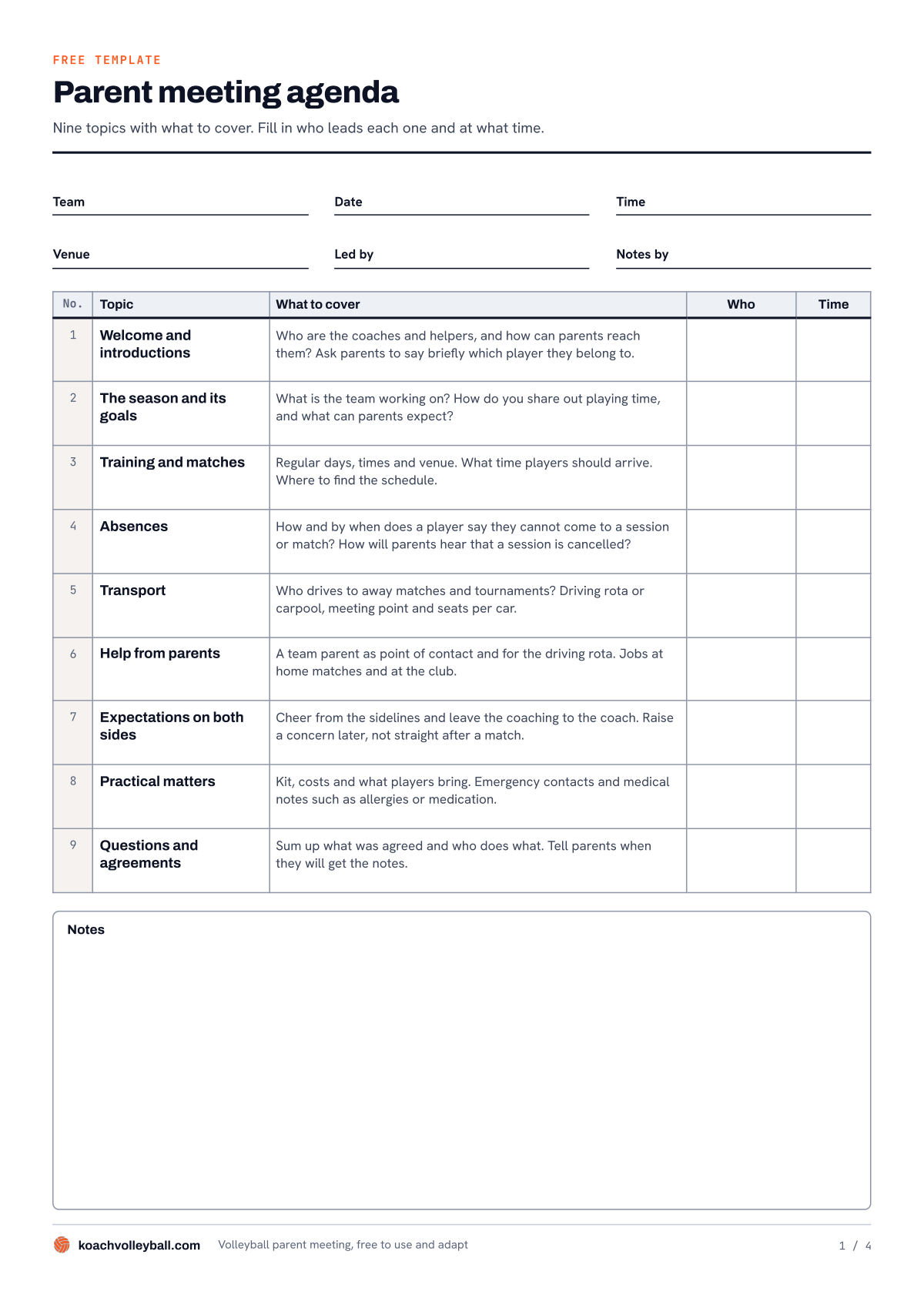
Page 1 of the template: the agenda with nine topics. For each topic you fill in who leads it and at what time.
What should a parent meeting agenda for a sports team include?
At a meeting like this, parents mostly want to know how the season works in practice: when their child needs to be where, what is expected of them and who they can go to. The agenda in the template lists nine topics for that, each with a line on what to cover:
- Welcome and introductions. Who the coaches and helpers are, and how parents can reach them.
- The season and its goals. What the team is working on and how you share out playing time.
- Training and matches. Regular days, times, the gym and where to find the schedule.
- Absences. How and by when a player lets you know they cannot make it, and how parents hear that a session is cancelled.
- Transport. Who drives to away matches and tournaments, and where you meet.
- Help from parents. A team parent as point of contact, and jobs at home matches and at the club.
- Expectations on both sides. Cheering is welcome, coaching is the coach's job. How to set those sideline agreements is covered in parents on the sidelines; at the meeting you only put them on the table.
- Practical matters. Kit, costs, emergency contacts and medical notes such as allergies.
- Questions and agreements. Sum up who does what and tell parents when the notes will follow.
Next to each topic are two blank columns: Who and Time. Fill them in beforehand. An agenda with times keeps the meeting short, and parents can see there is an end to it. Hold the parent meeting at the start of the season, before the first match. How it fits in with the rest of your preseason prep is covered in organizing the volleyball season.
How to fill in the template: before, during and after the meeting
- Before: the agenda and the welcome letter. At the top of page 1, fill in the team, date, time, venue, who leads the meeting and who takes notes. Page 2 is the welcome letter. You introduce yourself, invite the parents with the date, time and venue, say what you will talk about and ask them to let you know by a certain date whether they can come. Below it are a short version for the group chat and three tips for the invitation.
- During: the sign-in sheet. Pass page 3 around. Each parent writes down the player's name, their own name, phone and email, and puts an X under Can drive or Team parent. By the end of the evening you know who wants to help. Under the list it says the sheet is for the team only: throw it away once you have copied the details.
- After: the follow-up page. On page 4 you write down each agreement, who will do it and by when, plus any open questions. Below that is an eight-point checklist for after the meeting: from short notes to all parents, including those who could not come, to the driving rota and another get-together halfway through the season.
Send the welcome letter well in advance and keep it short: parents read it on their phones. Messages for the rest of the season, such as the one before your first away match, are in letters to parents of your sports team.
After the parent meeting: where do the agreements end up?
The meeting itself usually goes fine. The hard part comes in the weeks after. The sign-in sheet is still in your bag, the notes are buried somewhere in the group chat, and before the first away match someone asks again who is driving. That is why the checklist in the template comes down to three things: parents know where to find the schedule, how to report their child absent and who is driving when.
You can handle that on paper and in the group chat. It costs nothing and everyone already has it. The downside is that every message gets buried under new ones, and you are the one keeping all the lists. A team app gives those things a fixed place. The table below shows side by side where things end up after the meeting. We make Koach, so read the right-hand column with that in mind.
| After the parent meeting | Paper and group chat | Koach |
|---|---|---|
| Date of the meeting | Message in the group chat | Parents evening appointment in the team schedule |
| Who is coming | Counting replies | Poll in the announcements, if parents already have an account |
| Reaching parents | Sign-in sheet | Their own account, linked to their child |
| Absences | Text to the coach | Parent taps yes or no, with a reason if needed |
| Transport | A list you keep yourself | Driving rota based on distance driven |
| Parent who organizes transport | Gets your lists | Team parent sees who is coming to matches |
| Meeting notes | Message that gets buried | Announcement on every parent's dashboard |
| Cost | Free | Free for parents; the coach pays after 14 days |
What Koach sets up for you after the parent meeting
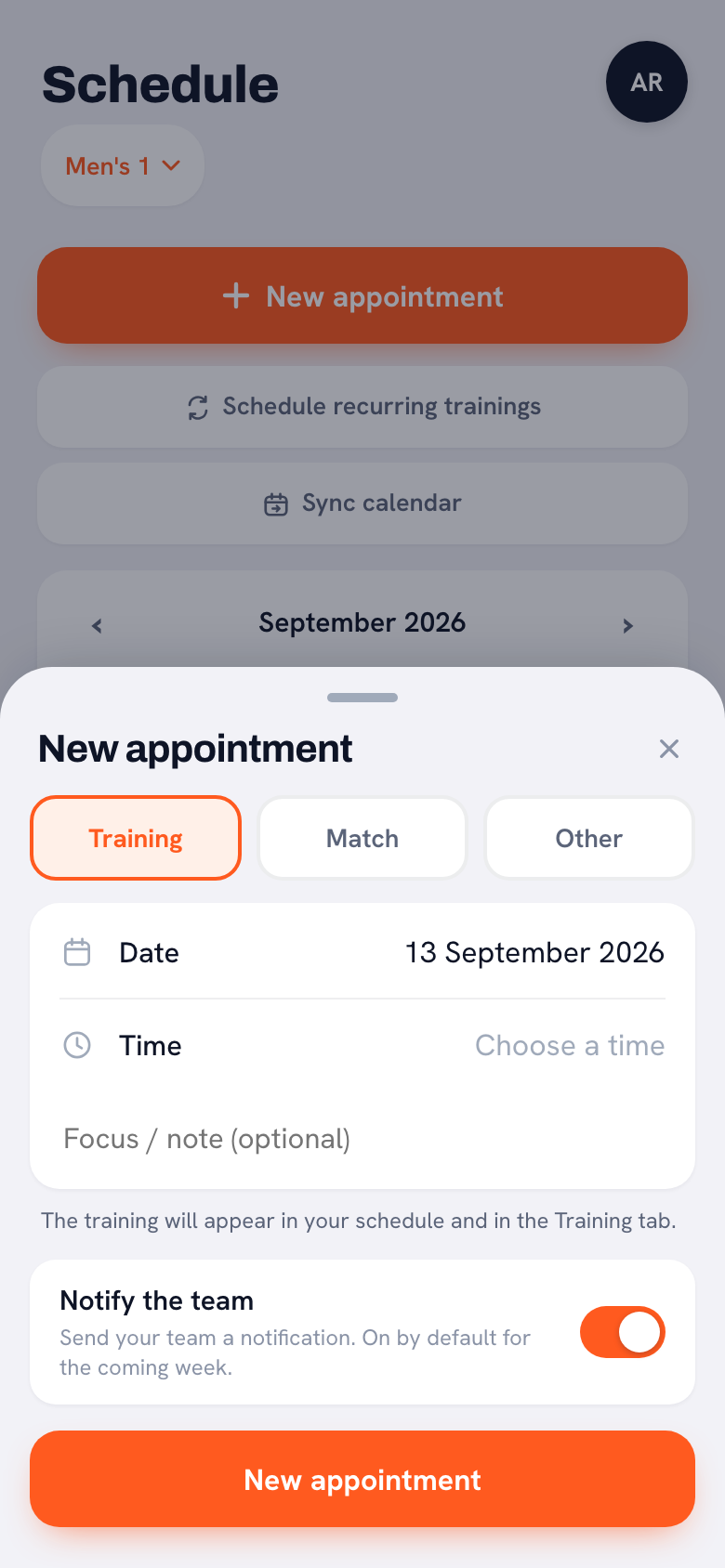
The meeting in the schedule. In the Schedule tab, tap New appointment and choose Other. Give the appointment the type Parents evening, a title, the date and, if you like, a time and a location, and leave For whom set to Whole team. The meeting then shows up in the team schedule, next to training and matches. One thing to know: an appointment like this has no sign-up buttons. Ask who is coming in the invitation, as the welcome letter does. Everything about this kind of appointment is in adding a one-off appointment to the schedule.
14 days free, no credit card. Add your team and the parents after the meeting, and see after the first away match whether it saves you messages.
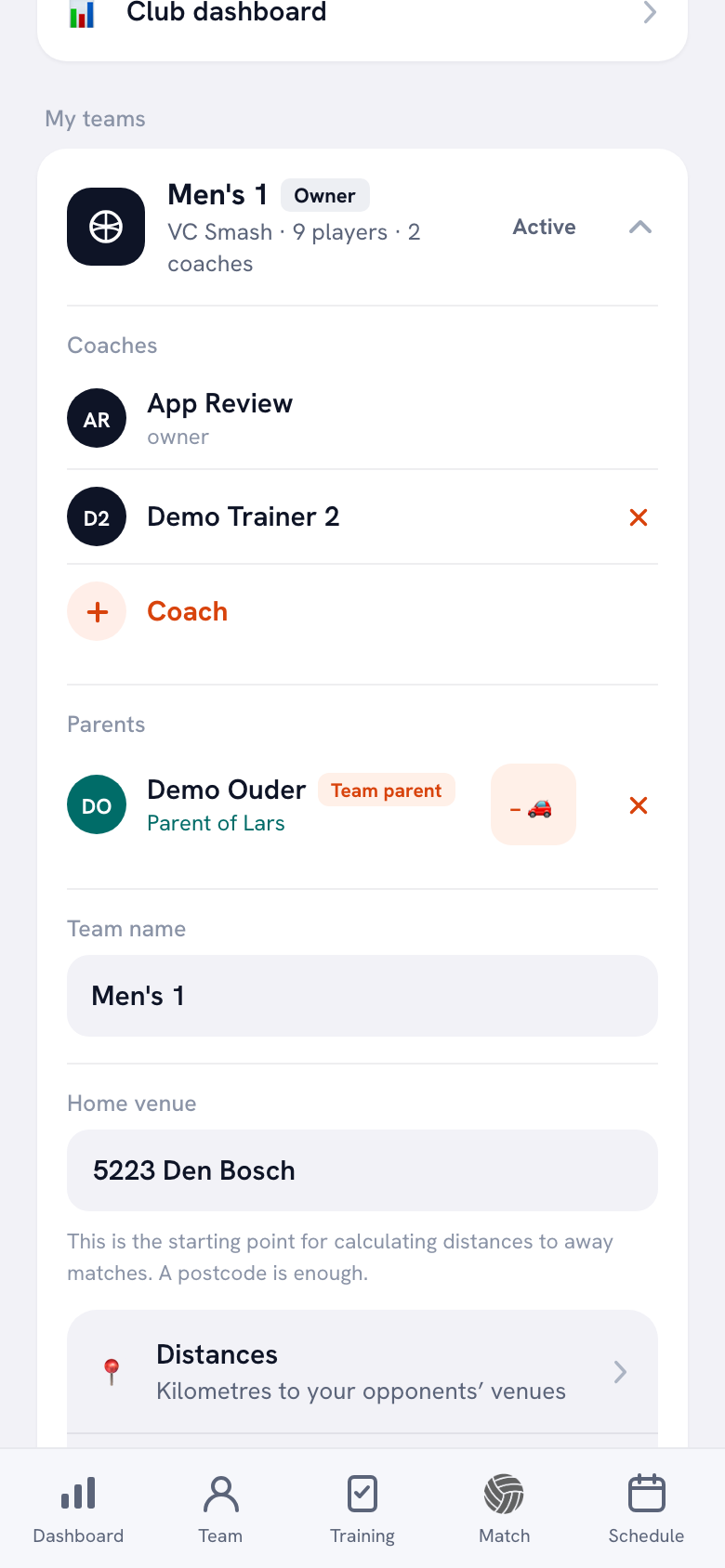
Try Koach with your teamParents in the team. In the Team tab, tap a player: their profile has the button Invite a parent. The parent gets a link, creates their own account and is linked to their child. The sign-in sheet helps here: you can see right away which parent belongs to which player. How inviting works step by step is in adding parents to your team. What a parent then sees in the app is in Koach for parents.
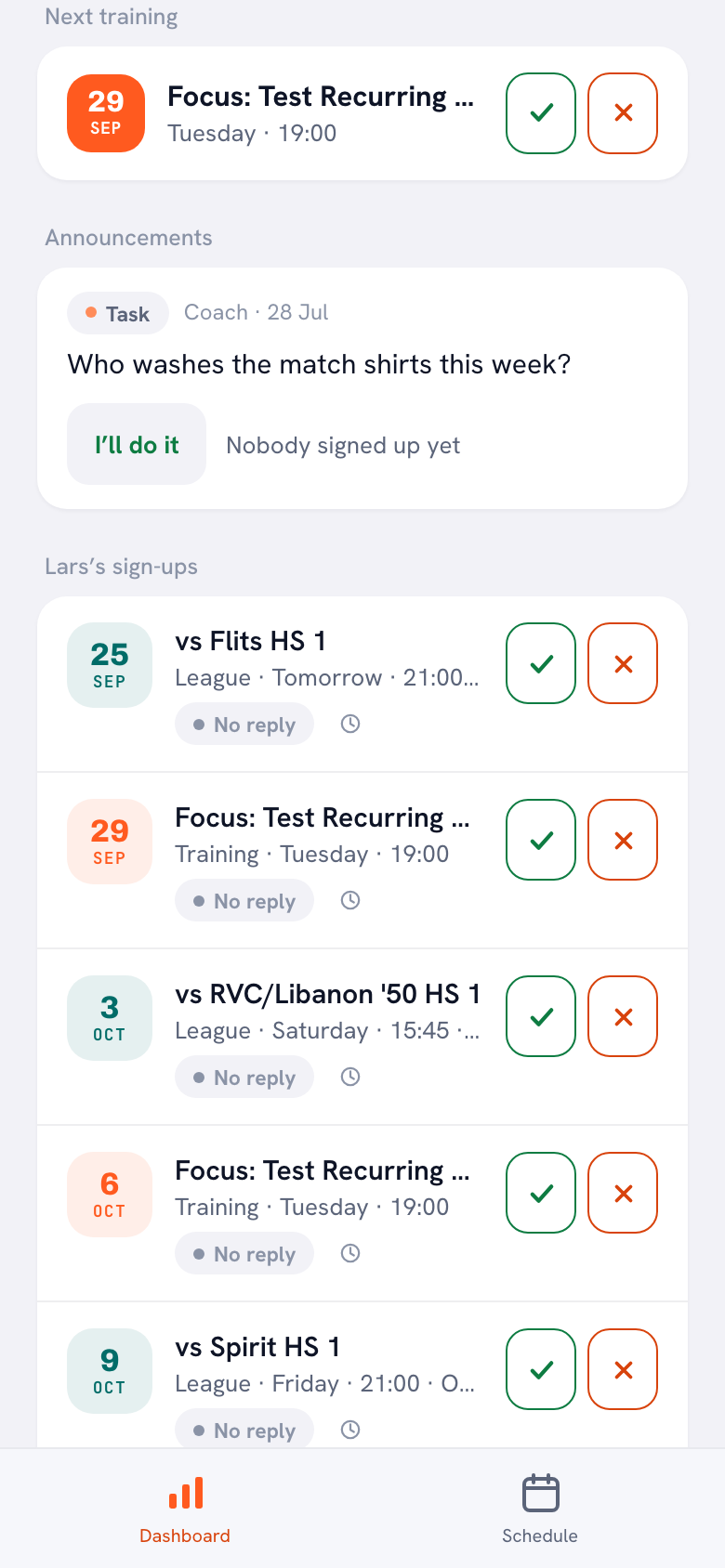
Absences. A parent's dashboard has a card with their child's sign-ups, for example Lars’s sign-ups. For each training session and match the parent taps the check mark or the cross, and if their child cannot come they can add a reason. If you set a session to Training cancelled, the team gets a notification about it in the app.
Notes and jobs. The same dashboard shows the team's Announcements, so that is where you post the notes from the meeting. A job that was left open at the meeting, such as who washes the match shirts, you post as a Task: a parent taps I’ll do it and everyone sees who has taken it on. If the parents are already in Koach, for example for a second parent meeting halfway through the season, you ask who is coming with a Poll. How those three kinds of message work is in announcements, polls and tasks.
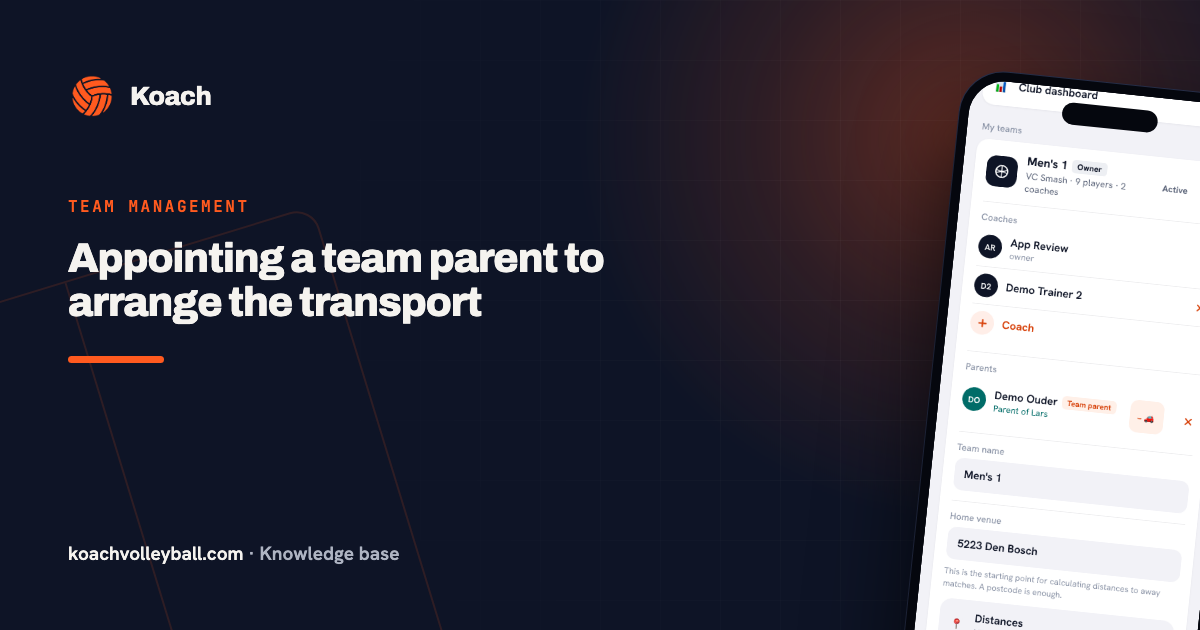
Driving rota and team parent. With the Driving rota you share out the trips to away matches. Whoever has driven the shortest distance so far is up next. Tournaments are deliberately left out: you arrange that transport separately, exactly as the checklist says. Anyone who put an X under Team parent on the sign-in sheet can be made Team parent in the app. That parent then sees who is coming to matches and tournaments and can create and edit the driving rota; they cannot change anyone else's sign-up. How to set that up is in assigning a team parent.
Who is this for, and who is it not for?
Koach suits a volleyball coach who does not want to keep track of everything alone after the parent meeting, usually with a youth team whose parents are involved. Parents report their own child's absences, the driving rota shares out the trips and a team parent takes over transport. For you there are lineups, live scoring and stats; parents do not see those.
It is less of a fit if all you want is to run the meeting: the template is enough for that. If your team has no parents involved, as with many adult teams, the parent side adds little. And Koach is for volleyball only. Good to know: Koach has no chat, does not handle club fees or any other payments and does not replace your club's membership system. Push notifications arrive in the app on iPhone and Android, not in the browser.
What does Koach cost for a team with parents?
For parents and players Koach is free, with their own account. As a coach you try the app free for 14 days, with no credit card and every feature. After that you choose Coach for €2.99 per month (one team, two coaches) or Club for €9.99 per month (unlimited teams and coaches). With a yearly plan you pay €2.49 or €8.33 per month. The prices are on the pricing page; in the App Store and on Google Play you see the price in your own currency.
Send the parent invites the same evening. Put the sign-in sheet next to your phone and invite each player's parent while the meeting is still fresh in everyone's mind. Parents who create an account straight away can see the schedule before the first training session.
Frequently asked questions
When should you hold a preseason parent meeting?
At the start of the season, before the first match, once training times and the schedule are set. That way you sort out absences, transport and help from parents before you need them. Ideally, hold it straight after a training session so parents do not need an extra trip. A second, shorter get-together halfway through the season helps you adjust what was agreed.
How long should a parent meeting last?
As short as possible. Say in the invitation what time you start and finish, and stick to it. On the template agenda, note for each topic who leads it and at what time; then you can see in advance whether everything fits. Anything that does not fit goes into the notes, or you discuss it later with the parents it concerns.
Is the parent meeting agenda template free, and can I edit it?
Yes. You download the PDF and the Word file without an account, and you are free to use, copy and adapt them. The PDF is for printing and has writing lines in the blanks. In Word you replace the words in square brackets with your own details and delete anything that does not fit your team.
Can parents RSVP for the parent meeting in Koach?
Not on the appointment itself. In Koach you add a parent meeting as a one-off appointment with the type Parents evening, and that kind of appointment has no sign-up buttons: it sits in the team schedule with its date. Ask who is coming in the invitation. If parents already have an account, you can also ask with a Poll in the announcements. For training and matches, parents do mark their child as coming or not coming in the app.
How much does Koach cost for parents?
Nothing. Parents and players have their own free account in the app or in the browser. Only the coach or the club pays: after a 14-day free trial, with no credit card, Coach costs €2.99 per month for one team with two coaches. Club costs €9.99 per month for unlimited teams and coaches.


Add your team and the parents to Koach after the meeting
14 days free, no credit card. Parents pay nothing and report their own child's absences.
Get started with KoachOr read first what the volleyball coaching app does.