Entering match stats afterwards without live scoring
You were coaching, substituting and talking to the referee, and your phone sat in your bag for the whole match. That doesn't have to leave a hole in your season: you can still enter what each player scored afterwards. Your totals carry on as normal — the only thing you miss is the story of the match itself.
Two ways in, depending on what's already there
Where you start depends on the status of the match:
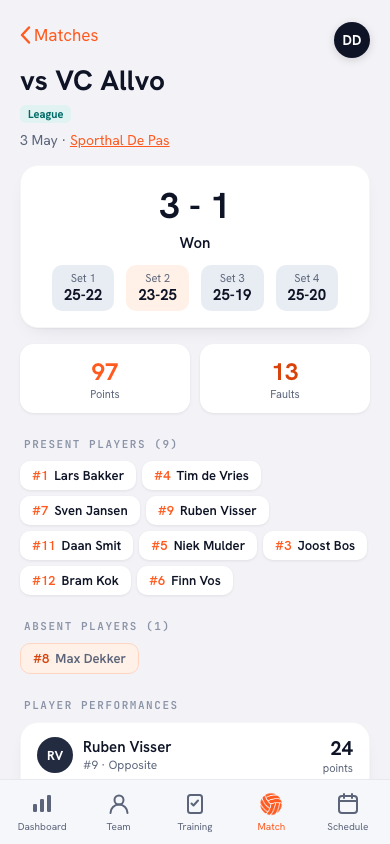
- The match has already been played — the result is in, only the player stats are missing. The match detail then carries the button Enter stats afterwards. If you've entered something before, that same button reads Update statistics.
- The match is still scheduled — you planned it properly but never started it. Then you get Enter result & statistics: you fill in the set scores first, and as soon as they're in, the player sheet opens straight after.
That order isn't arbitrary. Without at least one set score the match stays scheduled — the app needs a result before there's a match played to hang statistics on. If the date or the opponent no longer fits, you change that first with Edit on the match detail.
The sheet: a checkmark, points and faults
The screen is called Enter statistics. The line at the top says what it's about: “Fill in what each player scored. Only players with a checkmark count as having played.” Below it sits your squad, and three things per player: a Played checkmark, a field for points and a field for faults.
That checkmark matters more than it looks. It decides who goes down as having played in that match — not whether there's a number in the points field. So a player who sat on the bench for forty-five minutes and scored nothing doesn't get ticked; a player who did come on but never scored a point does get ticked, and stays on zero. Ticking at least one player is compulsory, otherwise the app saves nothing: “Tick at least one player who played.”
For the faults the app tells you itself: “Faults count towards the total and appear under ‘Other’ in the fault distribution.” So you don't enter fault types — no separate service errors, net faults or attacking errors — just a number per player. If your team has no players at all yet, you don't reach this sheet; the app asks you to add players first. Without names there's nothing to divide up.
What still works afterwards
This is the reason to do it. Figures entered afterwards aren't second-class data: they land in the same totals as everything you record live. In practice that means:
- Your top scorer list and the season totals per player add up again.
- The player statistics and the development per player gain a data point instead of a gap.
- The fault load carries on — just without a breakdown by type.
- Whoever you ticked counts as having played, so your match attendance and their involvement across the season stay right.
For a coach who doesn't get round to scoring ten times a season, that's the difference between a chart full of gaps and a chart you can read something sensible out of in March.
What you miss compared with live scoring
Let's be honest: a sheet filled in afterwards is a summary, not a record. Four things you don't get back:
- The momentum — when that run of seven points came, and off whose serve. That only exists if you count point by point.
- The playing time — you tick that somebody played, not how long. For sharing playing time fairly you really do need live scoring.
- The set-by-set picture — you have the set scores, but not which player scored in which set. Everything lands as one total across the whole match.
- The point types and fault types — no difference between an ace, a block and a kill, and faults all end up under “Other”.
In short: you keep the who and the how many, and you lose the when and the how. If you do want that when and how but can't get to it yourself, handing the scoring over to a substitute or a parent is the better route — it costs you nothing on the sideline and gives you the full point tracking per player.
Careful with a match you did score live
Open this sheet on a match that was already recorded live and the app warns you: “This match was scored live. Per-set stats with momentum and playing time already exist. Entering manually REPLACES the per-player totals and the per-set data is lost.”
Take that warning literally. It isn't a merge and it isn't a tweak to a couple of numbers: what you save here goes in place of what was there, and the set-by-set build-up disappears with it. So for correcting one player who was three points short, this is the wrong tool — you'd be trading a small slip for the entire scoring sequence.
Don't top up a half-scored match by hand. If you stopped counting live halfway through the second set, it's tempting to tap the rest in afterwards. That replaces everything you already had. Leave a match like that exactly as it is — incomplete real data is worth more than a complete-looking estimate.
The “Entered manually” label
A match filled in afterwards gets the label Entered manually. That's deliberately visible: three months on you won't remember which match you counted live and which one you tapped in from the bench afterwards. If you notice in a match review that the momentum is missing, the label explains why straight away.
You can always correct it. The sheet simply reopens with your earlier numbers in it, and the button then reads Update statistics. If you don't know the exact figures on a Sunday evening, fill in what you're sure of and put the rest right once you have the scorer's sheet. Better a rough entry you sharpen up later than an empty match nobody ever touches again.
Frequently asked questions
Can I still fill in a match from last month?
Yes. Every match played keeps the Enter stats afterwards button; there's no time limit on it. The catch is that the longer you wait, the rougher your estimate gets. Fill in what you're sure of and update it once you find the score sheet or a photo of it.
Do I have to tick every player who was in the hall?
No, only the ones who actually got on court. The Played checkmark decides who counts as having played, not the number of points. So a substitute who didn't score does get ticked, on zero points; somebody who sat on the bench all match doesn't. Ticking at least one player is compulsory.
Why can't I enter fault types?
The sheet you fill in afterwards only asks for a number of faults per player. They count towards the total and appear under Other in the fault distribution. The split between service, net and attacking faults only exists if you record point by point during the match; afterwards, nobody remembers it that precisely.
What happens if I do this on a match I scored live?
The app warns you that entering manually replaces the per-player totals and that the per-set data is lost — so momentum and playing time go with it. It isn't a merge. If all you want is to put one typo right in a match you counted live, this is the wrong tool.