
Club export: all your club's data in a single ZIP
A board member calls: a parent wants to know what the club has recorded about her daughter, and whether it can be deleted when she stops playing. Or more subtly: the club is thinking about a different system and somebody wonders out loud whether everything entered over three seasons would come back out again. Both questions need the same answer, and that answer is a single file.
Why a club has to be able to get its own data back
A club that works with Koach for a season builds up a sizeable archive without noticing. Teams with their line-ups, players with their date of birth and position, sessions with who was there and who was not, session reports, coaching notes, assessments, matches with the results and the figures behind them. That is exactly the point — it is what makes the coaching better — but it also means a moment will come when somebody wants to be able to inspect, take along or check that whole pile.
There are three moments when that question comes up in practice. The first is the end of a season, when a board wants to record what the year looked like before the teams are put together again. The second is a change of system: whoever leaves wants to take their data with them, and whoever stays wants to know that they could. The third is an access request from a member or from a member's parents.
Until September 2026 the club module had no answer to that. There were three export buttons in the app, but all of them were per team or per player — useful for a coach, useless for a board with twenty teams. Anyone who wanted the whole club had to walk through twenty screens. The club export replaces that with one button.
There is also a reassurance in it that you should not underestimate if you have to win a board over to a new system. The question “and if we stop using it in two years, have we lost everything?” is a genuine brake at clubs, and rightly so: there are plenty of clubs left holding a folder of loose spreadsheets after a system that shut down. An export you can make yourself at any moment, without having to ask anybody for it, takes that brake off.
Twelve files: what is in the ZIP
The export delivers one ZIP file with twelve CSVs inside it. Each file covers one kind of data, so that you can open it in a spreadsheet programme without having to work out the columns first:
- overzicht — what has been exported, when, and over which period.
- teams — every team currently attached to the club name.
- spelers — the players per team.
- trainers — who is attached to which team.
- trainingen and programma — the planned sessions and the match schedule.
- aanwezigheid — who was at which session.
- verslagen — the session reports.
- notities and beoordelingen — what coaches have recorded about players.
- wedstrijden and statistieken — the results and the figures behind them.
The overview file is the first one you open. It says not only what has been taken along and over which period, but also carries a row called please_note that repeats in plain words what the app said just before the download: once this file has been downloaded it falls outside Koach's protection. That row is there so that somebody who comes across the file in a shared folder six months later can see straight away what they are looking at.
The file names are Dutch in every language, so a German or Polish board member also gets a file called spelers.csv. The contents do follow the language of the app: the column headings and the fixed values appear in the language you use Koach in. That is a deliberate choice — the names stay comparable between languages, while the contents stay readable for whoever works with them.
Do not confuse this export with the two that already existed. The CSV a coach makes for their committee, described in managing several teams as a coach, covers their own teams. The end-of-season report per team under setting up a new season covers one team. This is the whole club in one go, and it is therefore not a coach's right but a board right.
Making the export in the app
The button sits at the bottom of the Overview tab of the club dashboard, under the heading Export everything. If you are not sure where to find the club dashboard, that is covered in the club dashboard for your club.
Under the heading there is one line of explanation, and it is worth reading before you tap: one file with every team, player, session, attendance record, report, note and assessment in the club — it contains personal data of members, including minors.
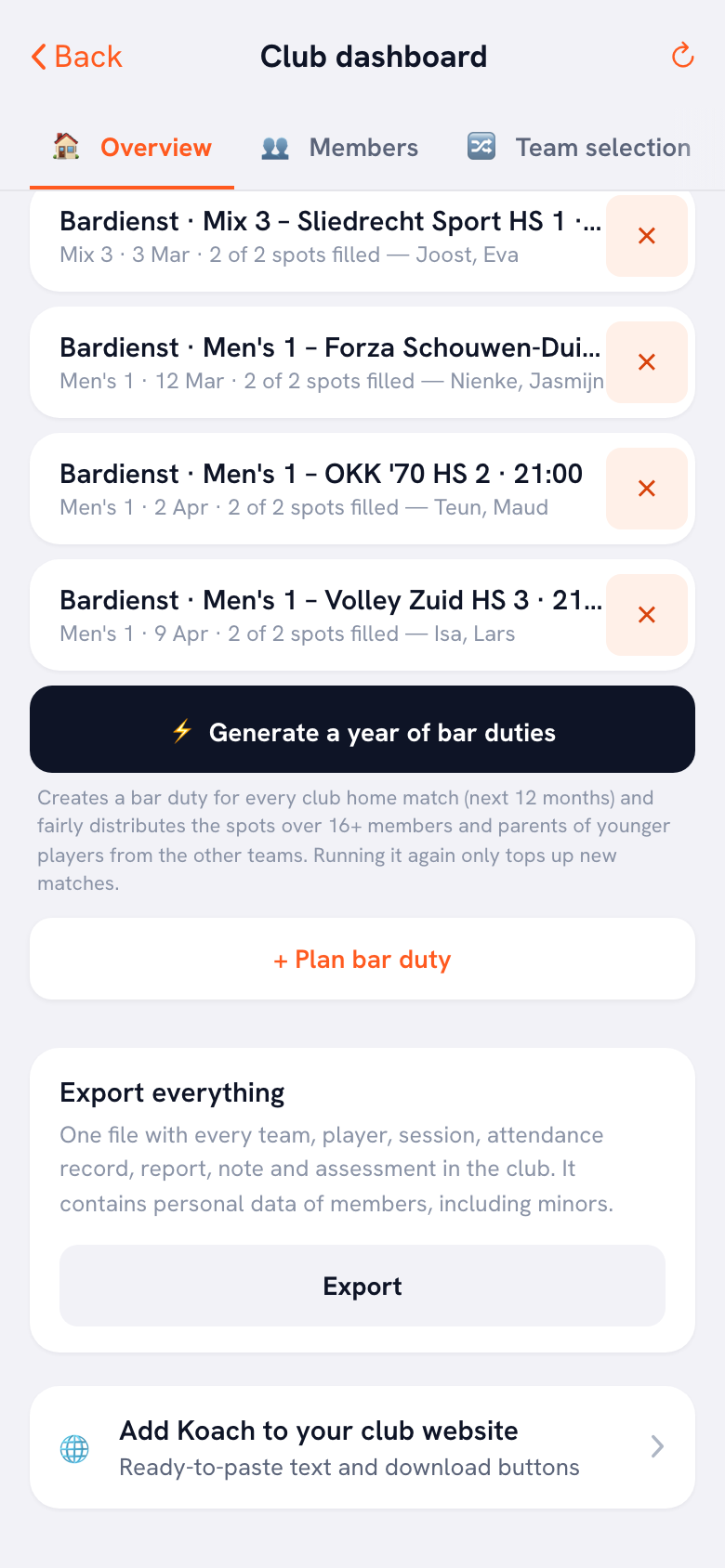
Tap Export and a confirmation comes first: “Once this file is on your computer, Koach no longer protects it. Keep it safe and do not share it further than necessary. Continue?” That is not a formality but the heart of the whole subject, and further down you will see why.
At a large club the file can become too big for a single download. You then get a second question: “The whole club is too large for a single file. Shall I take the last twelve months?” with the button Last twelve months. That is almost always the answer you are looking for, because the current season fits comfortably inside it. If you want a different period — exactly one season, say, or a year further back — you can pass that in yourself instead of accepting the default period.
After that the ZIP comes down and a message appears saying the export is ready. You unpack and open it with whatever programme you already use; all twelve files are ordinary CSVs.
What is deliberately left out
The list of what is missing matters as much as the list of what is in there, because the reasoning behind it is simple: what does not travel cannot go astray.
There are no contact details in it — no email addresses, no phone numbers, no home addresses. For many board members that is the surprise, because it is exactly what you would expect in a membership administration. The reason is that a contact list is the one thing you can do something with straight away from a stolen or forwarded file: mail, call, turn up. For the purpose of this export — knowing what has been recorded about the members — you do not need them.
There are also no account keys in it. A coach or the author of a note travels as a name, not as a technical identifier. A name is enough to recognise somebody; a login key does not belong in a file that ends up on a laptop.
Beyond that, the sign-off messages and reasons are missing, as are the parents and guardians, the emergency contacts, and of course everything from teams outside this club. The drills are not in it either: that is training material rather than personal data, it hangs on the drill library, and an animation cannot be put into a CSV.
One more boundary you should know: the export works on the teams that are attached to this club name right now. A team that has moved to another club does not travel — not even if it belonged here last season. That stops anybody picking up another club's membership list through an old link.
Who may export, and why the rest may not
Only the club manager and a board member can do this. Who holds which role and how you assign it is covered in club roles and inviting administrators. The other roles will not see the button work, and that is reasoned out role by role.
The technical manager pointedly does not get it. That surprises people, because they are the one who is responsible for the quality of the coaching. But they read along inside the app — that is where the team logs and the signals sit, and that is where the conversation belongs. They do not need a loose file they can forward by email; they need a conversation with the coach concerned.
The treasurer does not get it because they deal with money rather than with the content of coaching notes. The confidential adviser does not get it because that role is by definition confidential and one to one: a file with everything about every member is the opposite of how that role is meant to work.
Once the ZIP is on a laptop, Koach is no longer involved. No role, no login and no access rule protects it any more — it is a file in a downloads folder. Keep it somewhere secure, do not put it in a shared club folder, and delete it as soon as you no longer need it. What Koach itself does shield inside the app is covered in how Koach handles privacy and data.
Handling an access request in practice
If a request comes in from a member or from a member's parents, the club export is your tool but not your answer. The file covers the whole club, and you cannot forward it: that would hand over the data of every other member in one go.
The approach that does work is short. Make the export, open the files the player in question appears in — spelers, aanwezigheid, notities, beoordelingen, statistieken — and filter on that one name. Put the rows that remain into a separate overview and send that. That way you can be sure you have not forgotten anything and that nothing travels along that does not belong.
Two things there are worth pointing out. The first: the notes and the assessments carry the name of the coach who wrote them. That is relevant in an access request, because a parent reading what has been written about her child usually wants to know by whom — and it is better that you see that coming yourself than that it only surfaces in the conversation afterwards. The second: make the export at the moment you handle the request, not from a file from last month. An old ZIP misses whatever has been added since, and that is exactly the kind of incompleteness a request founders on.
One thing the export cannot do for you: it says nothing about whether you may keep that data, for how long, and on what legal basis. That is a board question rather than a button question, and it is worked out in the GDPR for a sports club. Answer that question before you give anybody export rights, not afterwards.
The export leaves no trace
This function only reads. It writes nothing back: no log line appears in the app, no “last exported” flag on the club, and the members get no notification that an export has been made. So nothing changes for the data itself, however often you use the button.
That is a design choice with a downside you need to know about: it also means the app cannot tell you who has made an export over the past few months. Anyone who wants to keep track of that keeps it outside Koach — for example by agreeing in the board that an export always goes into the minutes, with the reason next to it. That costs one sentence and it stops a situation where, a year on, nobody knows how many copies are floating around.
So keep the rights tight as well. The fewer people who can use the button, the fewer files come into existence, and the easier it is to know where they are. Two people with export rights in a club is usually enough.
Frequently asked questions
Why are the email addresses and phone numbers not in it?
Because a contact list is the one part you can act on straight away from a forwarded or stolen file: mailing, calling or turning up. For the purpose of this export — recording what has been kept about the members — that data is not needed. Emergency contacts and the details of parents and guardians stay out for the same reason.
Can the technical manager not simply have the export?
No, and that is a choice rather than an omission. They read the team logs and the signals inside the app, in the place where the conversation with the coach belongs. A loose file they can forward adds nothing to that and only increases the number of copies going round. If they do need something, they ask the club manager or a board member.
What do I do if the app says the club is too large?
You take the Last twelve months button the app offers you. That comfortably covers the current season and keeps the file small enough. If you need a different year, you can pass in a start and end date yourself instead of the default period. So you can also export season by season if you want everything.
Can anyone see that I have made an export?
No. The function only reads and writes nothing back: there is no log line, no flag on the club and no notification to the members. That also means Koach cannot tell you later who has exported. If you want to keep sight of that, agree in the board that an export always goes into the minutes with a reason.

Try it yourself in Koach
Less admin, more coaching.
Get started with KoachOr read first what the volleyball coaching app does.