
Koach 3.0: what's new and where to find it
The short answer
Koach 3.0 brings live scoring in two modes, Simple and Expert, a point on the first tap, sets to 25 or 15 per set and an analysis by rotation after the match. On top of that, the player profile, the dashboard and the club dashboard have been rebuilt, there is a dark mode and many actions can be undone straight away.
Koach 3.0 changes almost every screen of the app. This overview lists, area by area, what is really new, where you find it and which article explains it further. Things that were already in the previous version and only got a new look are listed separately at the bottom.
How do you get Koach 3.0?
Update the app through the App Store or Google Play, or reload Koach in your browser; everything you have recorded stays where it is. New to Koach? Start with getting started with Koach or the checklist for a volleyball app for coaches. What Koach costs after the trial is on the pricing page.
Live scoring: Simple and Expert
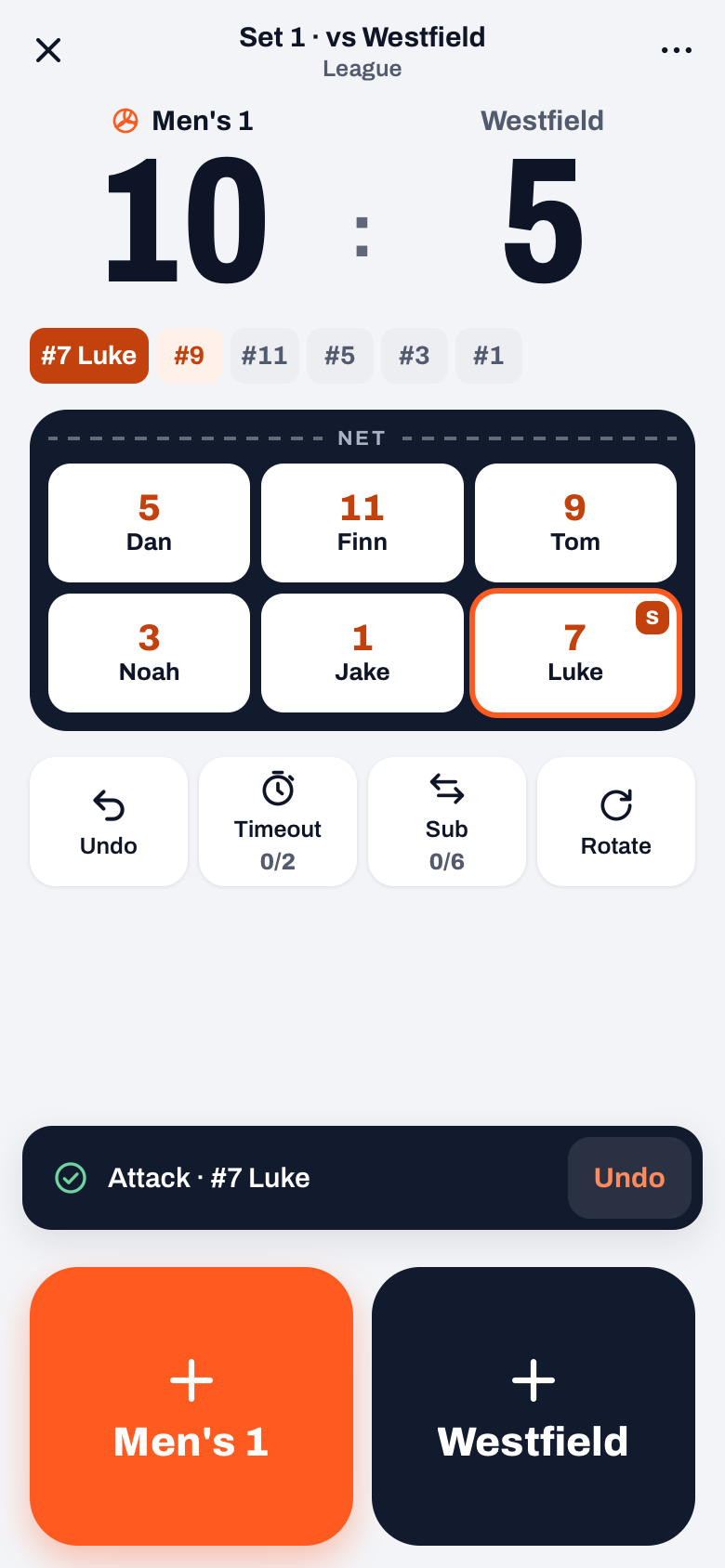
Live scoring has its own screen with two modes, which you can also switch in the middle of a match.
- Simple. One tap on a team's button counts the point straight away. Then, in the How did we score? or Why did they score? drawer, you pick how it happened, or you skip it. More in keeping stats during a match.
- Expert. Every ball contact gets a rating from 0 to 5, with Back, Their error, Their point and Skip at the bottom. Made for a second coach on the sideline: scouting your own team.
- Sets to 25 or 15. No choice up front between three or five sets: after each set you start the next one or choose End match. You set each set to 25 or 15; set 5 is set to 15 by default.
- A message after every point. You see what was recorded, with Undo. The existing button for taking back your last action is still there too, as the Undo button next to Timeout: fixing a wrong point.
- Back to live. Live scoring now fills the whole screen. If you put it away, the Back to live card in the Match tab brings you back: resuming a live match.
After the match: rotations, plus/minus and momentum
A played match now has the sections Summary, Stats and Players. What is new is an analysis of every rally:
- Rotations: the side-out, the break point and the errors per rotation, and in an Expert match also the pass. See side-out and break point by rotation.
- Plus/minus: per player, the rallies won minus the rallies lost while they were on court. See plus/minus in volleyball.
- Momentum: runs, what happens after a timeout or a substitution, and the closing phase from 20 points. See the end of a set.
- Expert figures: in an Expert match, among other things, the attack efficiency per player. See hitting percentage.
You get the analysis for every match you score live and finish from 3.0 onwards, in Simple and in Expert; not retroactively for older matches, and not when a player finishes the match as score keeper.
Players: a profile in three parts
- Overview, Stats and History. Under Stats you find, among other things, the errors by type with On court, and Rotations and positions with the duos. See a player tracking system for volleyball, errors by position and player combinations.
- Players see own errors. Under Team settings in the Team tab you choose whether players see their own errors, with an exception per player if you need one. It only applies to the player themselves; you always see them. See showing errors to young players.
- Own numbers only. At a match, a player sees only their own numbers. A team parent sees a separate section per child; a regular parent has no Match tab. See viewing your child's stats.
Practice: recording, report and practice game
- Record attendance. A separate tap completes the practice; under To do you see which practices are still open. See recording attendance.
- Report. The practice report already existed and now has three fixed fields: Went well, To improve and Focus for next time. See evaluating a practice.
- Practice game. Your own players in team A against team B, scored in Simple or Expert and stored separately. See the practice game.
Dashboard and schedule
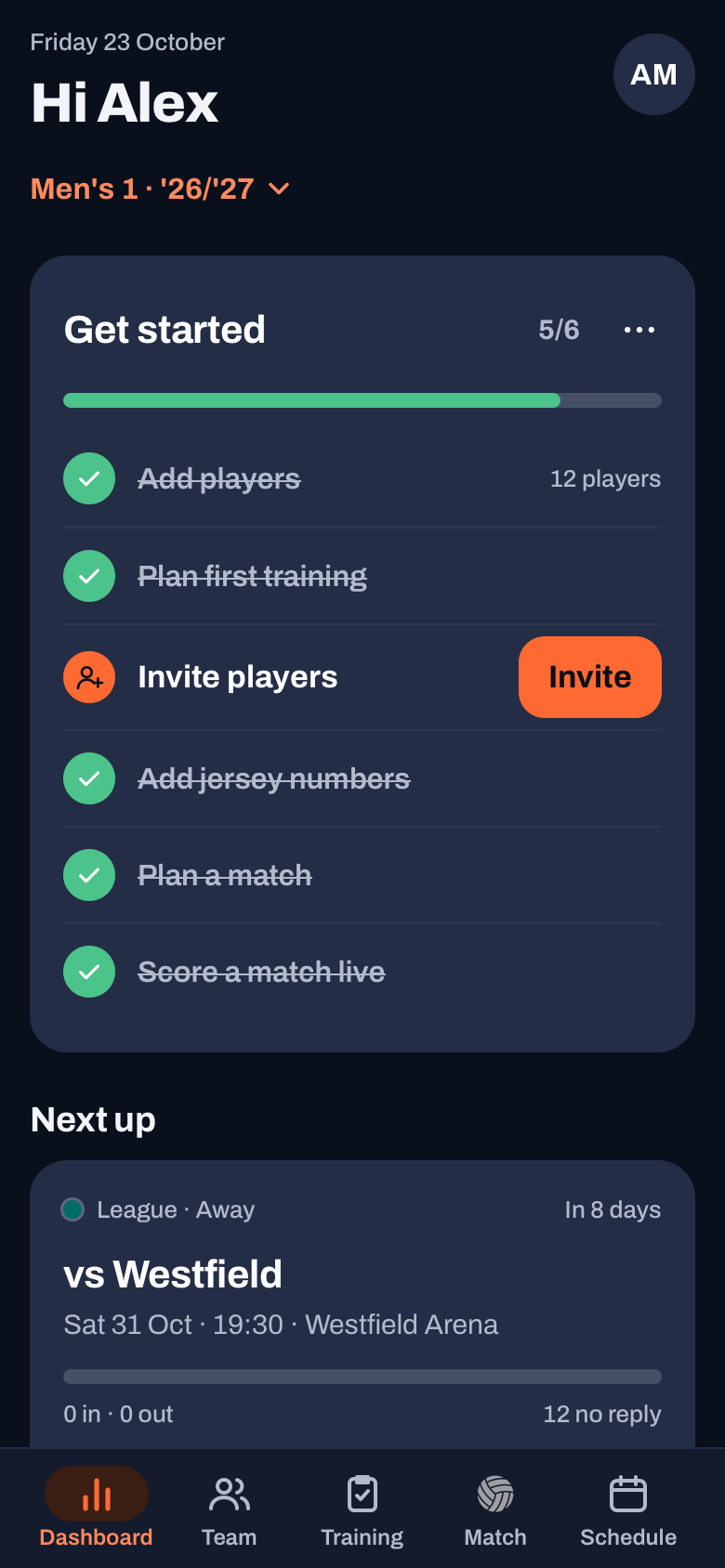
- Dashboard. With the Next up card, the To do list and a season card; All season insights opens a screen of its own with, among other things, Team development. See your team's season overview.
- Choosing team and season. Under the title of every tab there is one button with the team and the season. If you coach more than one team, read coaching multiple teams.
- Schedule. The month grid follows the filter chips, and tournaments now also go into the calendar feed. See matches in your calendar.
Club: one home screen and new planning
These parts come with the Club plan; what that includes is on the page for clubs.
- Club home. One home screen with a status per part, such as how many players do not have an account yet.
- Add teams. All teams at once, even without a coach: setting up club teams.
- Move to team. Moving a player was already possible; now it takes one tap and you undo it from the message: moving a player to another team.
- Club seasons. They run from 1 August to 31 July and exist automatically, for the team selection and the duties. You start the season of your own team yourself.
- Hall planner. The hall as a floor plan, several teams in one slot, a schedule you confirm and weeks that differ from it; the coach gets a card on their dashboard. See making a practice schedule and two teams on one court.
- Day plan. Next to the existing Match day list of home matches, there is now a plan for one home day with courts, times and duties, to share as a PDF or as text. See organising home matches.
14 days free, no credit card. Add your team tonight and score your first match in Simple on Saturday.
Try Koach 3.0 with your teamLook, settings and languages
- A new look with one orange main button per screen and the status in coloured labels.
- Dark mode under Profile, App, Appearance: System, Light or Dark, per device. See Koach settings.
- Undo instead of a question. Anything that can be reversed happens straight away, with Undo in the message. Steps you cannot reverse, such as deleting a team, still ask for confirmation.
- Sidebar. From 1000 pixels wide, such as an iPad in landscape or a computer, the tab bar becomes a sidebar with names. See Koach on the iPad.
- Languages. All the new texts are also available in Koach's six languages.
- Ad measurement. In the app for iPhone and Android, Koach asks once whether it may measure which ad brought you in. You turn it off under Profile, App, Ad measurement.
What is not new, but looks different
These features were already in the previous version and only got a new look: two setters in a 4-2 or 6-2, a maximum number of serves in a row with Rotate, planning a lineup, roles per match and per set, one parent account for several children, inviting players and parents in one go, the team parent, the rides schedule, the calendar feed and the duties. Read more about two setters, serves in a row in youth volleyball and the parent account for several children.
What went: the choice up front between three and five sets, the 0 to 5 ratings in Simple (you now give them only in Expert) and the guided tour with tooltips. For coaches, the Get started card on the dashboard takes over that role; you bring it back via Profile, Support, Get started.
Open your dashboard first after the update. The Next up card and the To do list show you right away where 3.0 changes something for your team, such as a practice whose attendance has not been recorded yet.
Frequently asked questions
What's new in Koach 3.0?
The main new things are live scoring in Simple and Expert, a point on the first tap, sets to 25 or 15 per set and an analysis by rotation with plus/minus and momentum. On top of that, the player profile, the dashboard and the club dashboard have been rebuilt, you can complete a practice with Record attendance, and there is a practice game and a dark mode.
Will I lose my data when I update to 3.0?
No. Your account, your teams, your matches and your practices stay where they are; you just update the app through the App Store or Google Play, or reload the page in your browser. Only the analysis by rotation, with plus/minus and momentum, comes with matches you score live from 3.0 onwards; older matches do not get it afterwards.
Where did the 0 to 5 ratings in Simple go?
They are no longer in the Simple mode. In Simple you only tap who scored and how; a 0 to 5 rating per ball contact is something you give in Expert. You can switch in the middle of a match through the More sheet of the live match. The score and everything you have already recorded stay as they are.
What does Koach 3.0 cost?
The update itself costs nothing extra: if you already use Koach, you get 3.0 with your existing plan. If you are a new coach, you can try Koach free for 14 days with one team, no credit card. After that you choose Coach (one team, two coaches) or Club (unlimited teams and coaches); the amounts are on the pricing page. Players and parents use the app for free.


Try Koach 3.0 with your team
14 days free, no credit card. By Saturday you know whether Simple or Expert suits you.
Get started with KoachOr read first what the volleyball coaching app does.